Reading view

The New Grad’s Guide to Job and Recruitment Scams

blogging on social media

Graduation season should be about launching your career, not dodging scams.

But for many new grads, the job search now comes with a hidden risk: fake recruiters, fraudulent job offers, and convincing messages designed to steal money, personal information, or both.

The threat is larger than many people realize. According to McAfee’s 2026 State of the Scamiverse report, 76% of Americans have encountered a scam, and the average person receives 14 scam messages every day through text, email, and social media. Americans now spend an estimated 114 hours each year trying to figure out what is real online and what is not.

Young adults are among the most heavily targeted groups. Nearly 3 in 10 people ages 18 to 24 (28%) report receiving conversational scams that begin with casual outreach such as “Hey, how are you?” or a “wrong number” text. Those same tactics increasingly appear in fake recruiter messages, LinkedIn outreach, and texts promoting remote job opportunities.

Today’s job scams can look highly professional. Scammers build polished LinkedIn profiles, clone legitimate company websites, and even use AI-generated interviews to appear credible. Many scams unfold quickly, with nearly half completed in less than an hour, creating pressure to act before candidates have time to verify what is real.

That’s where tools like McAfee’s Scam Detector come in—flagging suspicious emails, texts, links, and messages before you engage, so you can tell what’s real before you click. 

Here’s how to avoid job scams and stay safe with McAfee: 

How Job Scams Actually Work

Step

What Happens

Red Flags

What Scammers Want

1. The Outreach

You’re contacted via email, text, or social media about a job

Unsolicited offer, vague role, overly enthusiastic recruiter

Your attention

2. The Build-Up

They walk you through interviews or onboarding steps

No video calls, inconsistent details, fast timeline

Your trust

3. The Ask

They request personal info or payment

SSN requests, bank info, “training fees”

Identity + money

4. The Trap

They escalate the situation or disappear

More payment requests or sudden silence

Continued financial gain

A Real Example: How People Get Pulled In

Even experienced professionals fall for these scams.

In one case, a tech expert with decades of experience lost $13,000 after accepting what looked like a legitimate part-time role reviewing products.

The opportunity seemed real:

  • A polished website
  • Structured onboarding
  • A small initial payout

Then came the shift. He was told he needed to deposit money to continue working and kept paying more to “unlock” earnings that never came.

This type of advance fee scam is increasingly common in job fraud, and it works because it builds trust first.

What the Data Says

Recent graduates are entering the workforce at a time when scams are more sophisticated, more personalized, and harder to spot than ever before. McAfee’s 2026 State of the Scamiverse report highlights why younger job seekers should be especially cautious.

Young Adults Face Higher Risk

  • Younger adults report the highest rates of repeat scam victimization. McAfee’s research found that scam victims under 35 are more likely than older adults to be targeted again, suggesting that early-career professionals may be especially vulnerable as they navigate job searches, salaries, and onboarding for the first time.

Scam Messages Are Constant

  • Americans receive 14 scam messages per day on average.
  • 76% of Americans say they have encountered an online scam.
  • People spend 114 hours per year, nearly three full workweeks, trying to determine what is real and what is fake online.

Professional Platforms Are Not Immune

  • 7% of respondents reported encountering scams on LinkedIn.
  • 44% have replied to suspicious messages that contained no link at all.

Many modern scams begin with a simple message such as “I came across your profile” or “We’d like to discuss an opportunity,” rather than an obviously suspicious URL.

Job Scams Move Fast

  • The average scam unfolds in just 38 minutes.

Scammers often create urgency by claiming a role is limited, an offer will expire quickly, or onboarding must begin immediately.

AI Makes Fake Recruiters More Convincing

  • 35% of Americans are not confident they can spot deepfake scams.
  • McAfee predicts job scams will become increasingly personalized as scammers use AI to create tailored outreach, onboarding documents, and contracts that closely match a candidate’s background.

Job Scams Are a Growing Financial Threat

  • FTC-reported job scam losses rose nearly 40% year over year, increasing from $543 million in 2024 to $752 million in 2025.

For new graduates eager to land their first job, the lesson is simple: if an opportunity seems rushed, asks for money, or feels too good to be true, take a step back and verify before you respond.

Where McAfee Comes In

Job scams don’t just happen in one moment. They unfold in stages—first a message, then a conversation, then a request for information or money.

That’s why protection needs to work the same way: across the entire experience. McAfee’s comprehensive protection helps you stay ahead of job scams at every step:

McAfee+ Advanced gives you multiple layers working together so you are not left figuring it out after the damage is done:

  • Identity Monitoring alerts you if your personal info shows up where it should not, so you can act fast
  • Personal Data Cleanup helps remove your information from data broker sites, making you harder to target in the first place
  • Scam Detector flags suspicious texts, emails, links, and even deepfake videos before you engage
  • Safe Browsing helps block risky sites if you do click
  • Device Security helps detect malicious apps or downloads
  • Secure VPN keeps your data private, especially on public Wi-Fi   

The Biggest Red Flags to Watch For

These patterns show up again and again in job scams:

Red Flag

What It Looks Like

Why It’s a Problem

What to Do Instead

Requests for Sensitive Information Too Early

Asked for your Social Security number, banking info, or ID details early in the process

Scammers use this to steal your identity or access your accounts

Only share sensitive info after accepting a verified job—and through secure onboarding systems

You’re Asked to Pay to Work

Fees for training, equipment, onboarding, or background checks

Legitimate employers don’t charge candidates to get hired

Walk away immediately—this is one of the clearest signs of a scam

The Job Sounds Too Good to Be True

High pay, low hours, minimal experience required, vague responsibilities

Designed to hook attention and lower your guard

Research typical salaries and ask detailed questions about the role

The Hiring Process Moves Too Fast

Immediate job offers or rushed decisions without interviews

Real hiring processes involve multiple steps and evaluations

Be cautious of offers that skip standard hiring steps

No Real Interaction

Communication only via email or chat, refusal to do video or phone calls

Scammers avoid real-time interaction to stay anonymous

Request a video call or verify the recruiter through official company channels

How to Protect Yourself

You don’t need to overcomplicate it. Stick to a few grounded habits:

  • Verify the company independently: Search the company, check official sites, confirm recruiter identities
  • Keep communication on trusted platforms: Be cautious with offers coming from unexpected channels
  • Never pay upfront for a job: That’s a dealbreaker
  • Pause before sharing personal information: Especially early in the process
  • Use tools that flag risks automatically: Scam Detector helps catch what looks legitimate, but isn’t

What to Do If You Think It’s a Scam

If something feels off:

  • Stop communication immediately
  • Do not send money or personal information
  • Report the scam to the FTC
  • Monitor your accounts for suspicious activity

If you’ve already shared sensitive information, act quickly to secure your accounts.

With McAfee’s comprehensive protection, you’re not left to figure it out on your own.

From blocking risky links to monitoring your identity and helping you respond quickly, it’s designed to help you stay one step ahead, and recover faster if needed. Because job searching is stressful enough without scammers, and you deserve to land your next job with confidence.

The post The New Grad’s Guide to Job and Recruitment Scams appeared first on McAfee Blog.

  •  

Welcoming the Bangladesh Government to Have I Been Pwned

Welcoming the Bangladesh Government to Have I Been Pwned

Today, we welcome the 43rd government onboarded to Have I Been Pwned's free gov service, Bangladesh. The BGD e-GOV CIRT department now has full access to query all their government domains via API, and monitor them against future breaches.

Welcoming the Bangladesh Government to Have I Been Pwned

Bangladesh joins a growing list of national governments using HIBP to help protect their public sector digital assets, and we look forward to supporting their efforts to identify exposure of government email addresses in data breaches and respond quickly when new incidents appear.

  •  

Welcoming the Costa Rican Government to Have I Been Pwned

Welcoming the Costa Rican Government to Have I Been Pwned

Today, we welcome the 42nd government onboarded to Have I Been Pwned’s free gov service: Costa Rica.

The CSIRT of the Government of Costa Rica now has access to monitor government domains against the data in HIBP. This enables their national cybersecurity incident response team to identify exposure of government email addresses in data breach, support prevention and analysis activities, and respond more quickly when new incidents appear.

Costa Rica’s CSIRT plays a national role in cybersecurity incident response, helping coordinate, analyse, and respond to threats affecting the government and the broader digital ecosystem. We’re very happy to support that mission by providing visibility into breached government accounts and helping them proactively reduce risk across public sector services.

  •  

Weekly Update 503

Weekly Update 503

Well, it's the day before the Instructure "pay or leak" deadline (at least by my Aussie watch), and the company remains removed from the ShinyHunters website. In its place sits a press statement that amounts to "we're not making any statements". So did they pay? And if so, what lofty figure would an incident of this scale command? The lawsuits are already being prepared (search for "instructure class action lawsuit"), so perhaps that will be the catalyst for transparency. What a crazy time.

Weekly Update 503
Weekly Update 503
Weekly Update 503
Weekly Update 503
  •  

FreshRSS 1.29.0

This is a major release.

Feature highlights✨:

  • New sort order preferences at global, category, and feed levels
  • Use feed-provided icon
  • New option to hide sidebar by default
  • Show time since when a feed has problems
  • New functions to handle plural in internationalisation
  • New cli/purge.php to apply purge policy from command line

Bug fixes highlights 🐛:

  • Improve support of PHP 8.5+
  • Several fixes related to searches

Security highlights 🛡:

  • Limit cURL to protocols HTTP, HTTPS

UI highlights 🖼:

  • Improve mobile view with multiple lines when thumbnails and summaries are shown
  • Several themes improved

Extensions highlights 🧩:

  • New Webhook extension for automated RSS notifications
  • New LLM Classification extension to automatically tag incoming articles based on a prompt sent to an LLM

This release has been made by @Alkarex, @Inverle, @Kiblyn11, @math-GH, @rupakbajgain, @xtmd and newcomers @polybjorn, @olivluca, @tomasodehnal, @PeterVavercak, @mrtnrdl, @ale-rt, @cweiske, @rid3r45, @gabbihive, @drosell271, @Kachelkaiser, @zanivann, @nanos, @bowencool, @pe1uca, @matheusroberson, @DenuxPlays, @rlrs, @chanse-syres, @IEEE-754, @umaidshahid, @michi-onl

Full changelog:

  • Features
    • New sort order preferences at global, category, and feed levels #8234
    • New filtering by date of Server modification date #8131, #8576
      • Corresponding search operator, e.g. mdate:P1D for finding articles modified by the author / server during the past day.
      • Especially useful for optimising the API synchronisation.
    • Use feed-provided icon #8633
    • New option to automatically mark new articles as read if an identical GUID already exists in the same category #8673
    • Automatic feed visibility/priority during search #8609
    • Add feed visibility filter to statistics view unread dates #8489
    • Add option to enable/disable notifications, also for PWA #8458
    • Add a form to create new user queries on the User Queries page #8623
    • Allow WebSub hub push from same private network #8450
    • Support category field in JSON feed import #8786
  • Bug fixing
    • Fix wrong search toString in case of regex-looking string #8479
    • Fix article last seen date in case of feed errors #8646
    • Fix search expansion with backslash #8497
    • Fix user query parsing #8543
    • Fix search in shared user queries #8789
    • Fix redirect to wrong view after mark as read in reader and global views #8552
    • Fix SQLite paging when sorting by article length #8594
    • Fix change sorting during paging #8688
    • Fix SQL keyset pagination when sorting by category name #8597
    • Fix SQL duplicates in the user labels when sorting randomly #8626
    • Fix wrong error redirect in subscription management #8625
    • Fix do not include hidden feeds when counting total number of unread articles #8715
    • Update user modify date when changing extensions UserJS / UserCSS #8607
    • Non-strict OPML export #eedefb
  • Security
    • Limit cURL to protocols HTTP, HTTPS #8713
    • Better sanitise favicon URLs #8714
    • New setting for <iframe> referrer allow list #8672
    • Fix email validation and allow error page for unverified email users #8582
    • Add allowfullscreen to <iframe> #8467
    • Rewrite Set-Cookie using native PHP support of SameSite #8447, #8778
      • Sanitize lifetime of session cookies from session.cookie-lifetime in php.ini
    • Update to <meta name="referrer" content="no-referrer" /> from deprecated never #8725
    • Preventive measure against search ingestion #8777
  • UI
    • New option to hide sidebar by default #8528
    • Improve mobile view with multiple lines when thumbnails and summaries are shown #8631
    • New option to disable unread counter in tab title and favicon #8728
    • Show time since when a feed has problems #8670
    • Improve add feed UI #8683
    • Improve slider behaviour when using navigate back button #8496, #8524
    • Improve consistency of slider behaviour after submitting form #8612
    • Create dynamic favicons from SVG instead of PNG canvas #8577, #8588
    • Only display scrollbar everywhere if there's an overflow (especially for Chromium) #8542
    • Fix CSS padding of .content pre code #8620
    • Fix wrong navigation buttons layout on Chromium #8606
    • Fix don’t mark as read if middle click is outside of article link #8553
    • More robust JS #8595
    • Fix sidebar slide animation at narrow viewports #8747
    • Visually dim disabled users in user management table #8768
    • Improve multiple UI themes #8711, #8732,
      #8733, #8734, #8735,
      #8736, #8737, #8738,
      #8739, #8743, #8746,
      #8749, #8761, #8781,
      #8784, #8785
    • Various UI and style improvements: #8537, #8538,
      #8541, #8624, #8731,
      #8774
  • Deployment
    • Also push Docker images to GitHub registry #8669
    • Improve support of PHP 8.5+ using Pdo\Mysql #8526
    • Add support for Podman in Makefile #8456
    • Re-add database status in installation check #8510
    • Docker / CLI: Allow chown/chmod to fail with warning #8635
  • Extensions
    • New Webhook extension for automated RSS notifications Extensions#456
    • New LLM Classification extension to automatically tag incoming articles based on a prompt sent to an LLM Extensions#458
    • New extension methods to get typed configuration values #8696
    • New hook: Minz_HookType::ActionExecute #8599, #8603
    • New hook to modify the list of feeds to actualize #8655, #8675
    • Allow passing Minz_HookType as hook name in registerHook() #8600
    • Return more info and status from httpGet() #8700
    • Make httpGet() cache nullable #8705
    • Allow extensions’ configuration UI to use select-input-changer JavaScript helper #8721
  • SimplePie
  • CLI
    • New cli/purge.php to apply purge policy #8740
  • I18n
  • Misc.

  •  

How to Protect Yourself After the Canvas Education Data Breach + Fake Amazon Recall Texts

If you have ever checked your child’s grades online, submitted a college paper through a school portal, downloaded homework assignments, or received messages from a teacher through a classroom app, there is a good chance you have used Canvas, a nationwide learning management system that was just in a massive data breach. 

This is exactly the moment McAfee+ Advanced was built for. With our built-in Scam Detector to flag risky links, QR codes, and deepfakes; Identity Monitoring that alerts you when your data appears where it shouldn’t; and Personal Data Cleanup that removes your information from the dark web and data brokers, McAfee+ Advanced is an all-in-one solution for protection after a data breach.

Now let’s get into what you need to know about this breach: 

Who Is Behind the Canvas Breach? 

The ransomware group ShinyHunters is claiming responsibility for the attack. The group alleges it stole roughly 275 million records tied to nearly 9,000 schools and educational institutions worldwide. 

How Did the Canvas Cyberattack Happen? 

Instructure, the company behind Canvas, confirmed a cyber incident affecting its cloud-hosted environment. The attackers later posted claims about the breach on their leak site, where ransomware groups pressure organizations into paying by threatening to release stolen data publicly. 

What Information Was Stolen in the Canvas Breach? 

The stolen data reportedly includes: 

  • Student names  
  • Teacher and staff names  
  • Email addresses  
  • Student IDs  
  • Course and enrollment information  
  • School-related records  

ShinyHunters claims the breach exposed roughly 275 million records and more than 231 million unique email addresses. 

How Could the Canvas Data Breach Impact Families and Students? 

Even if financial information was not exposed, this kind of data can still be extremely valuable to scammers. Criminals can use real school names, real classes, teacher names, and student information to create highly convincing phishing emails, fake school alerts, scholarship scams, tuition scams, or password reset messages. 

A scam message referencing your child’s actual school or assignment is much harder to spot as fake. 

This is what a Canvas message might look like when forwarded to your email inbox. Hackers claim to have millions of these types of messages.

This is a real message from Canvas from a community college professor after yours truly took an anthropology class for fun during the pandemic. It’s full of links to apply for programs and reach out to professors. It has exact details about courses I’ve taken.  

While this correspondence is real, it’s exactly the type of messaging that scammers could fake and replicate, replacing real links with fake “paid” opportunities to pursue degrees.  

Now think of the millions of messages and specific scenarios scammers have access to, to create dubious and convincing scams. That’s why protecting yourself after a breach is key.  

What To Do Right Now 

Here are some actions you can take immediately ot protect yourself after this breach:

  • Change you or your child’s Canvas password immediately, and update any other accounts where they reuse that password 
  • Turn on multi-factor authentication (2FA) on parent and student accounts wherever the school permits it — Instructure’s own post-incident guidance specifically called out enforcing MFA as a recommended precaution 
  • Ask your school what identity protection is being offered if sensitive data was involved 
  • Consider placing a credit freeze on your or your child’s file to block new accounts from being opened in their name 
  • Avoid clicking links in any messages that reference the breach, go directly to the official site instead 

And that, my friends, is issue number one in this week’s This Week in Scams. Let’s get into what else is on our radar in cybersecurity and scam news. 


Fake Amazon Recall Texts Are Targeting Shoppers  

Your phone buzzes. It’s a text from an unknown number, but the message looks official. 

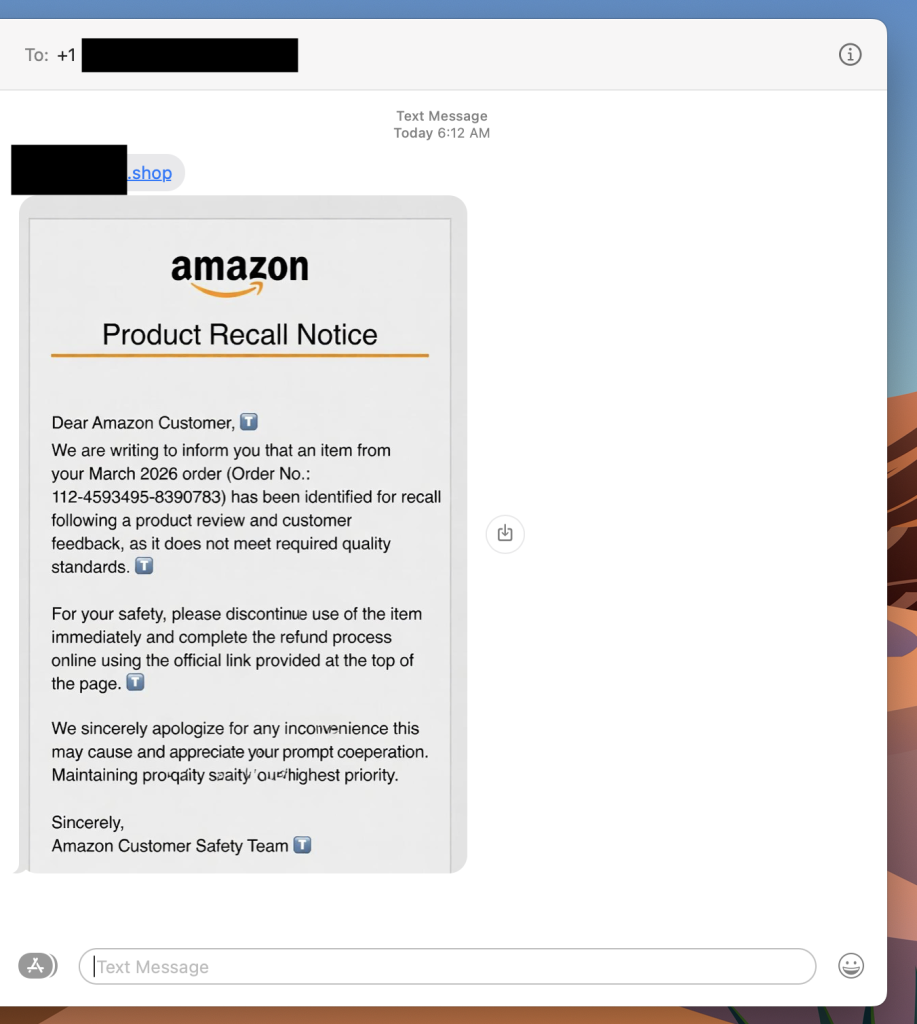
“Dear Amazon Customer, we are writing to inform you that an item from your March 2026 order has been identified for recall.” There’s an order number. A link at the top of the message. A note about quality standards and a refund waiting for you. 

It looks real. It has the Amazon logo, the branded formatting, even a reference to the “Amazon Customer Safety Team.” The only thing it doesn’t have? Any connection to Amazon at all. 

A photo of a scam recall text I received this week. Luckily Scam Detector flags the link as risky if you try to click.

This is a fake Amazon recall scam, and it is making the rounds right now. The goal is to get you to click that link, which takes you to a site designed to harvest your login credentials, payment information, or both.  

If you get a text like this, do not click the link. Go directly to amazon.com in your browser, log in, and check your orders and messages from there. Amazon does not initiate recall or refund processes through unsolicited texts with outside links. 

What Is a Fake Amazon Recall Scam And How Does It Work? 

A fake Amazon recall scam is a text message or email in which criminals impersonate Amazon to convince you that one of your recent orders has been flagged for a product recall. The message directs you to an external link leading to a phishing site designed to steal your Amazon credentials, credit card details, or personal information. 

Red Flags To Watch For 

  • The text comes from an unknown number, not a short code or verified sender 
  • The link goes to a domain that is not amazon.com 
  • The message asks you to complete a refund through an external link 
  • Small typos or awkward phrasing appear in what looks like official communication 
  • The greeting says “Dear Amazon Customer” rather than your actual name 

What To Do If You Get One 

  • Do not click the link 
  • Go to amazon.com directly and check your orders and account notifications 
  • Report the text to Amazon at stop-spoofing@amazon.com 
  • Block the number 

Where McAfee Steps In (So You Don’t Have to Guess)  

Scams today are layered.  A fake email leads to stolen credentials. A breach leads to targeted phishing. And those follow-ups are getting harder to spot.  

With McAfee+ Advanced, multiple layers work together so you’re not left figuring it out after the damage is done: 

  • Identity Monitoring alerts you if your personal info shows up where it should not, so you can act fast  
  • Personal Data Cleanup helps remove your information from sites selling it. 
  • Scam Detector flags suspicious texts, emails, links, QR codes, and even deepfake videos before you engage  
  • Safe Browsing helps block risky sites, even if you do accidentally click  
  • Device Security helps detect malicious apps or downloads  
  • Secure VPN keeps your data private, especially on public Wi-Fi    

McAfee Safety Tips This Week 

Our advice based on this week’s scams and stories: 

  • If your child’s school uses Canvas, update their password now and enable multi-factor authentication if available 
  • Consider a credit freeze for your child’s identity, especially if sensitive identifiers were part of the breach 
  • Never click links in unsolicited texts about refunds, recalls, or account issues — go directly to the official site instead 
  • Treat any message that references your recent orders or personal account details with extra skepticism, even if it looks legitimate 
  • Use Scam Detector to check suspicious links before engaging, and stay alert in the weeks and months after a breach, not just the first few days 

And we’ll be back next week with more scams and cybersecurity news making headlines. 

The post How to Protect Yourself After the Canvas Education Data Breach + Fake Amazon Recall Texts appeared first on McAfee Blog.

  •  

Canvas Breach Disrupts Schools & Colleges Nationwide

An ongoing data extortion attack targeting the widely-used education technology platform Canvas disrupted classes and coursework at school districts and universities across the United States today, after a cybercrime group defaced the service’s login page with a ransom demand that threatened to leak data from 275 million students and faculty across nearly 9,000 educational institutions.

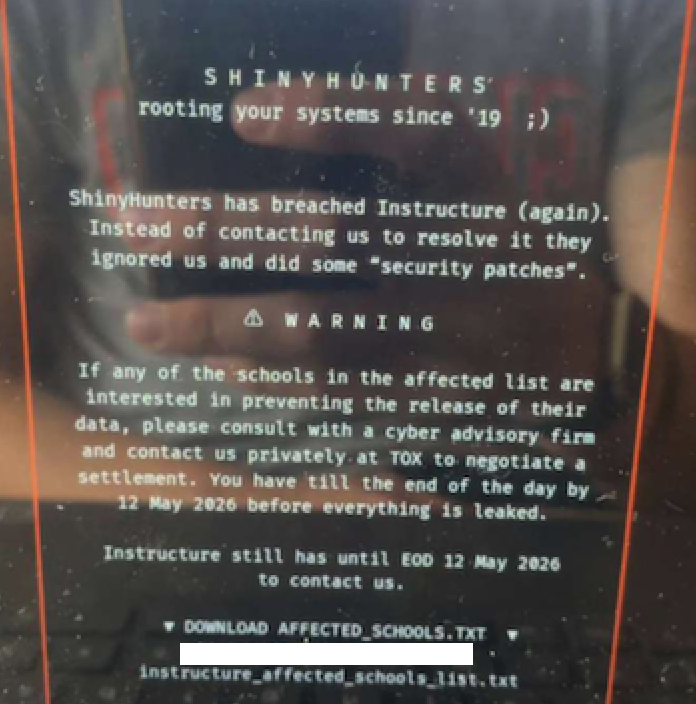
A screenshot shared by a reader showing the extortion message that was shown on the Canvas login page today.

Canvas parent firm Instructure responded to today’s defacement attacks by disabling the platform, which is used by thousands of schools, universities and businesses to manage coursework and assignments, and to communicate with students.

Instructure acknowledged a data breach earlier this week, after the cybercrime group ShinyHunters claimed responsibility and said they would leak data on tens of millions of students and faculty unless paid a ransom. The stated deadline for payment was initially set at May 6, but it was later pushed back to May 12.

In a statement on May 6, Instructure said the investigation so far shows the stolen information includes “certain identifying information of users at affected institutions, such as names, email addresses, and student ID numbers, as well as as messages among users.” The company said it found no evidence the breached data included more sensitive information, such as passwords, dates of birth, government identifiers or financial information.

The May 6 update stated that Canvas was fully operational, and that Instructure was not seeing any ongoing unauthorized activity on their platform. “At this stage, we believe the incident has been contained,” Instructure wrote.

However, by mid-day on Thursday, May 7, students and faculty at dozens of schools and universities were flooding social media sites with comments saying that a ransom demand from ShinyHunters had replaced the usual Canvas login page. Instructure responded by pulling Canvas offline and replacing the portal with the message, “Canvas is currently undergoing scheduled maintenance. Check back soon.”

“We anticipate being up soon, and will provide updates as soon as possible,” reads the current message on Instructure’s status page.

While the data stolen by ShinyHunters may or may not contain particularly sensitive information (ShinyHunters claims it includes several billion private messages among students and teachers, as well as names, phone numbers and email addresses), this attack could hardly have come at a worse time for Instructure: Many of the affected schools and universities are in the middle of final exams, and a prolonged outage could be highly damaging for the company.

The extortion message that greeted countless Canvas users today advised the affected schools to negotiate their own ransom payments to prevent the publication of their data — regardless of whether Instructure decides to pay.

“ShinyHunters has breached Instructure (again),” the extortion message read. “Instead of contacting us to resolve it they ignored us and did some ‘security patches.'”

A source close to the investigation who was not authorized to speak to the press told KrebsOnSecurity that a number of universities have already approached the cybercrime group about paying. The same source also pointed out that the ShinyHunters data leak blog no longer lists Instructure among its current extortion victims, and that the samples of data stolen from Canvas customers were removed as well. Data extortion groups like ShinyHunters will typically only remove victims from their leak sites after receiving an extortion payment or after a victim agrees to negotiate.

Dipan Mann, founder and CEO of the security firm Cloudskope, slammed Instructure for referring to today’s outage as a “scheduled maintenance” event on its status page. Mann said Shiny Hunters first demonstrated they’d breached Instructure on May 1, prompting Instructure’s Chief Information Security Officer Steve Proud to declare the following day that the incident had been contained. But Mann said today’s attack is at least the third time in the past eight months that Instructure has been breached by ShinyHunters.

In a blog post today, Mann noted that in September 2025, ShinyHunters released thousands of internal University of Pennsylvania files — donor records, internal memos, and other confidential materials — through what the Daily Pennsylvanian and other outlets later determined was, in part, a Canvas/Instructure-mediated access path.

“Penn was the named victim,” Mann wrote. “Instructure was the mechanism. The incident was treated as a Penn-specific story by most of the national press and quietly handled by Instructure as a customer-specific matter. That framing was wrong then. It is dramatically more wrong in light of the May 2026 events, which now look like the planned escalation of an attack pattern that ShinyHunters had been working against Instructure’s environment for at least eight months prior. The September 2025 Penn breach was the proof of concept. The May 1, 2026 incident was the production run. The May 7, 2026 recompromise was ShinyHunters demonstrating publicly that the May 2 ‘containment’ did not happen.”

In February, a ShinyHunters spokesperson told The Daily Pennsylvanian that Penn failed to pay a $1 million ransom demand. On March 5, ShinyHunters published 461 megabytes worth of data stolen from Penn, including thousands of files such as donor records and internal memos.

ShinyHunters is a prolific and fluid cybercriminal group that specializes in data theft and extortion. They typically gain access to companies through voice phishing and social engineering attacks that often involve impersonating IT personnel or other trusted members of a targeted organization.

Last month, ShinyHunters relieved the home security giant ADT of personal information on 5.5 million customers. The extortion group told BleepingComputer they breached the company by compromising an employee’s Okta single sign-on account in a voice phishing attack that enabled access to ADT’s Salesforce instance. BleepingComputer says ShinyHunters recently has taken credit for a number of extortion attacks against high-profile organizations, including Medtronic, Rockstar Games, McGraw Hill, 7-Eleven and the cruise line operator Carnival.

The attack on Canvas customers is just one of several major cybercrime campaigns being launched by ShinyHunters at the moment, said Charles Carmakal, chief technology officer at the Google-owned Mandiant Consulting. Carmakal declined to comment specifically on the Canvas breach, but said “there are multiple concurrent and discrete ShinyHunters intrusion and extortion campaigns happening right now.”

Cloudskope’s Mann said what happens next depends largely on whether Instructure’s customers — the universities, K-12 districts, and education ministries paying for Canvas — choose to apply pressure or absorb the breach quietly.

“The history of education-vendor incidents suggests the path of least resistance is the second one,” he concluded.

Update, May 8, 11:05 a.m. ET: Instructure has published an incident update page that includes more information about the breach. Instructure said its Canvas portal is functioning normally again, and that the hackers exploited an issue related to Free-for-Teacher accounts.

“This is the same issue that led to the unauthorized access the prior week,” Instructure wrote. “As a result, we have made the difficult decision to temporarily shut down Free-for-Teacher accounts. These accounts have been a core part of our platform, and we’re committed to resolving the issues with these accounts.”

Instructure said affected organizations were notified on May 6.

“If your organization is affected, Instructure will contact your organization’s primary contacts directly,” the update states. “Please don’t rely on third-party lists or social media posts naming potentially affected organizations as those lists aren’t verified. Instructure will confirm validated information through direct outreach to all affected organizations.”

Update, May 11, 10:16 p.m. ET: Instructure posted an update saying they paid their extortionists in exchange for a promise to destroy the stolen data. “The data was returned to us,” the update reads. “We received digital confirmation of data destruction (shred logs). We have been informed that no Instructure customers will be extorted as a result of this incident, publicly or otherwise.”

  •  
❌