 Login
Login
Cybercriminals: the 'auditors' you never hired
Every organisation gets audited. The question is who does the auditing.



Most people don’t get scammed because they ignore warning signs.
They get scammed because they find a reason to explain those warning signs away.
The website looks a little off, but the deal is incredible. The text message is unexpected, but they’re already waiting for a package. The seller is unfamiliar, but the discount is too good to pass up.
That’s what makes major shopping events such fertile ground for scammers.
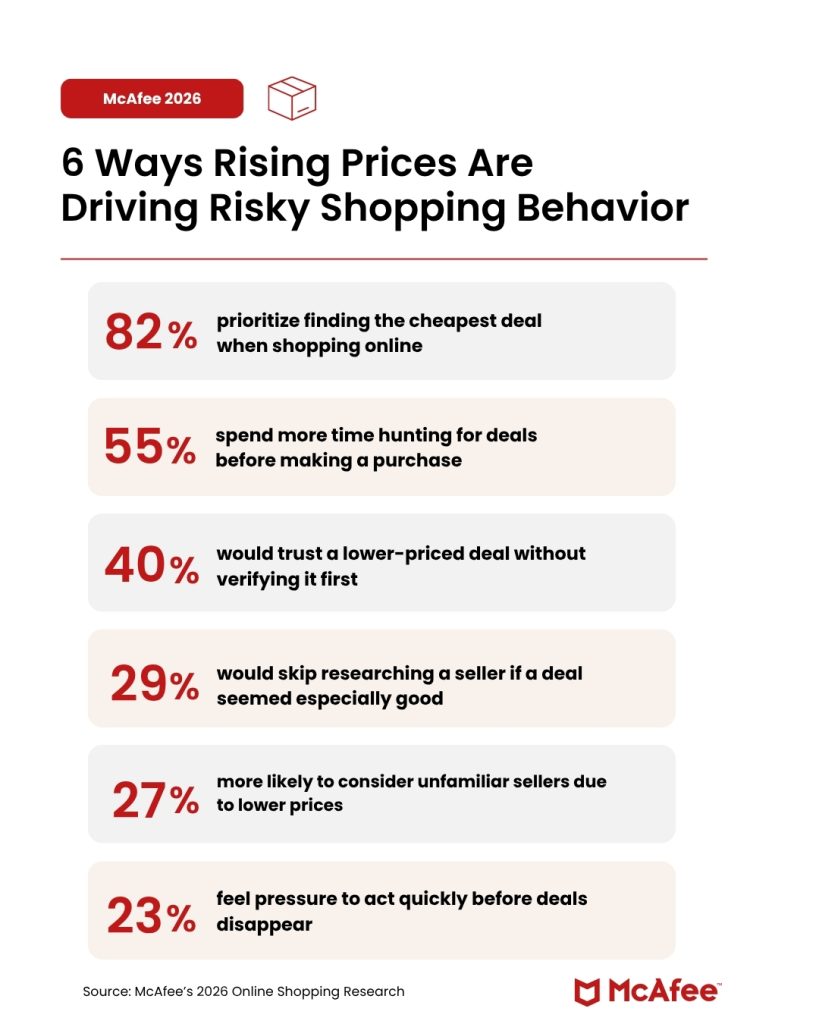
New McAfee research suggests that economic pressure may be making that problem worse, as 40% of consumers say they would trust a lower priced deal without verifying it. That means as costs are climbing, shoppers are less likely to second guess a too-good-to-be-true deal that could be a scam.
“Anyone who has ever fallen for a scam thought they would recognize one first,” McAfee’s Head of Threat Research Abhishek Karnik reminds shoppers.
“That confidence is part of what scammers count on,” he says. “Tools like McAfee exist precisely for those moments, flagging suspicious links, messages, and offers in real time, before a split-second decision becomes a costly one.”
While most shoppers believe they can spot a scam, McAfee’s new research suggests many are engaging in behaviors that increase their risk.
Economic pressure is changing how people shop online.
The same behaviors that help shoppers find bargains can also make them more vulnerable to fraud.
“What the data reflects is that economic pressure has effectively done some of the scammer’s work for them,” says Karnik. “When consumers are already primed to move quickly and prioritize price over authenticity, it takes far less effort to push them toward a bad click or a fraudulent purchase.”
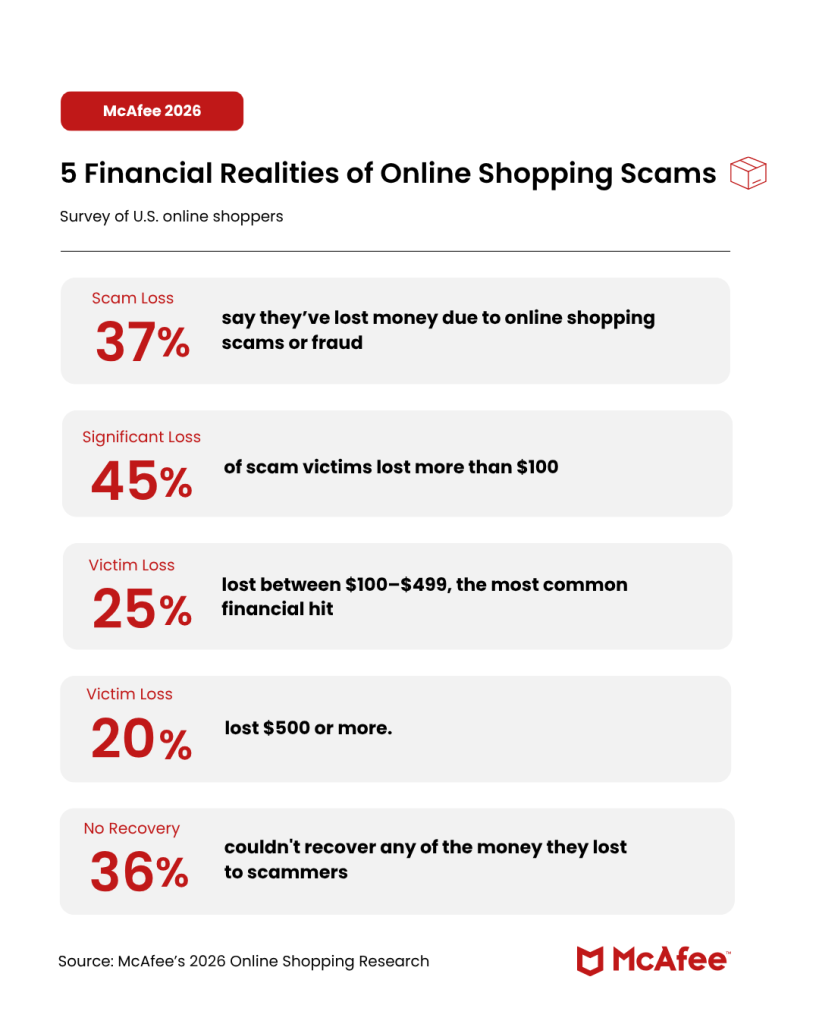
The financial impact is significant:
Consumers are increasingly aware that artificial intelligence is changing the scam landscape.
According to McAfee research:
“The signs people have historically relied on, poor grammar, low-quality images, obviously off branding, are no longer reliable,” advises Karnik. “AI has lowered the production cost of a convincing fake to nearly zero.”
It’s not just a fake landing page fraudsters are creating.
“AI is being used to make fake review sections, impersonation messages that look exactly like it came from a major retailer, realistic logos, believable URLS,” Karnik says. “When you’re shopping online, you need to adjust your expectations to match that new AI reality.”
Scammers follow consumer attention.
Whenever millions of people are searching for deals at the same time, scammers create fake websites, impersonate retailers and delivery companies, and use urgency to pressure shoppers into acting before they think.
Here are some of the most common shopping scams consumers encounter during major sales events, as well as the red flags consumers can watch for:
| Scam Type | How It Works | Red Flags |
| Fake shopping websites | Fraudulent websites mimic real retailers and disappear after collecting payments | Prices far below competitors, little company information, newly created websites |
| Fake social media ads | Ads promote products that never arrive or are counterfeit | Too-good-to-be-true discounts, limited reviews, unfamiliar brands |
| Delivery notification scams | Fake package alerts claim there is an issue with your shipment | Unexpected texts, suspicious links, requests for payment |
| Retailer impersonation scams | Messages claim there is a problem with your account or order | Urgent language, login requests, unfamiliar sender addresses |
| QR code scams | QR codes redirect shoppers to fraudulent websites | Codes placed on flyers, posters, packages, or public locations |
| Brushing scams | Unsolicited packages arrive at your home | Items you never ordered, requests to scan codes or leave reviews |
| Fake recall scams | Messages claim a recent purchase has been recalled | Requests for payment, account credentials, or personal information |
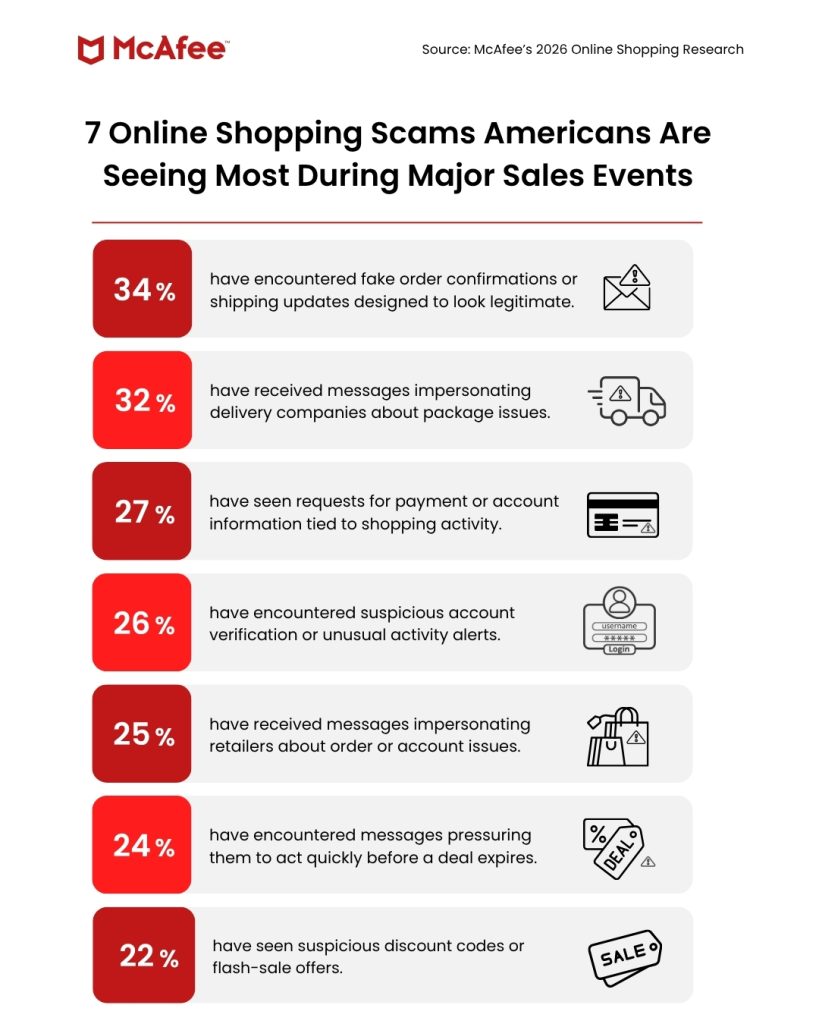
According to McAfee research, consumers most commonly report encountering fake shipping notifications, delivery scams, retailer impersonation scams, account alerts, and suspicious discount offers during major shopping periods.
With McAfee+ Premium, multiple layers work together before any damage is done:
Together, these protections are designed to address the broader range of online risks people face every day.
Plus, click here to get McAfee’s limited-time deals on real-time protection this Amazon Prime Day, from June 23 to June 26.
About our consumer research
McAfee surveyed 1,000 U.S. adults in May 2026 as part of a broader study of 5,000 respondents across the U.S., UK, France, Germany, and Japan, focused on online shopping intentions, scam awareness, and purchase behaviors.
The post New Research: Rising Costs Are Driving Consumers to Ignore Scam Instincts for Better Deals appeared first on McAfee Blog.

One gaming cyberattack this week exposed nearly 64,000 users.
Another has already infected more than 116,000 players.
Both are connected by the same common gaming behavior: looking for a cheat, mod, or shortcut.
This week in scam news, a popular Grand Theft Auto V cheat service was hacked, exposing tens of thousands of users. At the same time, McAfee researchers uncovered a massive malware campaign spreading through fake Minecraft mods, cheats, and game clients.
The takeaway is simple: some of the biggest threats facing gamers aren’t happening inside games. They’re hiding in the downloads, websites, and tools players use around them.
Let’s start with the GTA breach.
Atlas Menu, a cheat service for Grand Theft Auto V, was reportedly hacked, exposing data belonging to nearly 64,000 users.
According to reports, the leaked information included:
The hacker who claimed responsibility later posted the data online.
Many players think of cheats as harmless tools that unlock special abilities, provide advantages, or simply make games more entertaining.
But unofficial cheat services often operate outside the protections offered by legitimate gaming platforms.
That means users may be:
And that brings us to an even bigger threat.
McAfee researchers recently uncovered a large-scale malware operation targeting gamers searching for Minecraft mods, clients, and cheats.
The campaign is called WeedHack.
WeedHack is a type of Malware-as-a-Service (MaaS).
That means cybercriminals package malware into a subscription service that other attackers can use.
Researchers found that:
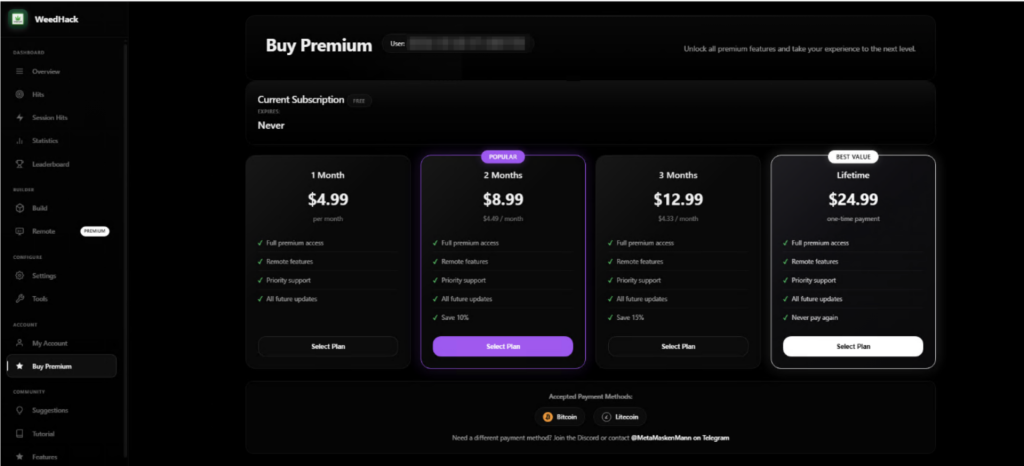
Premium versions reportedly cost as little as $5 per month and include tools that allow attackers to remotely access victims’ devices and webcams.
Once installed, the malware can collect:
Premium versions can also provide:
Gaming malware campaigns rely on three things:
With McAfee+ Advanced, multiple layers work together before any damage is done:
Together, these protections are designed to address the broader range of online risks people face every day.
Here are some other important headlines to be aware of:
Carnival Corporation disclosed a data breach affecting nearly six million customers after a social engineering attack allowed an unauthorized individual to gain access to part of the company’s IT systems.
Exposed information may include:
Affected customers should be alert for phishing emails, fake customer support calls, and identity theft attempts.
Instagram says it has fixed an issue that reportedly allowed attackers to manipulate its AI-powered support chatbot and gain access to other users’ accounts.
According to reports, attackers were allegedly able to influence the account recovery process and associate new email addresses with targeted accounts.
The incident highlights a growing challenge for AI-powered customer support systems: convenience cannot come at the expense of identity verification.
Voice cloning scams continue to grow as AI tools make it easier than ever to imitate friends, family members, and coworkers.
According to FBI data cited this week, Americans lost more than $893 million to AI-related scams last year.
These scams included:
If someone calls claiming to be a loved one in distress and urgently requests money, verify the situation through another communication channel before taking action.
Whether you’re downloading a Minecraft mod or answering an unexpected phone call, the same rule applies:
Slow down before you click, download, or share information.
Here are a few ways to stay safer:
We’ll be back next week with more scams making headlines.
The post GTA Cheat Users Exposed in Breach as Minecraft Malware Hits 116,000 Players appeared first on McAfee Blog.



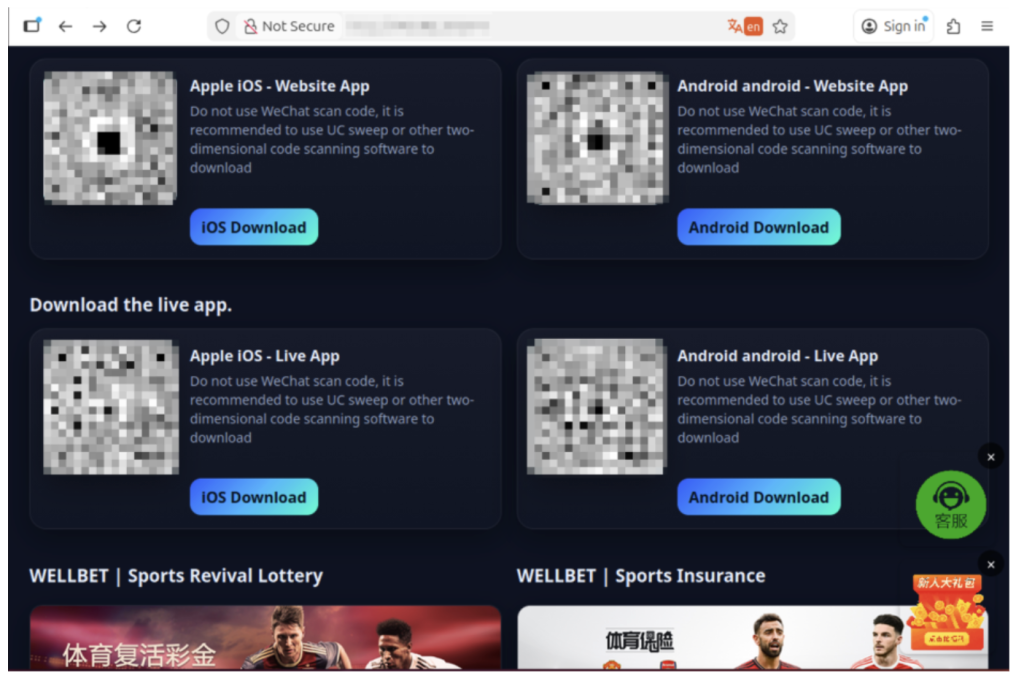
McAfee Labs has discovered a massive, ongoing malware campaign called WeedHack that disguises itself as free Minecraft mods and game clients to infect players’ computers. Since January 2026, it has logged more than 116,000 victim infections, averaging 2,000 to 3,000 new hits every single day.
What makes WeedHack different from most malware is how cheap and easy it is to use.
Typically, a hacker would pay hundreds of dollars per month to access attack tools through underground criminal networks. WeedHack offers a free version to anyone with a Discord account and an internet connection. A premium upgrade, which includes the ability to secretly watch victims through their own webcam, starts at just $5 a month.
This low barrier has attracted a younger crowd of would-be attackers, many of them appear to be teenagers or young adults. Our researchers were startled to discover teens using these tools not just for financial theft, but to harass and bully their peers, a pattern we’ve documented and that makes this campaign especially concerning.
The good news for McAfee users: Web Protection actively blocks the sites distributing WeedHack, and Threat Explainer tells you exactly why a flagged file is dangerous, so you’re never left guessing.
| What | Details |
| Campaign name | WeedHack |
| Active since | January 2026 |
| Total victims logged | 116,464+ |
| New infections per day | ~2,000–3,000 |
| Malicious files discovered | 3,820+ unique files |
| Malicious download URLs | 240+ |
| Free tier available? | Yes. Anyone can sign up |
| Premium price | Starting at $5/month; $24.99 lifetime |
| Who is being targeted | Minecraft players worldwide |
| Most affected country | United States, followed by Germany, India, the UK, Italy, and others |
| What attackers can access | Once installed, it can steal passwords, hijack accounts, and, for paying customers, it can give the attacker live access to the victim’s screen, webcam, and files. |
| The financial impact | It can steal Discord tokens, crypto wallet credentials, Minecraft account credentials.
Hackers will hold your information for ransom, requiring a large payment in exchange for your data. |
Read our research team’s full report here.
WeedHack is a Malware-as-a-Service (MaaS) campaign, meaning it’s a criminal business that sells hacking tools to customers, the same way a legitimate software company sells subscriptions.
The “product” is malware that gets secretly installed on a victim’s computer when they download what they think is a Minecraft mod or client. Once installed, it can steal passwords, hijack accounts, and, for paying customers, it can give the attacker live access to the victim’s screen, webcam, and files.
The campaign operates a polished, professional-looking dashboard hosted openly on the internet (not the dark web). That dashboard lets customers track their victims, download stolen data, and launch remote access features, all from a browser.
One of the most disturbing findings from our investigation is how WeedHack is being used.
While monitoring the campaign’s Telegram channel, which had over 850 members during the time of our research, we observed that many customers appear to be teenagers and young adults, and a significant portion are using the remote access tools not for financial gain, but to harass and intimidate other players.
We observed attackers recording victims through their webcams without consent and sharing those recordings in the Telegram channel as trophies. Others used knowledge of victims’ IP addresses and system access to threaten them.
It’s important to note that, at the current time of publishing, the Telegram channel has been taken down, and no replacement channel has appeared. McAfee is continuing to monitor any new channels that may be established by the threat actors for further communication.
Still, what we observed is a form of cyberbullying with unusually invasive tools behind it. If you or your child has been contacted by someone online claiming they have hacked your computer, have your webcam footage, or know your IP address, take it seriously.
What to do if this happens:

WeedHack spreads in two main ways, and the campaign even provides its customers with step-by-step tutorials on how to carry out both.
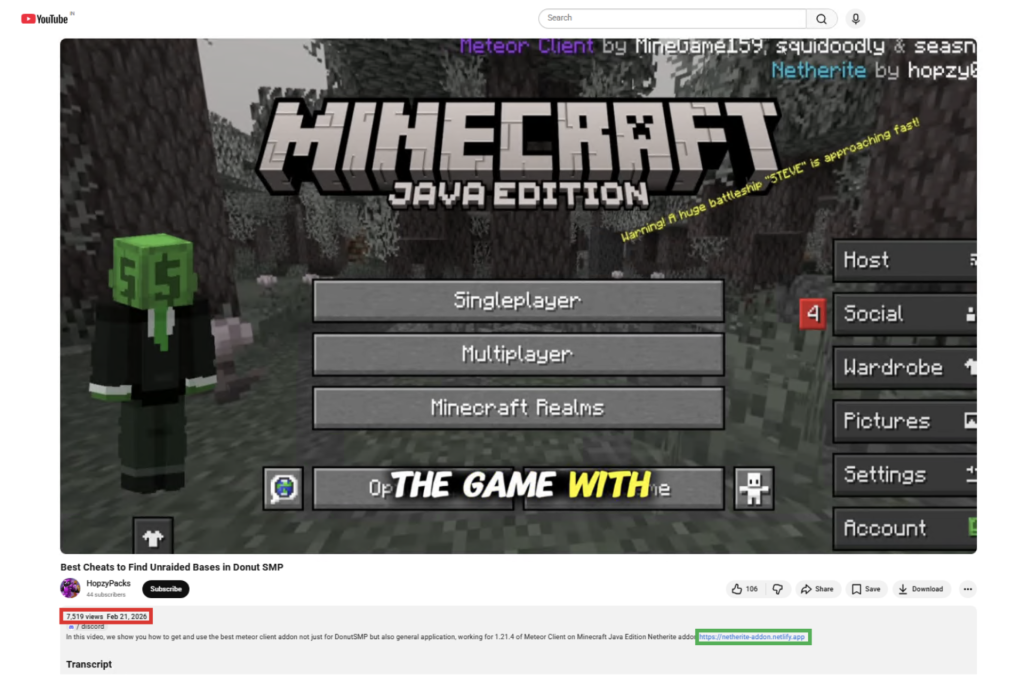
Attackers create convincing YouTube videos reviewing or demonstrating Minecraft clients and mods.
The videos are well-produced, some include voiceover narration, and link to malicious download sites in the description and comments.
One video McAfee identified had over 7,500 views before being flagged. Comments are also sometimes planted by the attackers claiming the files are safe.
WeedHack instructs customers to build convincing-looking websites that mimic official Minecraft mod pages. These sites are deliberately designed to show up high in search engine results for popular mod names, a tactic called SEO poisoning.
Some fake sites include fake security warnings, Discord links, and GitHub references to appear legitimate. In one case, a site warned players to “only download from us,” while actively distributing malware.
Minecraft clients and mods specifically targeted include: Meteor Client, Radium Client, Wurst Client, LiquidBounce, Impact Client, Future Client, and others.
Infection happens in four stages that happen silently in the background after a victim opens the downloaded file.
Stage 1 – First Contact: The malicious file launches quietly (without showing a console window), connects to a hidden network, and phones home to receive further instructions. It uses a sophisticated technique involving the Ethereum blockchain to locate its command server in a way that’s difficult to block or take down.
Stage 2 – Taking Hold: The malware disables Windows Defender protections, gathers detailed information about the victim’s computer (processor, graphics card, RAM, operating system), and takes a screenshot of their screen. It then steals Discord tokens and browser passwords and cookies. For McAfee users, this is where Web Protection would prevent users from visiting the site, and where our Antivirus would prevent any downloaded malware from taking hold.
Stage 3 – Digging In: The malware installs itself so that it automatically restarts every time the victim logs into their computer. It sets up a hidden scheduled task that runs continuously, even at the highest system privileges.
Stage 4 – Full Access: For premium customers, an additional component is installed that connects the attacker to the victim’s computer in real time. This includes live screen sharing with keyboard and mouse control, webcam access, keylogging (recording every keystroke), a reverse shell (full command-line access to the computer), and the ability to upload or download any files.
A separate component specifically hunts for Telegram credentials and cryptocurrency wallets, sending that data to a different server every five minutes.
Visit our guide: How to Quickly Remove Malware in 2026.
Free tier steals:
Premium tier adds:
Minecraft’s mod ecosystem is enormous and largely unregulated. Kids routinely search YouTube and Google for performance-boosting clients, cosmetic mods, and gameplay cheats, exactly the kinds of things WeedHack exploits.
Here’s a practical guide for families:
| Red Flag |  Safe Practice Safe Practice |
| The mod isn’t on the developer’s official website | Only download from CurseForge, Modrinth, or the mod’s verified GitHub |
| A site or video tells you to disable your antivirus to run the file | Never disable antivirus for a game mod. Legitimate mods don’t ask you to |
| A site you’ve never heard of claims to be the “only official” source | If you can’t verify the site is official, don’t download from it |
| Download links are in YouTube comment sections | Treat comment section links as a red flag, always |
| Your antivirus flags a file as malware, but they try to tell you to ignore it, it’s a “false alarm” | Use McAfee’s Threat Explainer to find out why this is malicious. Don’t disable antivirus |
One of the best ways parents can protect their families is with McAfee’s award-winning antivirus and Web Protection, which are specifically designed to detect threats like WeedHack and help block malicious downloads before a device can be compromised.
McAfee has been actively tracking WeedHack samples and detects this threat under the following signatures:
McAfee provides multiple layers of protection against threats like WeedHack.
Together, these protections help proactively block risky downloads, reactively stop malware, and explain what to watch for next.
McAfee Labs continues to monitor WeedHack and will update coverage as new samples and domains are identified. For the full technical report including indicators of compromise, see the McAfee Labs analysis.
| Term | What it means |
| Malware-as-a-Service (MaaS) | A criminal business model where hackers sell or rent attack tools to other people, just like a software subscription |
| RAT (Remote Access Trojan) | Malware that gives an attacker remote control over a victim’s device — screen, files, camera, and more |
| Infostealer | Malware designed to silently collect and transmit passwords, cookies, and account credentials |
| SEO Poisoning | Manipulating search engine results so a malicious website appears near the top when someone searches for a legitimate product |
| Minecraft Client/Mod | Third-party software that modifies or enhances the Minecraft game experience. Legitimate ones are common; WeedHack fakes them |
| Minecraft Session ID | A token that proves you’re logged into Minecraft. Stealing it lets an attacker take over your account without your password |
| Keylogger | Software that secretly records every key a person types — including passwords, messages, and search queries |
| Reverse Shell | A connection from the victim’s computer back to the attacker that gives the attacker full command-line control |
| EtherHiding | A technique that hides a malware’s server address inside the Ethereum blockchain, making it very difficult to block |
| Discord Token | A credential that lets someone access your Discord account. Stealing it gives attackers full access without needing your password |
The post New Malware Targeting Minecraft Infects 2K Daily, and Teens are Becoming Attackers appeared first on McAfee Blog.


Authored by Aayush Tyagi
Minecraft is a 2011 sandbox game developed and published by Mojang Studios. It is the best-selling video game in the world and has sold over 350 million copies worldwide. Its popularity has spanned over a decade due to its versatile gameplay, offering multiple game modes, including one of the most memorable Story Mode in gaming history.
It allows players to create and host multiplayer servers with a variety of gameplay options and offers a wide range of custom launchers, game mods, and cheats to choose from.
Its massive popularity and widespread use of third-party tools have also given rise to a dark side of the Minecraft ecosystem, which is filled with Remote Access Trojans (RATs), credential stealers, keyloggers and other malware threats.
McAfee Labs has recently uncovered a colossal Minecraft-focused Malware-as-a-Service (MaaS) campaign named ‘Weedhack’, that allows threat actors to remotely access and manipulate the victims’ screen, webcam and file system through a dashboard hosted on the clear net, making it easily accessible to anyone with a Discord account and an internet connection.
The post Game Over: WeedHack – The Rise of Minecraft Malware-as-a-Service Campaigns appeared first on McAfee Blog.

Whether you’re planning a once-in-a-lifetime trip or just hoping to catch a match while it’s in your city, the 2026 FIFA World Cup is already driving a surge in ticket searches, travel bookings, and last-minute plans.
But where there’s high demand and big money, scammers aren’t far behind.
“The World Cup is one of those events where excitement and cost collide,” says Abhishek Karnik, Head of Threat Research at McAfee. “Tickets have been expensive, and for many people, especially families or fans traveling, the costs add up quickly between tickets, flights, hotels, and everything else that comes with attending.”
“When prices feel out of reach, people naturally start looking for better deals or cheaper options. That is where things can get tricky. If someone suddenly offers what feels like a great price compared to everything else out there, it can feel like a rare opportunity worth jumping on. Scammers understand that.”
Let’s break down the new McAfee research, what scams to watch for, and how McAfee’s tools help you stay safe.
New research from McAfee shows that while most fans are aware of World Cup-related scams, many are still willing to take risks to secure tickets.
In fact, 40% say they would consider buying from an unofficial source if they can’t get tickets through the official FIFA site, as many expect tickets to sell out and hope to find affordable resale options.
That tension is what makes events like the World Cup especially vulnerable for scams.
With limited ticket availability, rising prices, and the pressure to act quickly, even informed fans can find themselves making decisions they normally wouldn’t, like buying tickets from a reseller on TikTok.
And scammers are counting on it.
Survey takeaways:
“Usually, it is not just one thing that gives a scam away,” Karnik says. “It is when a few warning signs start adding up at once, pressure to act quickly, prices that feel unusually low, or details that seem slightly off.”
“One of the biggest is urgency around pricing. If someone is pushing a deal that feels dramatically cheaper than similar tickets, claiming prices are about to go up, or creating pressure to buy immediately, that is worth paying attention to. Creating artificial urgency around a ‘great deal’ is one of the easiest ways scammers get people excited enough to move quickly.”
Below is a comprehensive breakdown of the most common scams tied to major global sporting events like the World Cup, including how they work and what to look for.
McAfee’s Scam Detector, Safe Browsing tools, VPN, and Password Manager work together to help you spot scams like these as they happen by flagging suspicious messages, blocking risky websites, and helping you make safer decisions before you click, pay, or share information.
 Scam Type Scam Type |
What It Is | How It Works | Red Flags |
| Fake Ticket Resale Scam | Fraudulent tickets sold through unofficial sites or individuals | Scammers create fake listings or duplicate real tickets and sell them to multiple buyers | Prices far below or above market, refusal to use official transfer systems, pressure to act fast |
| Social Media Ticket Scam | Tickets sold through platforms like Instagram, Facebook, TikTok, or X | Fake or hacked accounts post “last-minute” ticket offers and move conversations to DMs | Urgent language (“only 2 left”), new or suspicious profiles, requests to pay outside the platform |
| Duplicate QR Code Scam | One legitimate ticket is resold multiple times | Multiple buyers receive the same QR code, but only the first scan works | Screenshots instead of official transfers, identical tickets sold repeatedly |
| Fake Ticket Website Scam | Websites designed to look like official ticket platforms | Victims enter payment info or purchase tickets that don’t exist | Slightly misspelled URLs, unfamiliar domains, lack of official branding verification |
| Travel & Accommodation Scam | Fake hotels, rentals, or travel packages | Listings appear legitimate but either don’t exist or are already booked | Prices that seem unusually low, requests for upfront payment, lack of verified reviews |
| Booking Impersonation Scam | Fraudsters pose as airlines, hotels, or booking platforms | Victims receive messages about “issues” with bookings and are asked to click links or provide info | Unexpected messages, requests for login or payment details, links that don’t match official sites |
| Public Wi-Fi & Phishing Scam | Data theft through unsecured networks while traveling | Scammers intercept data or create fake login portals on public Wi-Fi | Open networks with no password, login pages asking for unnecessary information |
| Fake Giveaway Scam | Promotions claiming free tickets or VIP access | Victims are asked to enter personal data, click links, or pay “processing fees” | “You’ve won” messages you didn’t enter, requests for payment to claim prizes |
| Betting & Prediction Scam | Fake betting tips or “guaranteed wins” tied to matches | Scammers sell fake predictions or direct users to malicious betting sites | Claims of guaranteed outcomes, requests for upfront payment, unfamiliar platforms |
| Merchandise Scam | Counterfeit World Cup gear sold online | Buyers receive low-quality or no product at all | Unverified sellers, poor site quality, deals that seem too good to be true |
Unfortunately, with the continued improvement of AI, these scams are becoming more convincing.
AI tools allow scammers to create:
That means traditional advice like “look for typos” is no longer enough on its own.
Today’s scams often look polished, professional, and believable.
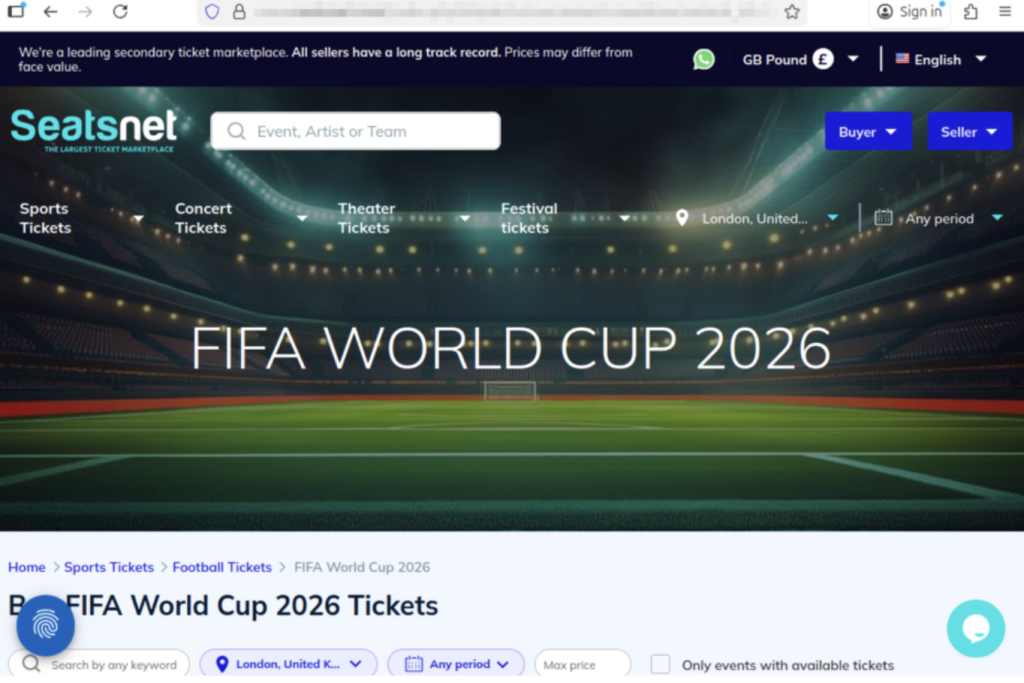
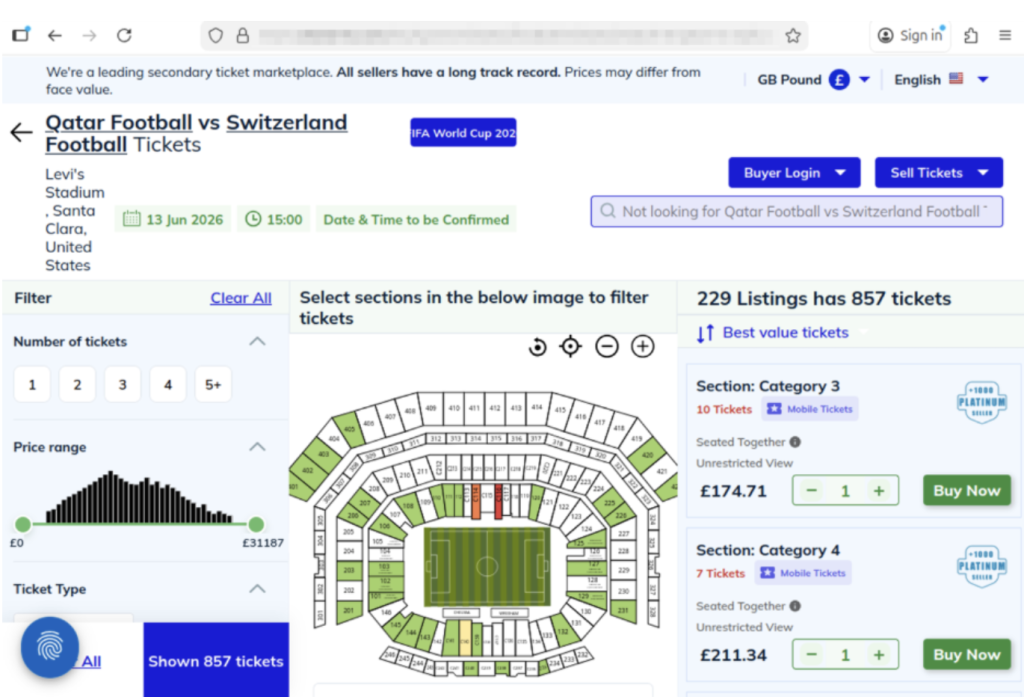
For the World Cup, official ticket sales happen through designated FIFA sales phases and platforms.
Buying outside those channels increases the risk of:
Even if a ticket looks legitimate, it may be:
When in doubt, go directly to the official FIFA website instead of clicking links from messages or ads. You can also visit their comprehensive FAQ section for all your ticket and event questions.
Here are practical steps fans can take to reduce risk:
| Safety Check | What To Do |
| Buy from official sources | Use FIFA’s official ticket platform whenever possible |
| Avoid clicking links in messages | Navigate directly to official websites instead. McAfee’s Safe Browing tools help prevent you from opening malicious links. |
| Be cautious with resale offers | Verify platforms and avoid direct peer-to-peer payments |
| Check QR codes before you scan them | You can check for QR code scams on-demand with Scam Detector |
| Don’t pay with untraceable methods | Avoid wire transfers, gift cards, or crypto-only payments |
| Double-check URLs | Look for misspellings or unusual domains |
| Use secure connections | Avoid making purchases on public Wi-Fi, or use a VPN like McAfee’s. |
| Protect your accounts | Use strong passwords and enable two-factor authentication. Consider a password manager like McAfee’s. |
| Verify before you buy | If something feels off, pause and check before sending money |
If you think you may have purchased a fraudulent ticket, clicked a suspicious link, or shared information with a scammer, acting quickly can help limit the impact.
Stop communication immediately
Do not send additional money or information, even if the sender claims you need to “complete” a transaction. It’s also a good idea to take screenshots of messages in case the scammer disappears.
Contact your bank or payment provider
Report the transaction as soon as possible. Many institutions can help reverse charges or flag fraudulent activity if caught early.
Secure your accounts
Change passwords for any accounts that may be affected, especially email, banking, and ticketing platforms. Our password manager and free password generator help create unique passwords every time.
Enable two-factor authentication (2FA)
Adding an extra layer of security can help prevent unauthorized access, even if your password was exposed.
Scan your device for threats
If you clicked a suspicious link or downloaded a file, run a security scan to check for malware or malicious software. Check out our free security scan.
Monitor for unusual activity
Keep an eye on financial accounts, email logins, and any services tied to your personal information. Our free WebAdvisor helps protect you from malware and phishing attempts while you surf.
McAfee offers more than traditional antivirus, combining multiple layers of digital protection in one app to help you stay safer while searching, clicking, and buying online.
Scam Detector helps flag suspicious texts, emails, and videos automatically, so you can spot a scam before it hits you and your wallet
Safe Browsing tools help block risky websites, alert you to phishing attempts, and guide you away from malicious links
VPN helps keep your connection private on public Wi-Fi, protecting your personal and payment information
Password Manager helps create and store strong, unique passwords to reduce the risk of account takeover
Identity Monitoring and Alerts notify you if your personal information appears where it shouldn’t, so you can quickly take steps to fix it
Personal info removal helps find and remove your personal info from data broker sites and close out old forgotten accounts
Device and Account Security helps protect the devices and accounts you use every day
The World Cup isn’t just another event, it’s a moment when millions of people are making fast decisions involving real money, travel plans, and personal information.
What McAfee’s research makes clear is that the biggest risk isn’t a lack of awareness. Most fans already know scams exist. The risk is what happens next.
“When prices feel out of reach, people naturally start looking for better deals or cheaper options. That is where things can get tricky. If someone suddenly offers what feels like a great price compared to everything else out there, it can feel like a rare opportunity worth jumping on,” Karnik says. “Scammers understand that.”
“If somebody claims they have hard-to-get tickets at an unusually good price, especially for a popular match, people may feel pressure to act quickly before the opportunity disappears.”
As demand continues to build toward the tournament, more fans will be searching, comparing, and purchasing online.
The takeaway is simple: Staying safe isn’t just about knowing scams exist. It’s about slowing down, verifying before you buy, and using tools that help you make informed decisions in the moment.
*McAfee is not affiliated with or endorsed by FIFA.
The post Are Your World Cup Tickets Legit? 40% of Fans May Risk Unofficial Sellers appeared first on McAfee Blog.



Trevor Lawrence didn’t actually cut his hair.
But millions of people thought he did.
The Jacksonville Jaguars recently released a viral schedule announcement video that appeared to show their star quarterback chopping off his signature long blond hair. The clip spread quickly online, pulling in nearly 4 million views on X and triggering reactions from fans, friends, and even Lawrence’s grandmother.
The catch? It wasn’t real.
The team later confirmed the moment was partially staged, partially AI-generated and part of the joke. Even Lawrence admitted the fake looked convincing.
And that’s exactly the problem.
What started as a harmless sports prank is also a reminder of how realistic AI-generated videos have become and how easily scammers can use the same technology to fool people online.
Deepfake scams use artificial intelligence to clone someone’s face, voice, or likeness to create fake videos, ads, phone calls, or social media posts that appear real.
And increasingly, scammers are using celebrities, influencers, athletes, and trusted public figures to do it.
According to McAfee research:
Why does it work? Because scammers know familiarity lowers our guard.
When people see a recognizable face, whether it’s Trevor Lawrence, Taylor Swift, Tom Hanks, or a favorite influencer, they’re more likely to trust what they’re seeing before stopping to question it.
The Jaguars video was meant as entertainment.
But scammers are already using the same technology for fraud.
McAfee researchers recently identified a growing wave of celebrity deepfake scams involving fake giveaways, investment schemes, romance scams, and fraudulent ads.
Some recent examples include:
In one high-profile case, a woman reportedly lost nearly $900,000 to scammers impersonating Brad Pitt using AI-generated images and messages.
The technology is getting good enough that “seeing is believing” no longer applies online.
Here are some of the biggest red flags to watch for:
| Red Flag | What to Watch For |
| Emotional urgency | “Act now,” “limited time,” or panic-driven messaging |
| Too-good-to-be-true offers | Free giveaways, investment promises, miracle products |
| Slightly unnatural video details | Off-sync lips, robotic speech, strange blinking, awkward lighting |
| Fake verified-looking accounts | Usernames with extra characters or copied profile photos |
| Requests for money or personal data | Especially through DMs, crypto links, gift cards, or wire transfers |
AI scams are evolving fast, but layered protection can help you stay ahead of them.
McAfee’s Scam Detector, included in all core McAfee plans, can help identify suspicious links, messages, videos, and deepfake-related scams across texts, email, and social platforms before you click.
Additional protections like Web Protection and Identity Monitoring can also help reduce your risk if scammers attempt to steal your credentials or personal information.
Charter Communications confirmed a data breach tied to a third-party vendor, exposing customer information. Whenever breaches like this happen, scammers often follow up with phishing emails and fake customer support calls pretending to help affected users.
Reports surrounding a potential 7-Eleven data breach are circulating online. Consumers should stay alert for fake password reset emails, loyalty account phishing attempts, and scam texts impersonating retailers.
A tragic case tied to an alleged Tom Selleck impersonation scam is drawing attention to the growing threat of celebrity AI fraud. Experts warn that scammers are increasingly using fake celebrity profiles, AI-generated messages, cloned voices, and deepfake videos to build trust with victims online, especially older adults.
The case underscores how emotionally manipulative and financially devastating these scams can become.
Researchers told The Verge that attackers are beginning to manipulate chatbot behavior and personalities to trick users into unsafe actions, highlighting growing concerns around AI trust and social engineering.
A phishing scam making headlines this week uses fake inheritance notices and “unclaimed estate” emails to pressure victims into sharing personal information.
Unlike older scam emails full of spelling mistakes, newer versions look polished and professional, often using legal-sounding language, fake reference numbers, and urgent 48-hour deadlines designed to trigger panic before people stop to verify the message.
The next deepfake won’t always look fake. That’s what makes these scams dangerous.
Here are some practical, go-to tips
And we’ll be back next week with more.
The post Trevor Lawrence’s Viral “Haircut” is a Lesson in Deepfakes: This Week in Scams appeared first on McAfee Blog.
