As war reshapes the Gulf, the satellite infrastructure the world relies on to see conflict clearly is being delayed, spoofed, and privately controlled—and nobody is sure who is responsible.
The crowdsourced website and app Mahsa Alert provides citizens in Iran with crucial information amid the country’s ongoing war with the US and Israel—and an internet blackout.
Under a Homeland Security program, police departments around the US are signing up to assist in immigration enforcement. The cops of Carroll, New Hampshire, are going all in—and they’re likely not alone.
First heard as US and Israeli strikes on Iran began, the shortwave broadcast has since been traced to a US military base in Germany—but its purpose and its operator remain unclear.
In a place denied access to basic forensic technology—and where people disappear into Israeli detention—the fate of thousands remains unknown. One of them is an autistic teenager.
For families of the missing, systemic obstacles to identifying remains and locating people in Israeli detention has created a kind of social and legal purgatory.
Congressman Jim Himes claims a sweeping surveillance authority should stay intact because he hasn't seen abuses by Kash Patel's FBI, according to internal messaging obtained by WIRED.
Meta blamed users for not opting into the privacy-protecting feature. Experts fear the move could be the first major domino to fall for end-to-end encryption tech worldwide.
The Aisuru, Kimwolf, JackSkid, and Mossad botnets had infected more than 3 million devices in total, many inside home networks, according to the US Justice Department.
Moxie Marlinspike says the technology powering his encrypted AI chatbot, Confer, will be integrated into Meta AI. The move could help protect the AI conversations of millions of people.
Today marks the start of Spring in the Northern Hemisphere, and with warmer weather setting in summer trips are vacation planning are starting to take shape.
But before you respond to that message about your hotel booking or payment confirmation, it’s worth asking: is it actually legit?
This week in scams, we’re breaking down a travel phishing scheme making the rounds through realistic booking messages, as well as new McAfee research on betting scams and AI-driven malware.
Scammers Who Know Your Exact Travel Reservation Details
A new phishing campaign targeting travelers is exploiting hotel booking platforms like Booking.com, and it’s convincing enough to fool even cautious users.
According to reporting from ITBrew and Cybernews, attackers are running a multi-stage scam:
How The Booking Scam Works
Scam Stage
How It Works
What You’ll Notice
How to Protect Yourself
Where McAfee Helps
Stage 1: Hotel account gets compromised
Attackers phish or hack hotel staff to access booking platforms and guest reservation data.
You won’t see this part — it happens behind the scenes.
Use strong, unique passwords and enable multi-factor authentication on your own accounts to reduce risk of similar breaches.
Identity Monitoring can alert you if your personal information appears in suspicious places or data leaks.
Stage 2: You receive a realistic message
Scammers use stolen booking data to send messages via WhatsApp, email, or even booking platforms.
The message includes your real name, hotel, and travel dates, making it feel legitimate.
Be cautious of unexpected outreach, even if the details are correct. Don’t assume accuracy means authenticity.
Scam detection tools can help flag suspicious messages and identify potential phishing attempts.
Stage 3: Urgency is introduced
The message claims there’s an issue with your reservation and pushes you to act quickly.
Phrases like “confirm within 12 hours” or “risk cancellation” create pressure.
Pause before acting. Legitimate companies rarely require urgent payment changes without prior notice.
Scam detection can help identify high-risk messages designed to pressure you into quick decisions.
Stage 4: You’re sent to a fake payment page
A link leads to a convincing lookalike site designed to steal your payment details.
The page looks real but may have subtle URL differences or unusual formatting.
Always navigate directly to the official website or app instead of clicking links in messages.
Safe Browsing tools can help block risky or known malicious websites before you enter sensitive information.
March Madness Brackets, Bets, and Bad Actors
March Madness brings brackets, bets, and a flood of bad actors.
New McAfee research found that 1 in 3 Americans (32%) say they’ve experienced a betting or gambling scam, and nearly a quarter (24%) say they’ve lost money to one. On average, victims reported losing $547.
That’s not surprising when you look at the environment around the tournament. More than half of Americans are watching, more than half are participating in some form of betting, and 82% say they’ve seen betting promotions in the past year.
Some of the most common setups this season include:
“Guaranteed win” or “can’t lose” betting tips that require payment upfront
Fake sportsbook promotions offering bonus bets or free credits
Messages claiming you have winnings, but need to pay a fee to unlock them
Impersonation scams posing as sportsbook support or betting platforms
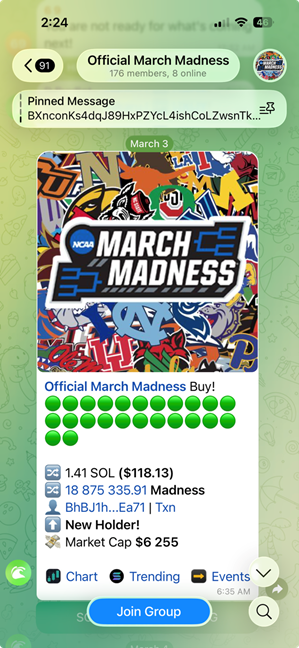
Invitations to private “VIP betting groups” on WhatsApp or Telegram
The takeaway: If a betting offer promises guaranteed results, demands the use of bizarre apps and sites, asks for money upfront, or pushes you to act quickly, it’s not an edge. It’s a scam.
“AI-Written” Malware Is Hiding in Everyday Downloads
Not all scams start with a message. Some start with a search.
443 malicious ZIP files disguised as legitimate software
1,700+ file names used to make those downloads look credible
48 variants of a malicious DLL file used to infect devices
These weren’t hosted on obscure corners of the internet either. The files were distributed through platforms people recognize, including Discord, SourceForge, and file-sharing sites.
Here’s how the attack typically works:
You search for a tool.
You download what looks like the right file.
It opens normally at first.
Then, behind the scenes, malware loads quietly and begins pulling in additional code. In some cases, victims are shown fake error messages while the real infection happens in the background.
From there, attackers can:
Turn your device into a cryptocurrency mining machine
Install additional malware like infostealers or remote access tools
Slow down your system while running hidden processes
What makes this campaign stand out is that some of the code appears to have been generated with help from AI tools.
That doesn’t mean AI is running the attack on its own. But it does suggest attackers are using AI to:
Generate code faster
Create more variations of malware
Scale campaigns more efficiently
In other words, the barrier to building malware is getting lower.
The takeaway: If a download is unofficial, hard to find, or feels like a shortcut, it’s worth slowing down. The file may look right, but that doesn’t mean it’s safe.
How McAfee+ Advanced Works in These Scam Moments
Whether it’s a message about your booking, a betting offer that looks legitimate, or a download that appears to be exactly what you were searching for, these scams all rely on the same thing: they blend into everyday moments.
That’s where having backup like McAfee+ Advanced comes in. It includes:
McAfee’s Scam Detector, which helps flag suspicious links in texts and messages like the ones used in these booking and betting scams, so you can spot something risky before you engage
Web protection and real-time device security, helping protect against risky links, malicious sites, and evolving threats if you do click, including fake betting platforms or malware hidden in downloads
Personal Data Cleanup, which helps remove your information from sites that sell it, making it harder for scammers to access the personal details that make messages and scams feel legitimate
Secure VPN, which helps keep your personal info safe and private anywhere you use public Wi-Fi, like hotels, airports, and cafés while traveling
Identity Monitoring and alerts, with 24/7 scans of the dark web to help ensure your personal and financial information isn’t being exposed or reused
Credit and transaction monitoring, so you can get alerts about suspicious financial activity if your information is ever compromised
Identity restoration support and up to $2 million in identity theft coverage, giving you access to US-based experts and added peace of mind if something does go wrong
Stay skeptical, verify before you click, and we’ll see you next week with more.
McAfee Labs has uncovered a widespread malware campaign hiding inside fake downloads for things like game mods, AI tools, drivers, and trading utilities.
What makes this campaign especially notable is that some parts of it appear to have been built with help from large language models (LLMs). McAfee researchers found signs that certain scripts likely used AI-generated code, which may have helped the attackers create and scale the campaign faster.
That does not mean AI created the whole operation on its own. But it does suggest AI may be helping cybercriminals lower the effort needed to build malware and launch attacks.
Attackers created many different fake downloads to reach more victims
48 malicious DLL variants
The campaign used multiple versions of the malware, not just one file
1,700+ file names observed
The same threat was repackaged under many different names to look convincing
17 distinct kill chains
Researchers found multiple attack flows, but they followed a similar overall pattern
Hosted on familiar platforms
The malware was distributed through services users may recognize, including Discord and SourceForge
AI-assisted code suspected
Some scripts contained explanatory comments and patterns that strongly suggest LLM assistance
Cryptomining and additional malware observed
Infected devices could be used to mine cryptocurrency or receive more malicious payloads
What Is “AI-Written Malware”?
In this case, “AI-written malware” does not meanan AI system independently invented and launched the attack.
Instead, McAfee Labs found evidence that the attackers very likely used AI tools to help generate some of the code used in the campaign, especially in certain PowerShell scripts.
Put simply:
Term
Plain-English meaning
Large language model (LLM)
An AI system that can generate text and code based on prompts
AI-assisted malware
Malware where attackers appear to have used AI tools to help write or structure parts of the code
Vibe coding
A style of coding where someone describes what they want and an AI does much of the writing
This matters because it can make malware development faster, easier, and more scalable for attackers.
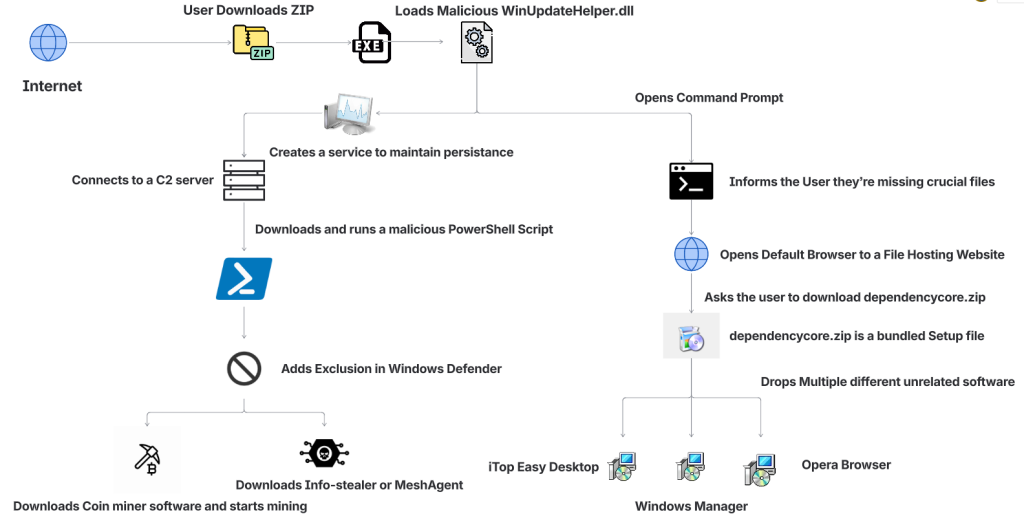
Figure 1: Attack Vector
How The Fake Download Attack Works
The attack begins when someone searches for software online and downloads what looks like the tool they wanted.
That tool might appear to be a game mod, AI voice changer, emulator, trading utility, VPN, or driver. But behind the scenes, the ZIP archive includes malicious components that start the infection.
Step
What happens
1. A user downloads a fake file
The ZIP archive is disguised as something useful or desirable, such as a mod menu, AI tool, or driver
2. The file appears normal at first
In some cases, the package includes a legitimate executable so it feels more convincing
3. A malicious DLL is loaded
A hidden malicious file, often WinUpdateHelper.dll, starts the real attack
4. The user is distracted
The malware may display a fake “missing dependency” message and redirect the user to install unrelated software
5. A PowerShell script is pulled from a remote server
While the user is distracted, the malware contacts a command-and-control server and runs additional code
6. More malware is installed
Depending on the sample, the device may receive coin miners, infostealers, or remote access tools
7. The infected device is abused for profit
In many cases, attackers use the victim’s system resources to mine cryptocurrency in the background
What Kinds of Files Were Used as Bait
McAfee found that the attackers cast a very wide net. The malicious ZIP files impersonated many types of software, including:
Bait category
Examples
Gaming tools
game mods, cheats, executors, Roblox-related tools
AI-themed tools
AI image generators, AI voice changers, AI-branded downloads
System utilities
graphics drivers, USB drivers, emulators, VPNs
Trading or finance tools
stock-market utilities and related downloads
Fake security or malware tools
fake stealers, decryptors, and other risky-looking utilities
That broad range is part of what made the campaign effective. It was designed to catch people already looking for shortcuts, unofficial tools, or hard-to-find software.
Why McAfee Researchers Believe AI Was Used
One of the strongest clues came from the comments inside some of the attack scripts.
McAfee researchers found explanatory comments that looked more like AI-generated instructions than the kind of shorthand attackers usually leave for themselves. In one example, a comment referred to downloading a file from “your GitHub URL,” which suggests the code may have come from a generated template and was not fully cleaned up before use.
These details do not prove every part of the campaign was AI-made. But they do support McAfee’s assessment that certain components were likely generated with help from large language models.
What Happens on an Infected Device
In many cases, the malware was used to turn victims’ computers into quiet crypto-mining machines.
McAfee observed mining activity involving several cryptocurrencies, including:
Ravencoin
Zephyr
Monero
Bitcoin Gold
Ergo
Clore
Some samples also downloaded additional payloads such as SalatStealer or Mesh Agent.
For victims, that can mean:
Possible effect
What it may look like
Slower performance
apps lag, games stutter, system feels unusually sluggish
High CPU or GPU usage
fans run constantly, laptop gets hot, battery drains faster
if an infostealer or remote access tool is installed
McAfee was also able to trace several Bitcoin wallets tied to the campaign. At the time of the report, those wallets held about $4,536 in Bitcoin, while total funds received were approximately $11,497.70. Researchers note the real total could be higher because some of the currencies involved are harder to trace.
Who Was Targeted Most
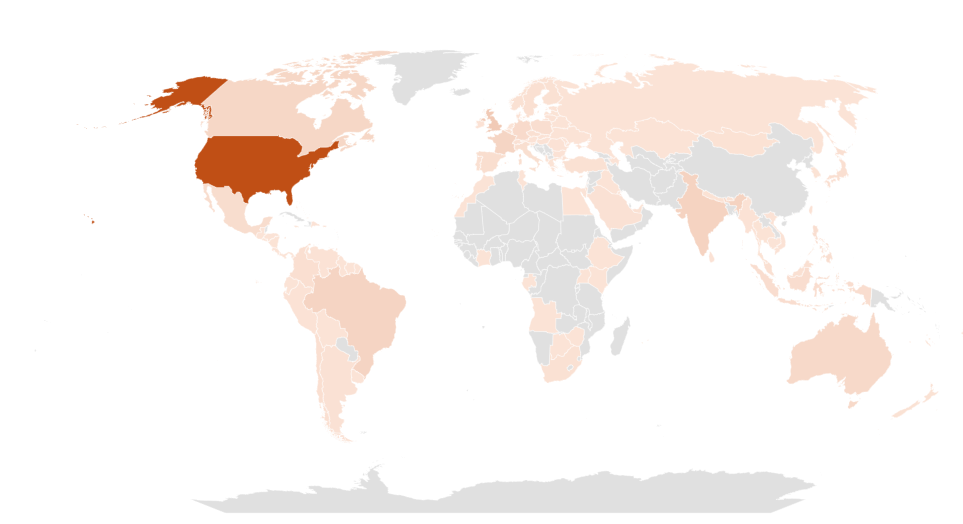
This campaign was observed most heavily in:
United States
United Kingdom
India
Brazil
France
Canada
Australia
That does not mean users elsewhere were unaffected. These were simply the countries where researchers saw the highest prevalence.
Figure 2: Geographical Prevalence
Red Flags To Watch For
Even though the campaign used advanced techniques, the warning signs for users were often familiar.
Red flag
Why it matters
You found the file through a random link
Unofficial forums, Discord links, and file-hosting pages are common malware delivery paths
The download is a ZIP for something sketchy or unofficial
Cheats, cracks, mod tools, and unofficial utilities carry higher risk
You get a “missing dependency” message
Attackers may use this to push a second download while the real infection happens in the background
The file name looks right, but the source feels wrong
Familiar names can be faked easily
Your PC suddenly slows down or overheats
Hidden cryptominers often abuse system resources
You notice new, unrelated software installed
The campaign sometimes used unwanted software installs as a distraction
How To Stay Safe From Malware Hidden in Fake Downloads
This campaign is a reminder that not every convincing file is a safe one. A few habits can reduce your risk significantly.
Safety step
Why it helps
Download software only from official sources
This lowers the chance of accidentally installing a trojanized file
Avoid cheats, cracks, and unofficial mods
These categories are common bait for malware campaigns
Be skeptical of dependency prompts
Unexpected requests to install helper files or missing components can be part of the attack
Keep your security software updated
Current protection can help detect known threats and suspicious behavior
Pay attention to system performance
A suddenly hot, loud, or slow PC may be a sign something is running in the background
Review what you download before opening it
Even a familiar file name does not guarantee a file is legitimate
McAfee helps protect against malware threats like these with multiple layers of security, including malware detection and safer browsing protections designed to help stop risky downloads before they can do damage.
What To Do If You Think You Opened One of These Files
If you think you downloaded and ran a suspicious file like one described in this campaign:
Action
Why it matters
Disconnect from the internet
This can help interrupt communication with attacker-controlled servers
Run a full security scan
A trusted scan can help identify malicious files and behavior
Delete suspicious downloads
Remove the file and avoid reopening it
Check for unfamiliar software or startup items
The infection may have installed additional components
Change important passwords from a clean device
This is especially important if data-stealing malware may have been involved
Monitor accounts for unusual activity
Keep an eye on email, banking, and other sensitive accounts
If your computer continues acting strangely after a scan, it may be worth getting professional help.
What This Means for the Future of Malware
This campaign highlights how cybercrime is evolving.
The core risk is not just fake downloads. It is the fact that attackers are using AI tools to help generate code, create variations, and speed up parts of the malware development process.
That can make campaigns like this easier to scale and harder to ignore.
For everyday users, the takeaway is simple: if a file seems unofficial, rushed, or too good to be true, pause before opening it. A fake download may look like a shortcut, but it can quietly turn your device into a target.
Frequently Asked Questions
FAQs
Q: What is AI-written malware?
A: AI-written malware generally refers to malicious code, or parts of a malware campaign, that appear to have been created with help from AI coding tools or large language models.
Q: Did AI create this entire malware campaign?
A: McAfee Labs did not say that. The research suggests that certain components, especially some scripts, were likely generated with help from large language models.
Q: What was this malware disguised as?
A: The malicious files impersonated game mods, AI tools, drivers, trading utilities, VPNs, emulators, and other software downloads.
Q: What can happen if you open one of these fake files?
A: Depending on the sample, the malware may install coin miners, steal data, establish persistence, or download additional malicious tools.
Q: Can malware really use my computer to mine cryptocurrency?
A: Yes. McAfee observed samples in this campaign that used victims’ CPU and GPU resources to mine cryptocurrency in the background.
Q: What is the safest way to avoid this kind of malware?
A: Download software only from official or trusted sources, avoid unofficial tools and cheats, be cautious of fake dependency prompts, and keep your security protection up to date.
Whether you’re a hardcore basketball fan or the office colleague who gets roped into filling out a bracket every year, March Madness is the season for brackets, office pools, and last-minute picks.
More than half of Americans (57%) plan to watch the NCAA basketball tournament, and 55% say they participate in some kind of betting or bracket activity during March Madness, from office pools to licensed sportsbook wagers.
But where there’s excitement and money, scammers aren’t far behind.
New research from McAfee finds that 1 in 3 Americans (32%) say they’ve experienced a betting or gambling scam, and 24% say they’ve lost money to one, with victims losing an average of $547.
Big events like March Madness create the perfect storm: massive attention, constant betting promotions, and fans searching online for predictions, tips, and an edge.
Scammers know it, and they’re exploiting the moment.
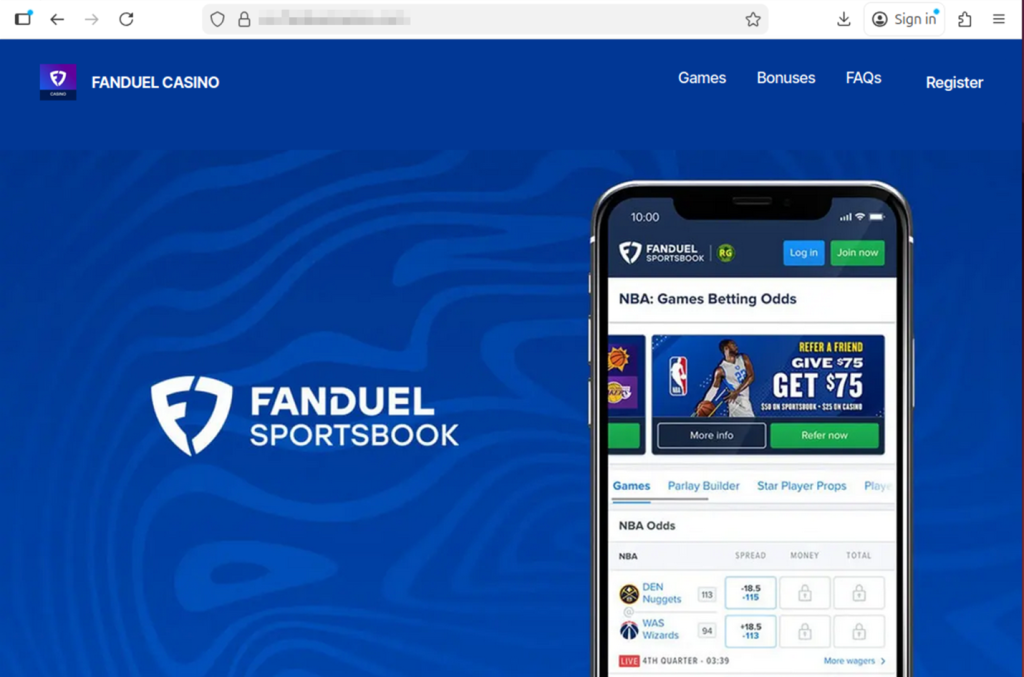
This example shows an incredibly realistic, but fake, FanDuel site created by scammers to impersonate the real thing.
Why March Madness is Prime Time for Betting Scams
Sports betting promotions are everywhere during major events like March Madness.
According to McAfee research, 82% of Americans say they’ve seen sports betting promotions or offers in the past year, often on social media, streaming broadcasts, and sports websites.
That flood of promotions makes it easier for scams to blend in with legitimate content.
Many scams start the same way legitimate offers do, through messages, ads, or links promising bonuses or tips. But once someone clicks or responds, the situation can escalate quickly.
For example:
42% of Americans say they’ve been asked to click a link sent via email tied to a betting offer
Others report links sent through social media messages or text messages directing them to betting sites, apps, or private betting groups
In many cases, victims are then asked to send money to unlock winnings, activate accounts, or access premium betting picks.
The payout rarely exists.
The Most Common Betting Scams Fans Encounter
Betting scams come in several forms, but many follow familiar patterns.
Here are some of the most common tactics reported in McAfee’s research:
Scam Type
Definition
How It Works
Red Flags
Guaranteed Win Scam
A betting scam where someone promises a “guaranteed win,” “sure bet,” or “can’t lose” outcome in exchange for money, clicks, or sign-ups. According to McAfee Findings, about 1 in 6 Americans say they’ve received these kinds of messages, which are designed to lure fans looking for an edge.
Scammers send private messages, emails, or social posts claiming they have insider knowledge or a lock on a game. The goal is usually to get the victim to pay for picks, join a private group, or click a malicious link.
Claims that a bet is guaranteed, pressure to act fast, requests for payment to access picks, and promises that sound risk-free.
Fake Free Bet Promotion Scam
A scam that pretends to offer bonus bets, deposit matches, or free credits through a fake sportsbook promotion.
The victim sees what looks like a real sportsbook offer, often through social media, email, or text. Clicking may lead to a fake site that steals login details, payment information, or deposits.
Unfamiliar brand names, unofficial links, urgent sign-up language, and promotions that seem unusually generous.
Winnings Release Fee Scam
A scam where a victim is told they have winnings waiting, but must first pay a fee, deposit, or processing charge to collect them.
The scammer claims the user has won money, then invents a reason payment is required before the funds can be released. Once the fee is sent, the payout never arrives.
Requests to pay before receiving winnings, vague “processing” or “verification” fees, and pressure to send money immediately.
Fake Betting App or Website Scam
A scam involving a fraudulent app or website designed to look like a real sportsbook or betting platform.
Victims are directed to a fake platform where they may create an account, enter personal information, or deposit money. The site may appear legitimate, but withdrawals are blocked or impossible.
Slightly misspelled URLs, strange app download paths, poor website quality, and platforms that make deposits easy but withdrawals difficult.
Sportsbook Impersonation Scam
A scam in which someone pretends to represent a legitimate betting platform or sportsbook support team.
The scammer contacts the victim claiming there is an issue with an account, a bonus, or winnings. They then ask for login credentials, payment details, or personal information.
Requests for passwords, bank details, or identity information; unexpected outreach; and messages pushing you to resolve an “account issue” through a link.
Fake Insider Tip Scam
A scam that uses claims of insider information, fixed games, or special access to make a betting offer sound exclusive and trustworthy.
Scammers position themselves as experts, insiders, or connected sources who can help the victim beat the odds. The real goal is usually payment, account access, or enrollment in a scam betting channel.
Claims of fixed outcomes, “insider” knowledge, exclusive access, and offers that rely on secrecy or urgency.
Celebrity or Influencer Endorsement Scam
A betting scam that uses fake or misleading celebrity, athlete, or influencer endorsements to make an offer seem legitimate.
Scammers create ads, videos, or posts that appear to feature a public figure recommending a betting platform, app, or tip service. In some cases, AI-generated content makes these endorsements look more convincing.
Endorsements that seem off-brand, videos or graphics that look unnatural, unfamiliar accounts, and promotions tied to fake urgency or suspicious links.
Private Betting Group Scam
A scam that tries to move betting conversations into private channels like WhatsApp, Telegram, or Signal.
After initial contact on social media or another public platform, the scammer encourages the victim to join a private group for “exclusive picks,” “VIP bets,” or “premium insights.” These groups are often used to pressure victims into sending money or clicking malicious links.
Pressure to move off-platform quickly, promises of VIP access, requests for payment to join, and little proof that the group is legitimate.
Who Is Most Likely to Encounter Betting Scams
McAfee’s research found that Americans under 45 are significantly more likely to encounter betting scams, with 44% saying they’ve experienced one compared with 19% of those over 45.
Men also report higher exposure, with 40% saying they’ve experienced a betting scam, compared with 25% of women.
Men and younger adults are also more likely to participate in brackets, fantasy sports, or sportsbook betting, the same spaces where scams often appear.
Example of a scam March Madness betting opportunity that uses real logos and imagery
AI Is Making Betting Scams Harder to Spot
Artificial intelligence is beginning to change how scams look and sound.
About 1 in 5 Americans say they’ve encountered betting scams that appeared more realistic because of AI, and 27% believe they’ve seen AI-generated betting content such as fake promotions, images, or videos.
Among those who encountered AI-driven scams:
58% reported AI-generated images or graphics in betting ads
57% saw AI-written messages that sounded natural or personalized
45% encountered fake celebrity or influencer endorsements
36% interacted with chatbots posing as betting experts or support agents
As these tools improve, scam messages are becoming smoother, more convincing, and harder to distinguish from legitimate promotions.
Safety Check
What To Do
Be skeptical of “guaranteed wins”
No bet is risk-free. Ignore messages promising sure bets, insider picks, or guaranteed outcomes.
Use only licensed sportsbooks
Stick to official betting apps and well-known sportsbooks. Avoid unfamiliar websites or apps.
Don’t click betting links from unknown messages
If you receive a betting offer via email, text, or social media, go directly to the official site instead of clicking the link.
Never pay fees to unlock winnings
If someone says you must send money to claim winnings or activate a betting account, it’s almost certainly a scam.
Be cautious of private betting groups
Invitations to “VIP betting groups” on apps like Telegram or WhatsApp are often used to promote scam picks or collect payments.
Tools like McAfee’s Scam Detector can flag suspicious links, websites, and messages before you engage.
March Madness is meant to be fun, filling out brackets, debating picks with friends, and cheering for the next big upset. Betting can be part of that excitement, but it’s worth remembering that scammers are watching the tournament too.
A simple rule of thumb can go a long way: if a betting offer promises guaranteed wins, asks for money upfront, or pushes you to act quickly, take a step back and verify it first.
The safest plays are the ones where you slow down, stick to trusted platforms, and keep your personal information protected.
This image shows another scam site built around sports betting. It’s important to remember these sports betting scams extend beyond basketball and the U.S.
If You or Someone You Know Needs Help
Sports betting can be fun, but for some people it can become difficult to manage. If you or someone you know is struggling with gambling, help is available through the National Problem Gambling Helpline (1-800-MY-RESET), operated by the National Council on Problem Gambling.
A powerful iPhone-hacking technique known as DarkSword has been discovered in use by Russian hackers. It can take over devices running iOS 18 that simply visit infected websites.
Dozens of Telegram channels reviewed by WIRED include job listings for “AI face models.” The (mostly) women who land these gigs are likely being used to dupe victims out of their money.
This week in scams, the Pokémon Trainer pursuit to “catch ’em all” is being hijacked by criminals posting fake trading card listings online; duping buyers, including young collectors, out of hundreds of dollars.
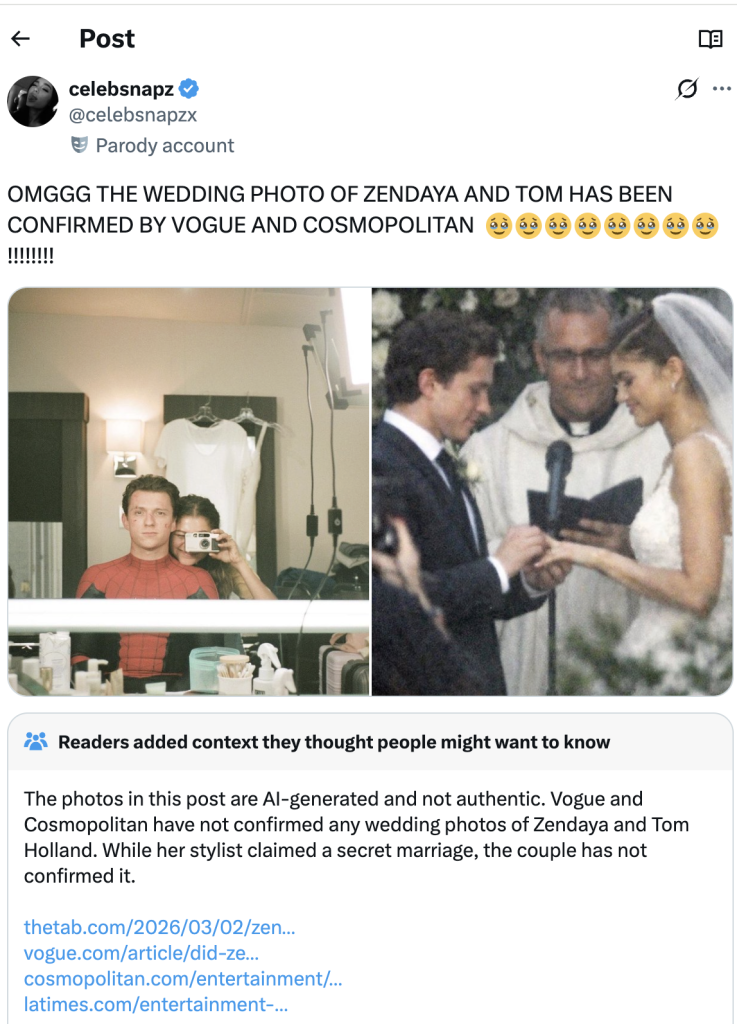
Meanwhile, threatening email extortion scams claiming your personal data has been stolen are flooding inboxes around the world. And a viral “wedding photo” of Tom Holland and Zendaya shows how AI-generated images can blur the line between real and fake online.
Here’s what to know.
Pokémon Card Scams Surge on Online Marketplaces
The booming market for collectible Pokémon cards has become a new target for scammers.
According to reporting from The Straits Times, Singapore police recently arrested a 25-year-old man suspected of running a series of e-commerce scams involving Pokémon trading cards. Victims reportedly lost more than $135,000 after paying for limited-edition cards that never arrived.
Authorities say the suspect allegedly advertised pre-orders for rare cards on the online marketplace Carousell. After receiving payment through bank transfers or digital payment apps, the seller either became unreachable or claimed there were delivery problems.
Police say at least 35 reports tied to the suspect have been filed since October 2025, and more broadly there have been over 600 reported Pokémon card e-commerce scams totaling more than $1.1 million in losses during that same period.
Why this matters:
Collectibles create the perfect storm for online scams. Limited releases, hype, and rising resale values make buyers feel pressure to act quickly before items “sell out.” Scammers take advantage of that urgency.
How to Stay Safe When Buying Collectibles Online
If you’re buying trading cards or other collectibles online:
Buy from authorized retailers or well-established marketplaces
Avoid sellers who require direct bank transfers or payment apps upfront
Use platforms with buyer protection or escrow payment systems
Be cautious of sellers who suddenly move the conversation to WhatsApp, Telegram, or other messaging apps
When demand spikes for a product, whether it’s sneakers, concert tickets, or Pokémon cards, scams usually follow.
The “Your Data Was Stolen” Email Extortion Scam
Another scam spreading widely right now arrives in a much more intimidating format: a threatening email claiming hackers have stolen your personal data.
According to reporting from Fox News, many people are receiving messages that claim the sender has access to their passwords, files, or financial information. The message then demands payment in Bitcoin to prevent the data from being sold on the dark web.
At first glance, these emails can feel frightening. They often use dramatic language like:
“I have your complete personal information”
“Your files and devices are compromised”
“Pay within 48 hours or your data will be leaked”
But in most cases, there’s one major problem with the claim.
There’s no proof.
Security experts note that these messages usually include no screenshots, no passwords, and no evidence of a real breach. Instead, scammers send the same message to thousands of email addresses at once, hoping a small percentage of recipients will panic and pay.
Often, the scammers obtained your email address from old data breach lists circulating online, which makes the message feel more believable.
What to Do If You Receive One of These Emails
If you receive a threatening extortion email:
Do not reply
Do not send money
Mark the message as spam or phishing
Delete it
Reporting the message helps email providers improve spam filters and prevent similar scams from reaching others.
The biggest tactic here is fear. Once you slow down and evaluate the message, the scam usually falls apart.
That Viral Tom Holland and Zendaya “Wedding Photo”? AI
A viral image circulating on social media this week claimed to show Tom Holland and Zendaya’s wedding, sparking massive speculation online.
But many viewers quickly suspected the image wasn’t real.
According to reporting on Yahoo Entertainment, the photo appeared to originate from a fan account on X (formerly Twitter) that claimed the image had been “confirmed” by major outlets like Vogue and Cosmopolitan. However, no such confirmation existed, and soon the official label was added marking the content as AI-generated.
A screenshot of the viral AI-generated image.
Celebrity rumors already spread quickly online. Add generative AI to the mix, and fabricated images can travel even faster.
While a fake celebrity wedding photo may seem harmless, the same technology can easily be used in more serious ways.
AI-generated visuals are already being used to create:
Fake celebrity endorsements
Fabricated news events
Scam ads featuring public figures
Fraudulent investment promotions
The line between real and synthetic content is getting harder to spot.
How to Spot Potential AI Images
If a viral image seems surprising or dramatic:
Check whether credible news outlets or verified accounts are reporting it
Look for visual inconsistencies in hands, text, or background details
Reverse image search the photo to see where it first appeared
Verify through official sources before sharing
When something looks shocking online, that’s often exactly why it spreads. McAfee’s built-in Scam Detector can help you spot AI-generated audio and video.
McAfee’s Safety Tips This Week
A few simple habits can help reduce your risk across all three of these scenarios:
Be cautious when buying high-demand collectibles online
Never send money in response to threatening emails
Treat viral images and breaking celebrity news with healthy skepticism
Use strong, unique passwords and enable two-factor authentication
Verify surprising claims through trusted sources before reacting
Scams today don’t always look like scams. They often look like exciting deals, urgent warnings, or AI depictions of people you trust.
The best defense is slowing down before clicking, paying, or sharing.
We’ll Be Back Next Week
From collectible card fraud to email extortion campaigns and AI-generated viral content, the tactics scammers use may change, but the strategy is the same: manipulate emotion and urgency.
Stay skeptical, verify before you trust, and we’ll be back next week with another breakdown of the scams making headlines, and what they mean for your security.
Plus: A porn-quitting app exposed the masturbation habits of hundreds of thousands of users, Russian hackers are trying to take over people’s Signal accounts, and more.
A bipartisan bill would force the FBI to get a warrant to read Americans’ messages and ban the federal purchase of commercial data on US residents ahead of a critical April deadline.
Amid a paralyzing breach of medical tech firm Stryker, the group has come to represent Iran's use of “hacktivism” as cover for chaotic, retaliatory state-sponsored cyberattacks.
 Login
Login