
FreshRSS

🔒
❌ Secure Planet Training Courses Updated For 2019 - Click Here
There are new available articles, click to refresh the page.
☐ ☆ ✇ Security – Cisco Blog

Integrating With Cisco XDR at Black Hat Europe

By: Jessica (Bair) Oppenheimer — February 9th 2026 at 13:00
Investigating indicators of compromise (IOCs) requires a unified view of security data. See how we integrated Cisco XDR with third-party tools and open-source models at Black Hat Europe.
☐ ☆ ✇ Security – Cisco Blog

Black Hat Europe: Enhancing Security Operations With Cisco XDR and Foundation-sec-8b-Instruct LLM

By: Piotr Jarzynka — February 9th 2026 at 13:00
Manual triage often slows down incident response. Learn how we integrated an 8-billion parameter security LLM into Cisco XDR to summarize alerts and trace attack paths in real time.
☐ ☆ ✇ Security – Cisco Blog

Black Hat Europe 2025: A Decade of Cisco Security Cloud Innovation

By: Jessica (Bair) Oppenheimer — February 9th 2026 at 13:00
Building a secure network for thousands of cybersecurity experts in just three days requires intense collaboration. Discover the hardware, software, and engineering behind the Black Hat Europe NOC.
☐ ☆ ✇ Security – Cisco Blog

Black Hat Europe 2025: Firepower IDS Flags Unwanted P2P on Rented Gear

By: Rene Straube — February 9th 2026 at 13:00
Rented hardware often carries digital baggage from previous users. Discover how our NOC team used JA3 fingerprints and Cisco XDR to track down unauthorized P2P syncing in London.
☐ ☆ ✇ Security – Cisco Blog

Securing DNS With Secure Access at Black Hat Europe

By: Rob DeCooman — February 9th 2026 at 13:00
For a decade, Cisco has secured Black Hat events with DNS security. Learn how the evolution to Cisco Secure Access provided visibility into 66 million queries and 6,000 unique apps in London.
☐ ☆ ✇ Security – Cisco Blog

Lessons Learned from Securing the World’s Largest Cyber Events

By: Jessica (Bair) Oppenheimer — February 6th 2026 at 13:00
Announcing the launch of the Cisco Event SOCs website and the release of our comprehensive Reference Architecture & Operations Guide.
☐ ☆ ✇ Security – Cisco Blog

Engaging Cisco Talos Incident Response is just the beginning

By: Yuri Kramarz — January 20th 2026 at 13:00
Cisco Talos Incident Response Retainer provides expert, proactive, and reactive cybersecurity support to quickly contain threats and strengthen defenses.
☐ ☆ ✇ WeLiveSecurity

Why LinkedIn is a hunting ground for threat actors – and how to protect yourself

— January 16th 2026 at 10:00
The business social networking site is a vast, publicly accessible database of corporate information. Don’t believe everyone on the site is who they say they are.
☐ ☆ ✇ WIRED

Elon Musk’s Grok ‘Undressing’ Problem Isn’t Fixed

By: Matt Burgess — January 15th 2026 at 19:30
X has placed more restrictions on Grok’s ability to generate explicit AI images, but tests show that the updates have created a patchwork of limitations that fail to fully address the issue.
☐ ☆ ✇ WeLiveSecurity

Is it time for internet services to adopt identity verification?

— January 14th 2026 at 10:00
Should verified identities become the standard online? Australia’s social media ban for under-16s shows why the question matters.
☐ ☆ ✇ Security – Cisco Blog

Why your organization needs a Cisco Talos Incident Response Retainer

By: Yuri Kramarz — January 6th 2026 at 13:00
Every day, new ransomware and data breaches dominate the headlines, reminding us that it’s a matter of when, not if, your organization may be next. Having a well-prepared response plan and a team of forensic professionals ready to act at a moment’s notice can mean a world of difference between swift incident recovery or a […]
☐ ☆ ✇ Security – Cisco Blog

A Newbie’s Perspective: From Curiosity to Confidence, My SOC Story

By: Jessica (Bair) Oppenheimer — December 12th 2025 at 22:32
A new analyst shares their Cisco Live SOC experience, covering quick onboarding, using Cisco XDR and Endace for incident investigation, and building confidence in threat response.
☐ ☆ ✇ Security – Cisco Blog

Have You Seen My Domain Controller?

By: Duane Waddle — December 12th 2025 at 16:09
Windows clients expose Active Directory DNS queries on public Wi-Fi, risking OSINT and credential leaks. Learn from Cisco Live SOC observations how to protect clients with VPNs .
☐ ☆ ✇ Security – Cisco Blog

Splunk in Action: From SPL to PCAP

By: Brendan Kuang — December 12th 2025 at 13:57
Learn how Cisco Live SOC uses Splunk SPL and Endace PCAP to investigate exposed HTTP authentication and Kerberos activity, securing sensitive data on public Wi-Fi networks.
☐ ☆ ✇ Security – Cisco Blog

Cisco Live Melbourne 2025 SOC

By: Jessica (Bair) Oppenheimer — December 12th 2025 at 13:00
Cisco Security and Splunk protected Cisco Live Melbourne 2025 in the Security Operations Centre. Learn about the latest innovations for the SOC of the Future.
☐ ☆ ✇ Security – Cisco Blog

Cisco Live Melbourne Case Study: Cisco Live TMC Experience and DDoS

By: Hanna Jabbour — December 12th 2025 at 13:00
Explore a Cisco TME's experience in the Cisco Live SOC, detailing efficient onboarding, incident escalation, and a real-world DDoS attack investigation and response.
☐ ☆ ✇ McAfee Blogs

Ways to Tell if a Website Is Fake

By: McAfee — November 4th 2025 at 16:40

Unfortunately, scammers today are coming at us from all angles, trying to trick us into giving up our hard-earned money. We all need to be vigilant in protecting ourselves online. If you aren’t paying attention, even if you know what to look for, they can still catch you off guard. There are numerous ways to detect fake sites, phishing, and other scams, including emails.

Before we delve into the signs of fake websites, we will first take a closer look at the common types of scams that use websites, what happens when you accidentally access a fake website, and what you can do in case you unknowingly purchased items from it.

What are fake or scam websites?

Fake or scam websites are fraudulent sites that look legitimate while secretly attempting to steal your personal information, money, or account access.

These deceptive platforms masquerade as trustworthy businesses or organizations, sending urgent messages that appear to be from popular shopping websites offering fantastic limited-time deals, banking websites requesting immediate account verification, government portals claiming you owe taxes or are eligible for refunds, and shipping companies asking for delivery fees.

The urgency aims to trick you into logging in and sharing sensitive information, such as credit card numbers, Social Security details, login credentials, and personal data. Once you submit your data, the scammers will steal your identity, drain your accounts, or sell your details to other criminals on the dark web.

These scam websites have become increasingly prevalent because they’re relatively inexpensive to create and can reach millions of potential victims quickly through email and text campaigns, social media ads, and search engine manipulation.

Cybersecurity researchers and consumer protection agencies discover these fraudulent sites through various methods, including monitoring suspicious domain registrations, analyzing reported phishing attempts, and tracking unusual web traffic patterns. According to the FBI’s Internet Crime Complaint Center, losses from cyber-enabled fraud totaled $13.7 billion, with fake websites accounting for a significant portion of these losses.

Consequences of visiting a fake website

Visiting a fake website, accidentally or intentionally, can expose you to several serious security risks that can impact your digital life and financial well-being:

  • Credential theft: Scammers can capture your login information through fake login pages that look identical to legitimate sites. Once they have your username and password, they can access your real accounts and steal personal information or money.
  • Credit card fraud: When you enter your bank or credit card details on fraudulent shopping or fake service portals, scammers can use your payment information for unauthorized purchases or sell these to other criminals on the dark web.
  • Malware infection: Malicious downloads, infected ads, or drive-by downloads may happen automatically when you visit certain fake sites. These, in turn, can steal personal files, monitor your activity, or give criminals remote access to your device.
  • Identity theft: Fake sites can collect personal information, such as Social Security numbers, addresses, or birthdates, through fraudulent forms or surveys.
  • Account takeovers: Criminals can use stolen credentials to access your email, banking, or social media accounts, potentially locking you out and using your accounts for further scams.

Common types of scam websites

Scammers employ various tactics to create fake websites that appear authentic, but most of these techniques follow familiar patterns. Knowing the main types of scam sites helps you recognize danger faster. This section lists the most common categories of scam websites, explains how they operate, and identifies the red flags that alert you before they can steal your information or money.

  • Fake shopping stores: These fraudulent e-commerce sites steal your money and personal information without delivering products. They offer unrealistic discounts (70%+ off), have no customer service contact information, or accept payments only through wire transfers or gift cards. These sites often use stolen product images and fake customer reviews to appear legitimate.
  • Phishing login pages: These sites mimic legitimate services such as banks, email providers, or social media platforms to harvest your credentials. Their URLs that don’t match the official domain, such as “bankofamerica-security.com” instead of “bankofamerica.com.” Their urgent messages claim your account will be suspended unless you log in immediately.
  • Tech support scam sites: These fake websites claim to detect computer problems and offer remote assistance for a fee. They begin with a pop-up ad with a loud alarm to warn you about viruses, providing phone numbers to call “immediately” or requesting remote desktop access from unsolicited contacts.
  • Investment and crypto sites: These sites guarantee incredible returns on cryptocurrency or investment opportunities, feature fake celebrity endorsements, or pressure you to invest quickly before a “limited-time opportunity” expires.
  • Giveaway and lottery pages: You receive notifications with a link to a page that claims you’ve won prizes In contests you never entered, but require upfront fees or personal information to receive them. They will request bank account details to “process your winnings” or upfront processing fees.
  • Shipping and parcel update portals: These typically appear as tracking pages that mimic delivery services, such as USPS, UPS, or FedEx, to steal personal information or payment details. The pages ask for immediate payment to release and deliver the packages, or for login credentials to accounts you don’t have with that carrier.
  • Malware download pages: These ill-intentioned sites offer “free” but uncertified software, games, or media files that contain harmful code to infect your device once you click on the prominent “Download” button.
  • Advance fee and loan scams: These sites claim to guarantee approved loans or financial services, regardless of your credit score. But first, you will have to post an upfront payment or processing fees before any actual assistance is rendered.

Understanding these common scam types helps you recognize fake sites before they can steal your information or money. When in doubt, verify legitimacy by visiting official websites directly through bookmarks or search engines rather than clicking suspicious links.

For the latest warnings and protection guidance, check resources from the Federal Trade Commission and the FBI’s Internet Crime Complaint Center.

Recognize a fake site

You can protect yourself by learning to recognize the warning signs of fake sites. By understanding what these scams look like and how they operate, you’ll be better equipped to shop, bank, and browse online with confidence. Remember, legitimate companies will never pressure you to provide sensitive information through unsolicited emails or urgent pop-up messages.

  1. Mismatched domain name and brand: The website URL doesn’t match the company name they claim to represent, like “amazoon-deals.com” instead of “amazon.com.” Scammers use similar-looking domains to trick you into thinking you’re on a legitimate site.
  2. Spelling mistakes and poor grammar: Legitimate businesses invest in professionally created content to ensure clean and error-free writing or graphics. If you are on a site with multiple typos, awkward phrasing, or grammatical errors, this indicates that it was hastily created and not thoroughly reviewed, unlike authentic websites.
  3. Missing or invalid security certificate: The site lacks the “https://” prefix in the URL or displays security warnings in your browser. Without proper encryption, any information you enter can be intercepted by criminals.
  4. Fantastic deals: Look out for prices that are dramatically low—like designer items at 90% off or electronics at impossibly low costs. Scammers use unrealistic bargains to lure victims into providing payment information.
  5. High-pressure countdown timers: The site displays urgent messages such as “Only 2 left!” or countdown clocks with limited-time offers that reset when you refresh the page. These fake urgency tactics push you to make hasty decisions without proper research.
  6. No physical address, contact information, or legitimate business details: The site provides only an email address or contact form. In the same vein, any email address they provide may look strange, like northbank@hotmail.com. Any legitimate business will not use a public email account, such as Hotmail, Gmail, or Yahoo.
  7. Missing or vague return policy: Legitimate businesses want satisfied customers and provide clear policies for returns and exchanges. Scams, however, often fail to provide clear refund policies, return instructions, or customer service information.
  8. Stolen or low-quality images: Scammers often steal images from legitimate sites without permission, making their product photos look pixelated, watermarked, or inconsistent in style and quality.
  9. Fake or generic reviews: Authentic reviews include specific details and a mix of ratings and comments. On fake websites, however, customer reviews are often overly positive, using generic language, posted on the same dates, or containing similar phrasing patterns.
  10. Limited payment options: Legitimate businesses offer secure payment options with buyer protection. Fake websites, however, only accept wire transfers, cryptocurrency, gift cards, or other non-reversible or untraceable payment methods.
  11. Recently registered domain: The website was created very recently—often just days or weeks ago, whereas established businesses typically have older, stable web presences.
  12. Fake password: If you’re at a fake site and type in a phony password, the fake site is likely to accept it.

Recognize phishing, SMiShing, and other fake communications

Most scams typically start with social engineering tactics, such as phishingsmishing, and fake social media messages containing suspicious links, before directing you to a fake website.

From these communications, the scammers impersonate legitimate organizations before finally executing their malevolent intentions. To avoid being tricked, it is essential to recognize the warning signs wherever you encounter them.

Email phishing red flags

Fake emails are among the most common phishing attempts you’ll encounter. If you see any of these signs in an unsolicited email, it is best not to engage:

  • One way to recognize a phishing email is by its opening greeting. A legitimate email from your real bank or business will address you by name rather than a generic greeting like “Valued Customer” or something similar.
  • In the main message, look for urgent language, such as “Act now!” or “Your account will be suspended immediately.” Legitimate organizations rarely create artificial urgency around routine account matters. Also, pay attention to the sender’s email address. Authentic companies use official domains, not generic email services like Gmail or Yahoo for business communications.
  • Be suspicious of emails requesting your credentials, Social Security number, or other sensitive information. Banks and reputable companies will never ask for passwords or personal details via email.
  • Look closely at logos and formatting. Spoofed emails often contain low-resolution images, spelling errors, or slightly altered company logos that don’t match the authentic versions.

SMS and text message scams

Smishing messages bear the same signs as phishing emails and have become increasingly sophisticated. These fake messages often appear to come from delivery services, banks, or government agencies. Common tactics include fake package delivery notifications, urgent banking alerts, or messages claiming you’ve won prizes or need to verify account information.

Legitimate organizations typically don’t include clickable links in unsolicited text messages, especially for account-related actions. When in doubt, don’t click the link—instead, open your banking app directly or visit the official website by typing the URL manually.

Social media phishing

Social media platforms give scammers new opportunities to create convincing fake profiles and pages. They might impersonate customer service accounts, create fake giveaways, or send direct messages requesting personal information. These fake sites often use profile pictures and branding that closely resemble legitimate companies.

Unusual sender behavior is another indicator of a scam across all platforms. This includes messages from contacts you haven’t heard from in years, communications from brands you don’t typically interact with, or requests that seem out of character for the supposed sender.

Examples of fake or scam websites

Scammers have become increasingly cunning in creating fake websites that closely mimic legitimate businesses and services. Here are some real-life examples of how cybercriminals use fake websites to victimize consumers:

USPS-themed scams and websites

Scammers exploit your trust in the United States Postal Service (USPS), designing sophisticated fake websites to steal your personal information, payment details, or money. They know you’re expecting a package or need to resolve a delivery issue, making you more likely to enter sensitive information without carefully verifying the site’s authenticity.

USPS-themed smishing attacks arrive as text messages stating your package is delayed, undeliverable, or requires immediate action. Common phrases include “Pay $1.99 to reschedule delivery” or “Your package is held – click here to release.”

Common URL tricks in USPS scams

Scammers use various URL manipulation techniques to make their fake sites appear official. Watch for these red flags:

  • Misspelled domains: Sites like “uspps.com,” “uspo.com,” or “us-ps.com” instead of the official “usps.com”
  • Extra characters: URLs containing hyphens, numbers, or additional words like “usps-tracking.com” or “usps2024.com”
  • Different extensions: Domains ending in .net, .org, .info, or country codes instead of .com
  • Subdomain tricks: URLs like “usps.fake-site.com” where “usps” appears as a subdomain rather than the main domain
  • HTTPS absence: Legitimate USPS pages use secure HTTPS connections, while some fake sites may only use HTTP

Verify through official USPS channels

Always verify package information and delivery issues through official USPS channels before taking any action on suspicious websites or messages:

  • Official USPS website: Report the incident directly to usps.com by typing the URL into your browser rather than clicking links from emails or texts. Use the tracking tool on the homepage to check your package status with the official tracking number.
  • Official USPS mobile app: The USPS mobile app, available from official app stores, provides secure access to tracking, scheduling, and delivery management. Verify that you are downloading from USPS by checking the publisher name and official branding.
  • USPS Customer Service: If you receive conflicting information or suspect a scam, call USPS Customer Service at 1-800-ASK-USPS (1-800-275-8777) to verify delivery issues or payment requests.
  • Your local post office: When you need definitive verification, speak with postal workers at your local USPS location who can access your package information directly in their systems.

Where and how to report fake USPS websites

Reporting fake USPS websites helps protect others from falling victim to these scams and assists law enforcement in tracking down perpetrators.

  • Report to USPS: Forward suspicious emails to the United States Postal Inspection Service and report fake websites through the USPS website’s fraud reporting section. The Postal Inspection Service investigates mail fraud and online scams targeting postal customers.
  • File with the Federal Trade Commission: Report the fraudulent website at ReportFraud.ftc.gov, providing details about the fake site’s URL, any money lost, and screenshots of the fraudulent pages.
  • Contact the Federal Bureau of Investigation: Submit reports through the FBI’s Internet Crime Complaint Center, especially if you provided personal information or lost money to the scam.
  • Alert your state attorney general: Many state attorneys general’s offices track consumer fraud and can investigate scams targeting residents in their jurisdiction.

Remember that legitimate USPS services are free for standard delivery confirmation and tracking. Any website demanding payment for basic package tracking or delivery should be treated as suspicious and verified through official USPS channels before providing any personal or financial information.

Tech support pop-up ads scams

According to the Federal Trade Commission, tech support scams cost Americans nearly $1.5 billion in 2024. These types of social engineering attacks are increasingly becoming sophisticated, making it more important than ever to verify security alerts through official channels.

Sadly, many scammers are misusing the McAfee name to create fake tech support pop-up scams and trick you into believing your computer is infected or your protection has expired, and hoping you’ll act without thinking.

These pop-ups typically appear while you’re browsing and claim your computer is severely infected with viruses, malware, or other threats. They use official-looking McAfee logos, colors, and messaging to appear legitimate to get you to call a fake support number, download malicious software, or pay for unnecessary services.

Red flags of fake McAfee pop-up

Learning to detect fake sites and pop-ups protects you from scams. Be on the lookout for these warning signs:

  • Offering phone numbers to call immediately: Legitimate McAfee software never displays pop-ups demanding you call a phone number right away for virus removal.
  • Requests for remote access: Authentic McAfee alerts won’t ask you for permission to control your computer to “fix” issues remotely.
  • Immediate payment demands: Real McAfee pop-ups don’t require instant payment to resolve security threats.
  • Countdown timers: Fake alerts often include urgent timers claiming your computer will be “locked” or “damaged” if you don’t act immediately.
  • Poor grammar and spelling: Many fraudulent pop-ups contain obvious spelling and grammatical errors.
  • Browser-based alerts: Genuine McAfee software notifications appear from the actual installed program, not through your web browser.

Properly close a McAfee-themed pop-up ad

If you see a suspicious pop-up claiming to be from McAfee, here’s exactly what you should do:

  1. Close the tab immediately: Don’t click anywhere on the pop-up, not even the “X” button, as this might trigger malware downloads.
  2. Use keyboard shortcuts: Press Ctrl+Alt+Delete or Command+Option+Escape (Mac) to force-close your browser safely.
  3. Don’t call any phone numbers: Never call support numbers displayed on the pop-ups, as these connect you directly to scammers.
  4. Avoid downloading software: Don’t download any “cleaning” or “security” tools offered through pop-ups.
  5. Clear your browser cache: After closing the pop-up, clear your browser’s cache and cookies to remove any tracking elements.

Verify your actual McAfee protection status

To check if your McAfee protection is genuinely active and up-to-date:

  • Open your installed McAfee software directly: Click on the McAfee icon in your system tray or search for McAfee in your start menu.
  • Visit the official McAfee website: Go directly to mcafee.com by typing it into your address bar.
  • Log in to your McAfee account: Check your subscription status through your official McAfee online account.
  • Use the McAfee mobile app: Download the official McAfee Mobile Security app to monitor your protection remotely.

Remember, legitimate McAfee software updates and notifications come through the installed program itself, not through random browser pop-ups. Your actual McAfee protection works quietly in the background without bombarding you with alarming messages.

Crush fake tech support pop-ups

Stay protected by trusting your installed McAfee software and always verifying security alerts through official McAfee channels, such as your installed McAfee dashboard or the official website.

  1. Close your browser safely. If you see a fake McAfee pop-up claiming your computer is infected, don’t click anything on the pop-up. Instead, close your browser completely using Alt+F4 (Windows) or Command+Q (Mac). If the pop-up does not close, open Task Manager (Ctrl+Shift+Esc) and end the browser process. This prevents any malicious scripts from running and stops the scammers from accessing your system.
  2. Clear browser permissions. Fake security pop-ups often trick you into allowing notifications that can bombard you with more scam alerts. Go to your browser settings and revoke notification permissions for suspicious sites. In Chrome, go to Settings > Privacy and Security > Site Settings > Notifications, then remove any unfamiliar or suspicious websites from the list of allowed sites.
  3. Remove suspicious browser extensions. Malicious extensions can generate fake McAfee alerts and redirect you to scam websites. Check your browser extensions by going to the extensions menu and removing any that you don’t recognize or that you didn’t intentionally install.
  4. Reset your browser settings. If fake pop-ups persist, reset your browser to its default settings to remove unwanted changes made by malicious websites or extensions, while preserving your bookmarks and saved passwords. In most browsers, you can find the reset option under Advanced Settings.
  5. Run a complete security scan. Use your legitimate antivirus software to perform a full system scan. If you don’t have security software, download a reputable program from the official vendor’s website only, such as McAfee Total Protection, to detect and remove any malware that might be generating the fake pop-ups.
  6. Update your operating system and browser. Ensure your device has the latest security and web browser updates installed, which often include patches for vulnerabilities that scammers exploit. Enable automatic updates to stay protected against future threats.
  7. Review and adjust notification settings. Configure your browser to block pop-ups and block sites from sending you notifications. You could be tempted to allow some sites to send you alerts, but we suggest erring on the side of caution and just block all notifications.

Steps to take if you visited or purchased from a fake site

Be prepared and know how to respond quickly when something doesn’t feel right. If you suspect you’ve encountered a fake website, trust your instincts and take these protective steps immediately.

  1. Disconnect immediately: Close your browser by using Alt+F4 (Windows), Ctrl + W (Chrome), or Command+Q (Mac) on your keyboard.
  2. Run a comprehensive security scan: If you suspect a virus or malware, disconnect from the internet to prevent data transmission. Conduct a full scan using your antivirus software to detect and remove any potential threats that may have been downloaded.
  3. Contact your credit card issuer: Call the number on the back of your card and report the fraudulent charges for which you can receive zero liability protection. Card companies allow up to 60 days for charge disputes under federal law and can refund payments made to the fake store. Consider requesting a temporary freeze on your account while the investigation proceeds.
  4. Cancel your credit card: Request a replacement card with a new number to give you a fresh start. Your card issuer can expedite the request if needed, often within 24-48 hours.
  5. Document everything thoroughly: Save all emails, receipts, order confirmations, and screenshots of the fake website before it potentially disappears. This documentation will be crucial for your chargeback and insurance claims, and any legal proceedings.
  6. Update passwords on other accounts: Scammers often test stolen credentials across multiple platforms, so if you reused the same password on the fake site that you use elsewhere, change those passwords immediately. Enable two-factor authentication on important accounts like email, banking, and social media.
  7. Stay alert for follow-up scams: Scammers may attempt to contact you via phone, email, or text claiming to “resolve” your situation through fake shipping notifications, additional payments to “release” your package, or “refunds” on your money in exchange for personal information.
  8. Monitor your credit and financial accounts. Keep a close eye on your bank and credit card statements for several months and place a fraud alert on your credit reports through one of the three major credit bureaus—TransUnion, Equifax, and Experian. Consider a credit freeze for maximum protection.
  9. Check for legitimate alternatives. If you were trying to purchase a specific product, research authorized retailers or the manufacturer’s official website. Verify business credentials, secure payment options, and return policies before making new purchases.

Report a scam website, email, or text message

  • Federal Trade Commission: Report fraudulent websites to the FTC, which investigates consumer complaints and uses this data to identify patterns of fraud and take enforcement action against scammers.
  • FBI’s Internet Crime Complaint Center: Submit detailed reports to the IC3 for suspected internet crimes. IC3 serves as a central hub for reporting cybercrime and coordinates with law enforcement agencies nationwide.
  • State Attorney General: If the fake store claimed to be located in your state, consider reporting to your state attorney general’s office, as these have dedicated fraud reporting systems and can take action against businesses operating within state boundaries. Find your state’s reporting portal through the National Association of Attorneys General website.
  • Domain registrar, hosting provider, social media: Look up the website’s registration details using a WHOIS tool, then report abuse to both the domain registrar and web hosting company. Most providers have dedicated abuse reporting emails and will investigate violations of their terms of service. If the fake page is on social media, you can report it to the platform to protect other consumers.
  • Search engines: Report fraudulent sites to Google through their spam report form and to Microsoft Bing via their webmaster tools to prevent the fake sites from appearing in search results.
  • The impersonated brand: If scammers are impersonating a legitimate company, report directly to that company’s fraud department or customer service. Most brands have dedicated channels for reporting fake websites and will work to shut them down.
  • Share your experience to protect others: Leave reviews on scam-reporting websites such as the Better Business Bureau’s Scam Tracker or post about your experience on social media to warn friends and family. Your experience can help others avoid the same trap and contribute to the broader fight against online fraud.
  • Essential evidence to gather:
    • Full website URL and any redirected addresses
    • Screenshots of the fraudulent pages, including fake logos or branding
    • Transaction details, if you made a purchase (receipts, confirmation emails, payment information)
    • Email communications from the scammers
    • Date and time when you first encountered the site
    • Any personal information you may have provided
  • Additional reporting resources: The CISA maintains an updated list of reporting resources, while the Anti-Phishing Working Group investigates cases of fake sites that appear to be collecting personal information fraudulently. For text message scams, forward the message to 7726 (SPAM).

Final thoughts

Recognizing fake sites and emails becomes easier with practice. The key is to trust your instincts—if something feels suspicious or too good to be true, take a moment to verify through official channels. With the simple verification techniques covered in this guide, you can confidently navigate the digital world and spot fake sites and emails before they cause harm.

Your best defense is to make these quick security checks a regular habit—verify URLs, look for secure connections, and trust your instincts when something feels off. Go directly to the source or bookmark your most frequently used services and always navigate to them. Enable two-factor authentication on important accounts, and remember that legitimate companies will never ask for sensitive information via email. Maintaining healthy skepticism about unsolicited communications will protect not only your personal information but also help create a safer online environment for everyone.

For the latest information on fake websites and scams and to report them, visit the Federal Trade Commission’s scam alerts or the FBI’s Internet Crime Complaint Center.

The post Ways to Tell if a Website Is Fake appeared first on McAfee Blog.

☐ ☆ ✇ Security – Cisco Blog

GovWare 2025 Security Operations Centre

By: Jessica (Bair) Oppenheimer — December 3rd 2025 at 06:03
Cisco Security and Splunk secured the GovWare 2025 network in the Security Operations Centre. Learn about the latest innovations for the SOC of the Future.
☐ ☆ ✇ Security – Cisco Blog

From Detection to Deep Dive: Splunk Attack Analyzer and Endace for GovWare 2025 Security

By: Allison Gallo — December 2nd 2025 at 08:00
At GovWare 2025, the team leveraged Splunk Attack Analyzer's API to connect to Endace.
☐ ☆ ✇ Security – Cisco Blog

Unmasking Attacks With Cisco XDR at the GovWare SOC

By: Robin Wei — December 2nd 2025 at 08:00
During GovWare, Cisco XDR detected 39 incidents. The SOC team conducted analysis and response actions, and reported critical incidents to the GovWare NOC.
☐ ☆ ✇ Security – Cisco Blog

Splunk SOAR in Action at the GovWare: Zero-Touch Clear Text Password Response

By: Allison Gallo — December 2nd 2025 at 08:00
At GovWare 2025, the SOC team combined ES with Splunk SOAR to fully automate and track the incident response process.
☐ ☆ ✇ Security – Cisco Blog

GovWare Captive Portal: (Splash Page)

By: Ryan Maclennan — December 2nd 2025 at 08:00
Cisco provided a splash page for GovWare 2025, a click-through captive portal. Learn how the team did it.
☐ ☆ ✇ WeLiveSecurity

Oversharing is not caring: What’s at stake if your employees post too much online

— December 1st 2025 at 10:00
From LinkedIn to X, GitHub to Instagram, there are plenty of opportunities to share work-related information. But posting could also get your company into trouble.
☐ ☆ ✇ WeLiveSecurity

Influencers in the crosshairs: How cybercriminals are targeting content creators

— November 25th 2025 at 10:00
Social media influencers can provide reach and trust for scams and malware distribution. Robust account protection is key to stopping the fraudsters.
☐ ☆ ✇ Security – Cisco Blog

Seeing Inside the Vortex: Detecting Living off the Land Techniques

By: Matthew Robertson — November 11th 2025 at 13:00
Networking infrastructure is an often-overlooked threat surface being targeted by sophisticated threat actors. Learn more about this topic.
☐ ☆ ✇ WIRED

Scam Ads Are Flooding Social Media. These Former Meta Staffers Have a Plan

By: Craig Silverman — November 6th 2025 at 11:30
Rob Leathern and Rob Goldman, who both worked at Meta, are launching a new nonprofit that aims to bring transparency to an increasingly opaque, scam-filled social media ecosystem.
☐ ☆ ✇ WIRED

How China’s Propaganda and Surveillance Systems Really Operate

By: Zeyi Yang, Louise Matsakis — September 11th 2025 at 19:59
A series of corporate leaks show that Chinese technology companies function far more like their Western peers than one might imagine.
☐ ☆ ✇ Security – Cisco Blog

Conference Hopping: Training Attendee Scanning Def Con

By: Bilal Qamar — September 3rd 2025 at 12:00
Cisco is the Security Cloud Provider to the Black Hat conferences. Learn about the latest innovations for the SOC of the Future at Black Hat USA 2025.
☐ ☆ ✇ Security – Cisco Blog

Driving Cisco XDR Integration With Third-Party Partners at Black Hat

By: Aditya Sankar — September 3rd 2025 at 12:00
Cisco is the Security Cloud Provider to the Black Hat conferences. Learn about the latest innovations for the SOC of the Future at Black Hat USA 2025.
☐ ☆ ✇ Security – Cisco Blog

Cisco Secure Firewall: SnortML at Black Hat USA 2025

By: Adam Kilgore — September 3rd 2025 at 12:00
Cisco is the Security Cloud Provider to the Black Hat conferences. Learn about the latest innovations for the SOC of the Future at Black Hat USA 2025.
☐ ☆ ✇ Security – Cisco Blog

Black Hat Investigation: Attempted Exploitation of Registration Server

By: Bilal Qamar — September 3rd 2025 at 12:00
Cisco is the Security Cloud Provider to the Black Hat conferences. Learn about the latest innovations for the SOC of the Future at Black Hat USA 2025.
☐ ☆ ✇ Security – Cisco Blog

The Value of PCAP in Firewall Investigations

By: Steve Nowell — September 3rd 2025 at 12:00
Cisco is the Security Cloud Provider to the Black Hat conferences. Learn about the latest innovations for the SOC of the Future at Black Hat USA 2025.
☐ ☆ ✇ Security – Cisco Blog

Findings Report From the SOC at RSAC™ 2025 Conference

By: Jessica (Bair) Oppenheimer — August 19th 2025 at 12:00
Cisco Security and Splunk protected RSAC™ 2025 Conference in the Security Operations Center. Learn about the latest innovations for the SOC of the Future.
☐ ☆ ✇ Krebs on Security

Phishers Target Aviation Execs to Scam Customers

By: BrianKrebs — July 24th 2025 at 17:57

KrebsOnSecurity recently heard from a reader whose boss’s email account got phished and was used to trick one of the company’s customers into sending a large payment to scammers. An investigation into the attacker’s infrastructure points to a long-running Nigerian cybercrime ring that is actively targeting established companies in the transportation and aviation industries.

Image: Shutterstock, Mr. Teerapon Tiuekhom.

A reader who works in the transportation industry sent a tip about a recent successful phishing campaign that tricked an executive at the company into entering their credentials at a fake Microsoft 365 login page. From there, the attackers quickly mined the executive’s inbox for past communications about invoices, copying and modifying some of those messages with new invoice demands that were sent to some of the company’s customers and partners.

Speaking on condition of anonymity, the reader said the resulting phishing emails to customers came from a newly registered domain name that was remarkably similar to their employer’s domain, and that at least one of their customers fell for the ruse and paid a phony invoice. They said the attackers had spun up a look-alike domain just a few hours after the executive’s inbox credentials were phished, and that the scam resulted in a customer suffering a six-figure financial loss.

The reader also shared that the email addresses in the registration records for the imposter domain — roomservice801@gmail.com — is tied to many such phishing domains. Indeed, a search on this email address at DomainTools.com finds it is associated with at least 240 domains registered in 2024 or 2025. Virtually all of them mimic legitimate domains for companies in the aerospace and transportation industries worldwide.

An Internet search for this email address reveals a humorous blog post from 2020 on the Russian forum hackware[.]ru, which found roomservice801@gmail.com was tied to a phishing attack that used the lure of phony invoices to trick the recipient into logging in at a fake Microsoft login page. We’ll come back to this research in a moment.

JUSTY JOHN

DomainTools shows that some of the early domains registered to roomservice801@gmail.com in 2016 include other useful information. For example, the WHOIS records for alhhomaidhicentre[.]biz reference the technical contact of “Justy John” and the email address justyjohn50@yahoo.com.

A search at DomainTools found justyjohn50@yahoo.com has been registering one-off phishing domains since at least 2012. At this point, I was convinced that some security company surely had already published an analysis of this particular threat group, but I didn’t yet have enough information to draw any solid conclusions.

DomainTools says the Justy John email address is tied to more than two dozen domains registered since 2012, but we can find hundreds more phishing domains and related email addresses simply by pivoting on details in the registration records for these Justy John domains. For example, the street address used by the Justy John domain axisupdate[.]net — 7902 Pelleaux Road in Knoxville, TN — also appears in the registration records for accountauthenticate[.]com, acctlogin[.]biz, and loginaccount[.]biz, all of which at one point included the email address rsmith60646@gmail.com.

That Rsmith Gmail address is connected to the 2012 phishing domain alibala[.]biz (one character off of the Chinese e-commerce giant alibaba.com, with a different top-level domain of .biz). A search in DomainTools on the phone number in those domain records — 1.7736491613 — reveals even more phishing domains as well as the Nigerian phone number “2348062918302” and the email address michsmith59@gmail.com.

DomainTools shows michsmith59@gmail.com appears in the registration records for the domain seltrock[.]com, which was used in the phishing attack documented in the 2020 Russian blog post mentioned earlier. At this point, we are just two steps away from identifying the threat actor group.

The same Nigerian phone number shows up in dozens of domain registrations that reference the email address sebastinekelly69@gmail.com, including 26i3[.]net, costamere[.]com, danagruop[.]us, and dividrilling[.]com. A Web search on any of those domains finds they were indexed in an “indicator of compromise” list on GitHub maintained by Palo Alto NetworksUnit 42 research team.

SILVERTERRIER

According to Unit 42, the domains are the handiwork of a vast cybercrime group based in Nigeria that it dubbed “SilverTerrier” back in 2014. In an October 2021 report, Palo Alto said SilverTerrier excels at so-called “business e-mail compromise” or BEC scams, which target legitimate business email accounts through social engineering or computer intrusion activities. BEC criminals use that access to initiate or redirect the transfer of business funds for personal gain.

Palo Alto says SilverTerrier encompasses hundreds of BEC fraudsters, some of whom have been arrested in various international law enforcement operations by Interpol. In 2022, Interpol and the Nigeria Police Force arrested 11 alleged SilverTerrier members, including a prominent SilverTerrier leader who’d been flaunting his wealth on social media for years. Unfortunately, the lure of easy money, endemic poverty and corruption, and low barriers to entry for cybercrime in Nigeria conspire to provide a constant stream of new recruits.

BEC scams were the 7th most reported crime tracked by the FBI’s Internet Crime Complaint Center (IC3) in 2024, generating more than 21,000 complaints. However, BEC scams were the second most costly form of cybercrime reported to the feds last year, with nearly $2.8 billion in claimed losses. In its 2025 Fraud and Control Survey Report, the Association for Financial Professionals found 63 percent of organizations experienced a BEC last year.

Poking at some of the email addresses that spool out from this research reveals a number of Facebook accounts for people residing in Nigeria or in the United Arab Emirates, many of whom do not appear to have tried to mask their real-life identities. Palo Alto’s Unit 42 researchers reached a similar conclusion, noting that although a small subset of these crooks went to great lengths to conceal their identities, it was usually simple to learn their identities on social media accounts and the major messaging services.

Palo Alto said BEC actors have become far more organized over time, and that while it remains easy to find actors working as a group, the practice of using one phone number, email address or alias to register malicious infrastructure in support of multiple actors has made it far more time consuming (but not impossible) for cybersecurity and law enforcement organizations to sort out which actors committed specific crimes.

“We continue to find that SilverTerrier actors, regardless of geographical location, are often connected through only a few degrees of separation on social media platforms,” the researchers wrote.

FINANCIAL FRAUD KILL CHAIN

Palo Alto has published a useful list of recommendations that organizations can adopt to minimize the incidence and impact of BEC attacks. Many of those tips are prophylactic, such as conducting regular employee security training and reviewing network security policies.

But one recommendation — getting familiar with a process known as the “financial fraud kill chain” or FFKC — bears specific mention because it offers the single best hope for BEC victims who are seeking to claw back payments made to fraudsters, and yet far too many victims don’t know it exists until it is too late.
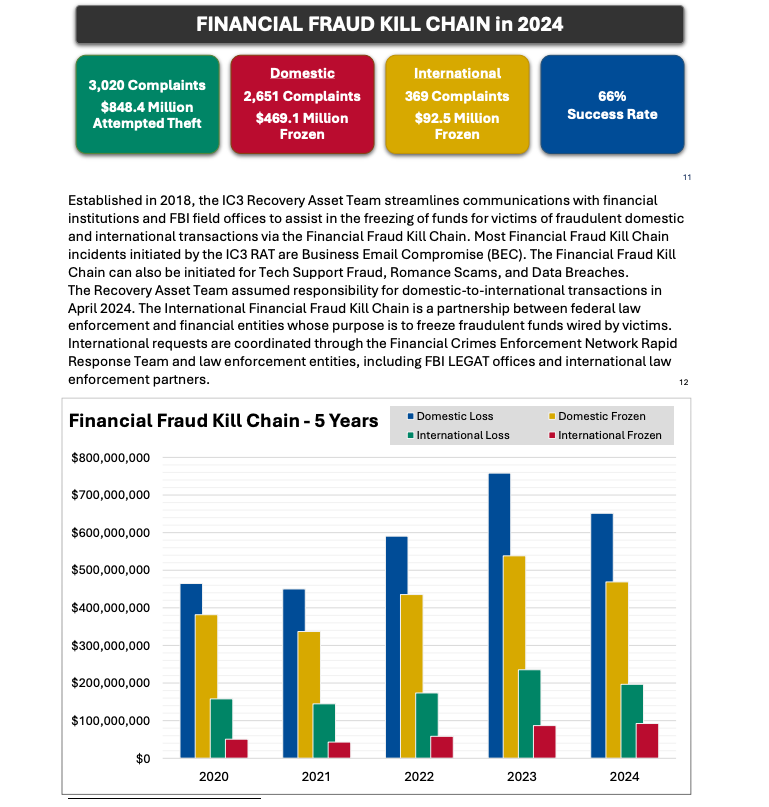
Image: ic3.gov.

As explained in this FBI primer, the International Financial Fraud Kill Chain is a partnership between federal law enforcement and financial entities whose purpose is to freeze fraudulent funds wired by victims. According to the FBI, viable victim complaints filed with ic3.gov promptly after a fraudulent transfer (generally less than 72 hours) will be automatically triaged by the Financial Crimes Enforcement Network (FinCEN).

The FBI noted in its IC3 annual report (PDF) that the FFKC had a 66 percent success rate in 2024. Viable ic3.gov complaints involve losses of at least $50,000, and include all records from the victim or victim bank, as well as a completed FFKC form (provided by FinCEN) containing victim information, recipient information, bank names, account numbers, location, SWIFT, and any additional information.

☐ ☆ ✇ Security – Cisco Blog

Customize Your Defense: Unlock Cisco XDR With Key Integrations

By: Ben Greenbaum — July 23rd 2025 at 12:00
The new Cisco XDR Connect tool helps users to search, browse, and view the details of all available XDR integrations and automation content.
☐ ☆ ✇ Security – Cisco Blog

Cisco Live San Diego Case Study: Malware Upatre! (Encrypted Visibility Engine Event)

By: Aditya Sankar — July 2nd 2025 at 12:00
Cisco Security and Splunk protected Cisco Live San Diego 2025 in the Security Operations Center. Learn about the latest innovations for the SOC of the Future.
☐ ☆ ✇ Security – Cisco Blog

Splunk in Action at the Cisco Live San Diego SOC

By: Jessica (Bair) Oppenheimer — July 2nd 2025 at 12:00
Cisco Security and Splunk protected Cisco Live San Diego 2025 in the Security Operations Center. Learn about the latest innovations for the SOC of the Future.
☐ ☆ ✇ Security – Cisco Blog

Using AI to Battle Phishing Campaigns

By: Ryan Maclennan — July 2nd 2025 at 12:00
Cisco Security and Splunk protected Cisco Live San Diego 2025 in the Security Operations Center. Learn about the latest innovations for the SOC of the Future.
☐ ☆ ✇ Security – Cisco Blog

Building an XDR Integration With Splunk Attack Analyzer

By: Ryan Maclennan — July 2nd 2025 at 12:00
Cisco XDR is an infinitely extensible platform for security integrations. Like the maturing SOCs of our customers, the event SOC team at Cisco Live San Diego 2025 built custom integrations to meet our needs. You can build your own integrations using the community resources announced at Cisco Live. It was an honor to work with […]
☐ ☆ ✇ Security – Cisco Blog

Cisco Live San Diego Case Study: Hunting Cleartext Passwords in HTTP POST Requests

By: Aditya Sankar — July 2nd 2025 at 12:00
Cisco Security and Splunk protected Cisco Live San Diego 2025 in the Security Operations Center. Learn about the latest innovations for the SOC of the Future. 
☐ ☆ ✇ Security – Cisco Blog

Developing With Cisco XDR at Cisco Live San Diego ‘25

By: Christopher Van Der Made — May 19th 2025 at 12:00
Join us at Cisco Live San Diego to explore Cisco XDR’s latest innovations, including custom integrations, AI automation, and community features. Don’t miss out!
☐ ☆ ✇ WIRED

For Tech Whistleblowers, There’s Safety in Numbers

By: Victoria Turk — May 19th 2025 at 10:00
Amber Scorah and Psst are building a “digital safe” to help people shine a light on the bad things their bosses are doing, without getting found out.
☐ ☆ ✇ Security – Cisco Blog

Automate Forensics to Eliminate Uncertainty

By: Rajat Gulati — May 5th 2025 at 12:00
Discover how Cisco XDR delivers automated forensics and AI-driven investigation—bringing speed, clarity, and confidence to SecOps teams.
☐ ☆ ✇ Security – Cisco Blog

Black Hat Asia 2025 NOC: Innovation in SOC

By: Jessica (Bair) Oppenheimer — April 24th 2025 at 12:00
Cisco is the Security Cloud Provider to the Black Hat conferences. Learn about the latest innovations for the SOC of the Future.
☐ ☆ ✇ Security – Cisco Blog

Instant Attack Verification: Verification to Trust Automated Response

By: Briana Farro — April 29th 2025 at 12:00
Discover how Cisco XDR’s Instant Attack Verification brings real-time threat validation for faster, smarter SOC response.
☐ ☆ ✇ Security – Cisco Blog

Cisco XDR Just Changed the Game, Again

By: AJ Shipley — April 28th 2025 at 11:55
Clear verdict. Decisive action. AI speed. Cisco XDR turns noise into clarity and alerts into action—enabling confident, timely response at scale.
☐ ☆ ✇ WeLiveSecurity

Deepfake 'doctors' take to TikTok to peddle bogus cures

— April 25th 2025 at 09:00
Look out for AI-generated 'TikDocs' who exploit the public's trust in the medical profession to drive sales of sketchy supplements
☐ ☆ ✇ Security – Cisco Blog

Black Hat Asia 2025: Innovation in the SOC

By: Jessica (Bair) Oppenheimer — April 24th 2025 at 12:00
Cisco is the Security Cloud Provider to the Black Hat conferences. Learn about the latest innovations for the SOC of the Future.
☐ ☆ ✇ WIRED

New Jersey Sues Discord for Allegedly Failing to Protect Children

By: Justin Ling — April 17th 2025 at 15:00
The New Jersey attorney general claims Discord’s features to keep children under 13 safe from sexual predators and harmful content are inadequate.
☐ ☆ ✇ Security – Cisco Blog

Sign Up for a Tour at the SOC at RSAC™ 2025 Conference

By: Jessica (Bair) Oppenheimer — April 14th 2025 at 12:00
Cisco and Endace provide Security Operations Center services at RSAC™ 2025 Conference. Sign up for a tour and see what happens in the SOC.
☑ ☆ ✇ WeLiveSecurity

Facebook exploit allowed attackers to remotely delete photos

— February 13th 2015 at 14:05
A Facebook hack that allowed attackers to remotely delete any photo they wanted to from the social network has been patched by the company.
☑ ☆ ✇ WeLiveSecurity

Facebook launches ThreatExchange for companies to share security threats

— February 12th 2015 at 12:17
Facebook has officially launched ThreatExchange - a collaborative social network where companies can share information on cybersecurity threats, in an effort to neuter potential damage.
☑ ☆ ✇ WeLiveSecurity

Facebook turns 11 - what you need to know, and what do your likes say about you?

— February 4th 2015 at 10:30
Facebook updated its privacy settings at the end of January. As Facebook turns 11 today, here’s what you need to know about the new settings and how they could affect you.
☑ ☆ ✇ WeLiveSecurity

Facebook porn scam infects 110k users in 48 hours

— February 2nd 2015 at 12:42
A new porn scam is spreading startlingly quickly through Facebook - one that has managed to spread malware to over 110,000 users in 48 hours, reports The Guardian.
☑ ☆ ✇ WeLiveSecurity

Facebook will highlight hoaxes in users' newsfeeds

— January 21st 2015 at 12:11
Facebook has announced plans to crack down on spam and hoaxes in the newsfeed, with a note highlighting 'false information' when enough people flag the link as a hoax.
☑ ☆ ✇ WeLiveSecurity

Facebook welcomes private browsers with dedicated Tor link

— October 31st 2014 at 17:45
Facebook has opened its doors to privacy concerned users, but opening up a dedicated Tor link, guaranteeing that people who visit the social networking site through anonymous browsers aren't mistaken for botnets, Gizmodo reports.
☑ ☆ ✇ WeLiveSecurity

Facebook 'Safety Check' allows travelers to alert family

— October 16th 2014 at 16:44
Facebook is introducing a new feature targeted at users it believes are in or near a disaster zone to let their loved ones know they are okay, according to The Independent.
☐ ☆ ✇ Security – Cisco Blog

Mobile World Congress 2025: SOC in the Network Operations Center

By: Filipe Lopes — April 3rd 2025 at 12:00
Cisco is the sole supplier of network services to Mobile World Congress, expanding into security and observability, with Splunk.
☐ ☆ ✇ Security – Cisco Blog

The Benefits of a Broad and Open Integration Ecosystem

By: Ben Greenbaum — March 26th 2025 at 12:00
Since inception, Cisco XDR has followed the Open XDR philosophy. We integrate telemetry and data from dozens of Cisco and third-party security solutions.
☐ ☆ ✇ WIRED

How to Avoid US-Based Digital Services—and Why You Might Want To

By: Violet Blue — March 21st 2025 at 10:30
Amid growing concerns over Big Tech firms aligning with Trump administration policies, people are starting to move their digital lives to services based overseas. Here's what you need to know.
❌